Concurrent HTTP connections in Node.js
Browsers and Node.js both cap the number of concurrent HTTP connections. If you don’t understand these limits, your application will misbehave in ways that are hard to debug. Let’s walk through what you need to know.
Browser
Browsers follow protocols. HTTP 1.1 states that a single client shouldn’t maintain more than two concurrent connections. Some older browsers enforce that number. Newer ones are more generous. Here’s the breakdown:
- IE 7: 2 connections
- IE 8 & 9: 6 connections
- IE 10: 8 connections
- IE 11: 13 connections
- Firefox, Chrome (Mobile and Desktop), Safari (Mobile and Desktop), Opera: 6 connections
Hold on to the number 6. It’ll matter when we hit the example.
Node.js
If you’ve worked with Node.js, you know it’s single-threaded and non-blocking. That means it handles a large number of concurrent connections, all powered by the JavaScript event loop.
The actual connection limit in Node.js depends on the machine’s available resources and the operating system settings.
Back in the early days (v0.10 and earlier), there was a hard limit of 5 simultaneous connections to a single host. Under the hood, when you use the built-in HTTP module (or anything that wraps it, like Express.js or Restify), you’re using a connection pool with HTTP keep-alive. This is great for performance. An HTTP request opens a TCP connection. The next request reuses that existing TCP connection instead of tearing it down and building a new one.
In versions above 0.10, the maxSockets value was changed to Infinity.
The
keep-aliveheader comes from the browser. You can see it by logging therequestobject in the right place. It looks something like this (example from a Restify server):headers: { host: 'localhost:3000', 'content-type': 'text/plain;charset=UTF-8', origin: 'http://127.0.0.1:8080', 'accept-encoding': 'gzip, deflate', connection: 'keep-alive',
Example
Let’s say we’ve got a frontend sending data to a backend API. (This is how most modern applications work.) The type of data doesn’t matter. It could be a bulk file upload or anything else.
I actually ran into this exact issue while building an application that bulk-uploaded images and sent them to a backend API for processing.
Here’s a simple Restify API server:
const restify = require('restify');
const corsMiddleware = require('restify-cors-middleware');
const port = 3000;
const server = restify.createServer();
const bunyan = require('bunyan');

const cors = corsMiddleware({
  origins: ['*'],
});

server.use(restify.plugins.bodyParser());
server.pre(cors.preflight);
server.use(cors.actual);

server.post('/api', (req, res) => {
  const payload = req.body;
  console.log(`Processing: ${payload}`);
});

server.listen(port, () => console.info(`Server is up on ${port}.`));
Sharp-eyed readers will have spotted a deliberate mistake in the code above. The API receives data via an HTTP POST request and logs a processing message. (The actual processing could be anything, but here it’s just a console statement.)
Now let’s create a simple frontend. Drop the following between <script> tags in an index.html:
const array = Array.from(Array(10).keys());
array.forEach((arrayItem) => {
  fetch('http://localhost:3000/api', {
    method: 'POST',
    mode: 'cors',
    body: JSON.stringify(`hello${arrayItem}`),
  })
    .then((response) => console.log(response.json()))
    .catch((error) => console.error(`Fetch Error: `, error));
});
The Fetch API iterates through 9 items (mimicking 9 file uploads, say) and fires 9 HTTP POST requests at the Restify API.
Start the API, serve index.html via an HTTP server, and look at the results.
Two quick ways to spin up an HTTP server:
python -m SimpleHTTPServer 8000(v2) orpython -m http.server 8080(v3). Or installhttp-serverglobally vianpmand runhttp-serverfrom the folder with yourindex.html.
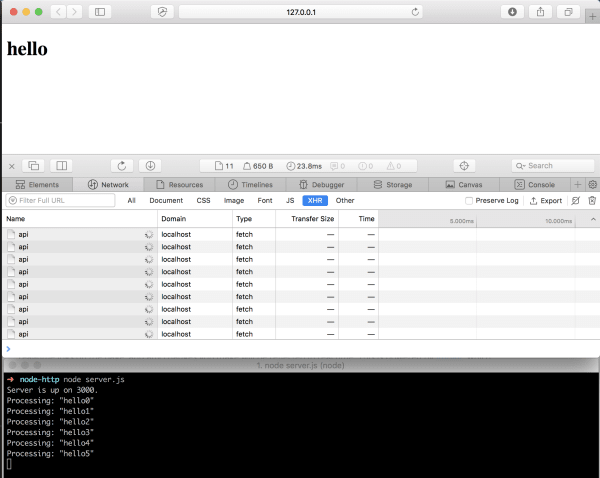
Look at what happened. We fired 9 HTTP POST requests but only six arrived at the Restify API (six log statements).
Wait about 2 minutes and the remaining log statements appear.
So what’s going on?
Remember: the browser (Safari in this case) can only make six connections to the same host (here, the API running on port 3000 on localhost).
The connections stay alive because we’re not returning anything from the Node.js API. That was the deliberate mistake. The browser sends six requests. Node.js receives them but never sends anything back, so the remaining requests sit there, blocked.
Why do the other log statements appear later? There’s a default timeout of 2 minutes. Once a request times out, it clears and new ones get processed.
Let’s update the code:
server.server.maxConnections = 20;
function getConnections() {
  server.server.getConnections((error, count) => console.log(count));
}
// add getConnections() in the API call:
server.post('/api', (req, res) => {
  // ...
  getConnections();
});
Setting server.server.maxConnections = 20; doesn’t change the outcome. We’re still not returning anything. (And remember, it’s set to Infinity by default anyway.)
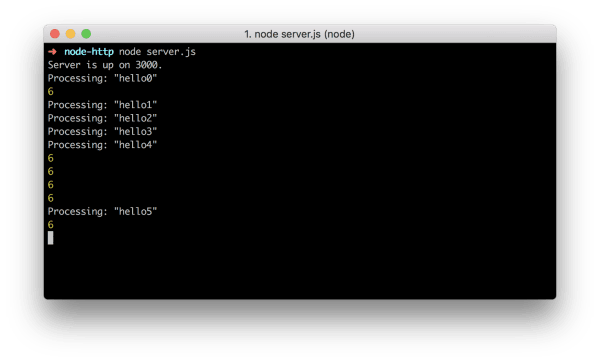
Now add this: server.server.setTimeout(500);
The result looks very different. By overwriting the server timeout to 500ms, we clear pending requests much faster, allowing new ones to come through.
This isn’t a real solution. It’s purely for demonstration.
Solving the problem
The right fix is obvious: return a response from the API.
server.post('/api', (req, res) => {
  const payload = req.body;
  console.log(`Processing: ${payload}`);
  return res.json(`Done processing: ${payload}`);
});
Now everything processes as expected:

All uploads processed. No blocking.
Remember, res.json() calls res.send() under the hood, which in turn calls res.end() to send the response and close the connection. This applies to both Restify and Express.js.
Conclusion
The takeaway: always close HTTP connections. No matter how you do it, close them. If you’re calling an API, check the documentation and make sure you’re closing any active HTTP connection.