Building a Historical Time Machine with Gemini and Google Maps
Have you ever wondered what your favourite landmark looked like a hundred years ago? In this post, I walk you through a Node.js application that generates historically accurate photographs of any real-world location at any point in time, and even checks its own work for anachronisms.
What did your favourite landmark look like a hundred years ago? A thousand? I wanted to find out. So I built something with a handful of Gemini API calls and a bit of imagination.
The result: a Node.js application that takes any real-world location, a year of your choosing, and generates a historically accurate photograph of what that place might have looked like. It even checks its own work for anachronisms. Spots a mobile phone in ancient Rome? It’ll have another go.
While this project is fun, the images generated aren’t intended as historical fact. They’re meant as an imaginative exploration of what the world might have looked like at different points in time.
The idea
You type in a location (“St Paul’s Cathedral, London”) and a year (1944). The application then runs through a multi-step pipeline to produce an image that’s as historically faithful as possible. It verifies the location using Google Maps, researches the historical context, selects a period-appropriate photographic style, generates the image, and critiques the result for anything that looks out of place.
The whole thing runs from the terminal and saves both the image and a fact sheet to disk. No frontend, no framework. Just a script and some very clever API calls.
Setting things up
The dependencies are minimal. You need the Google GenAI SDK and that’s genuinely it.
{
  "type": "module",
  "dependencies": {
    "@google/genai": "^1.30.0"
  }
}
You’ll also need a Gemini API key set as the GEMINI_API_KEY environment variable. With that sorted, the application starts by initialising the client.
import { GoogleGenAI } from '@google/genai';
import fs from 'node:fs';
import readline from 'node:readline';

const client = new GoogleGenAI({ apiKey: process.env.GEMINI_API_KEY });
Step 1: Grounding the location with Google Maps
First, the application verifies that the location you typed actually exists. If you type “that big church in London”, you want the model to resolve that to “St Paul’s Cathedral, St Paul’s Churchyard, London EC4M 8AD, United Kingdom” before it does anything else. This step uses Gemini’s Google Maps tool integration to ground the query in reality.
const scoutResponse = await client.models.generateContent({
  model: 'gemini-2.5-pro',
  contents: `Use Google Maps to find the exact entity for: "${userQuery}".
             Return a prompt for an image generator that includes:
             1. The official place name found on Maps.
             2. The specific city/country from the address.
             3. A visual description based on your internal knowledge of this specific place.`,
  config: {
    tools: [{ googleMaps: {} }],
  },
});
The model comes back with a grounded description: verified name, address, and a visual description of the place. This becomes the foundation for everything that follows.
Step 2: Generating historical context
Next, the application asks Gemini for a concise fact sheet about the location in the specified year. Ask for St Paul’s in 1944 and it’ll tell you about the Blitz, the surrounding bomb damage, and the American GIs stationed nearby in the build-up to D-Day.
const factResponse = await client.models.generateContent({
  model: 'gemini-2.5-pro',
  contents: `Provide a concise historical fact sheet for ${userQuery} in the year ${year}.
             Include:
             1. Major events occurring at this location in ${year}
             2. Architectural/landscape changes around this time
             3. Social/cultural context
             4. Notable figures or activities

             Format as a brief, readable text (max 200 words).`,
});
This fact sheet isn’t just for display. It gets fed directly into the image generation prompt so the model has concrete historical details to work with rather than guessing.
Step 3: Choosing an era-appropriate photographic style
Here’s where things get fun. A photograph from 1860 shouldn’t look like one from 1960. The application uses a simple function to select the right visual style based on the year.
function getEraStyle(year) {
  if (year < 1826) {
    return 'Photorealistic reconstruction, as if captured by a modern camera transported back in time. Natural lighting, sharp detail.';
  } else if (year < 1900) {
    return 'Early photography aesthetic. Sepia-toned, visible grain, soft focus. Shot on a large format bellows camera with a brass lens.';
  } else if (year < 1950) {
    return 'Black and white film photography. Moderate grain, rich tonal range. Shot on a Speed Graphic 4x5 press camera.';
  } else if (year < 1970) {
    return 'Early color film. Slightly desaturated, warm cast, soft grain. Shot on a Leica M3 with Kodachrome film.';
  } else {
    return 'Modern color photography. Natural colors, fine grain, sharp detail. Shot on a professional 35mm SLR.';
  }
}
Five eras covering everything from ancient history to the present day. For anything before 1826 (when photography hadn’t been invented), the app takes a “time-travel camera” approach: imagine a modern camera magically transported back in time. For everything after that, it specifies a period-accurate camera and film stock. This does a surprisingly good job of steering the visual output.
Step 4: Generating the image
All of the previous steps feed into one carefully constructed prompt sent to Gemini’s image generation model. The prompt combines the grounded location, the photographic style, the historical fact sheet, and a set of scene directives covering architecture, technology, fashion, crowd density, and lighting.
const imagePrompt = `A candid, street-level photograph taken in the year ${year}, capturing the location described in: ${groundedPrompt}.

PHOTOGRAPHIC STYLE:
${getEraStyle(year)}
Candid eye-level perspective, as if taken by a pedestrian or street photographer.

HISTORICAL CONTEXT (use this to inform the scene):
${factSheet}

SCENE DIRECTIVES:
- Architecture: Match buildings strictly to their ${year}-era condition and construction.
- Technology: Only include technology, infrastructure, and materials that existed at this location in ${year}.
- Fashion: All people must wear authentic clothing from ${year} for this region.
- Population: Infer crowd density from the historical context above.
- Lighting: Clear daylight with natural visibility unless the historical context describes a specific weather event.`;
The image is generated using gemini-3-pro-image-preview with the response modality set to IMAGE. The aspect ratio is fixed at 16:9 for that cinematic feel.
const imageResponse = await client.models.generateContent({
  model: 'gemini-3-pro-image-preview',
  contents: imagePrompt,
  config: {
    responseModalities: ['IMAGE'],
    imageGenerationConfig: {
      numberOfImages: 1,
      aspectRatio: '16:9',
    },
  },
});
Step 5: The anachronism check
This is arguably the cleverest bit. After the image is generated, the application sends it straight back to Gemini’s vision capabilities and asks it to critique the result for historical inaccuracies. Plastic sign in 1850? Modern paving in medieval times? The model will spot it.
The critique uses structured output with a JSON schema to ensure the response is machine-readable.
const VERDICT_SCHEMA = {
  type: 'object',
  properties: {
    verdict: { type: 'string', enum: ['PASS', 'FAIL'] },
    issues: { type: 'array', items: { type: 'string' } },
    corrections: { type: 'array', items: { type: 'string' } },
  },
  required: ['verdict', 'issues', 'corrections'],
};
The schema enforces a verdict of either PASS or FAIL, along with arrays of specific issues and corrections. The API call sends the generated image alongside the critique prompt.
const critiqueResponse = await client.models.generateContent({
  model: 'gemini-2.5-pro',
  contents: [
    {
      role: 'user',
      parts: [
        {
          inlineData: {
            mimeType: 'image/png',
            data: imageCandidate.inlineData.data,
          },
        },
        {
          text: `This image is supposed to depict "${userQuery}" in the year ${year}.

Analyze it for historical inaccuracies or anachronisms. Consider:
- Architecture, building materials, and construction techniques
- Technology, vehicles, infrastructure (roads, lighting, wiring)
- Clothing and fashion on any visible people
- Signage, fonts, materials (plastic, neon, etc.)
- Vegetation and landscaping if relevant`,
        },
      ],
    },
  ],
  config: {
    responseMimeType: 'application/json',
    responseJsonSchema: VERDICT_SCHEMA,
  },
});
If the verdict comes back as FAIL, the application takes the list of corrections, appends them to the original prompt, and regenerates the image. It only does this once to avoid an infinite loop of increasingly neurotic self-critique.
if (critique.verdict === 'FAIL') {
  const fixedResponse = await client.models.generateContent({
    model: 'gemini-3-pro-image-preview',
    contents: `${imagePrompt}

ADDITIONAL CORRECTIONS (fix these specific issues from a previous attempt):
- ${critique.corrections.join('\n- ')}`,
    config: {
      responseModalities: ['IMAGE'],
      imageGenerationConfig: {
        numberOfImages: 1,
        aspectRatio: '16:9',
      },
    },
  });
}
Handling ancient history
What happens when someone enters “BC 200” as the year? The original code used parseInt directly, which would choke on anything that wasn’t a plain number. The fix parses BC and AD prefixes and converts them into a human-readable label that gets passed through to the prompts.
const trimmed = yearInput.trim().toUpperCase();
const isBC = trimmed.startsWith('BC');
const num = parseInt(trimmed.replace(/^(BC|AD)\s*/i, ''), 10);
const year = isBC ? -num : num;

const yearLabel = year < 0 ? `${Math.abs(year)} BC` : `${year} AD`;
So “BC 200” becomes “200 BC” and “1944” becomes “1944 AD”. The model handles both perfectly well.
Saving the results
The application saves both the generated image and a markdown fact sheet to disk. The fact sheet includes the location, the year, and the historical context used to inform the image generation.
const timestamp = Date.now();
const filename = `output_${timestamp}.png`;
fs.writeFileSync(filename, Buffer.from(imageCandidate.inlineData.data, 'base64'));

const factFilename = `facts_${timestamp}.md`;
fs.writeFileSync(factFilename, `# ${userQuery} (${year})\n\n${factSheet}`);
The full pipeline
Here’s what happens when you run the application:
Examples
I had a ton of fun with this project. Here are some of the results.
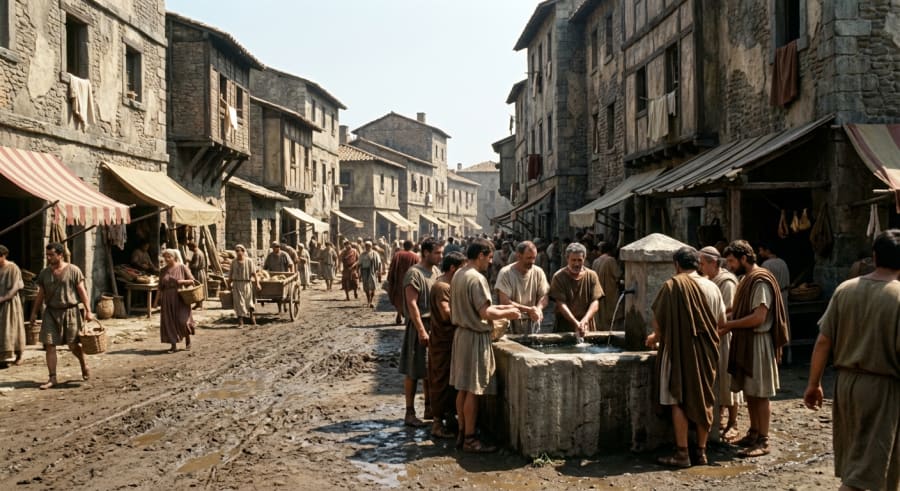 The Colosseum in 200 BC (It didn’t exist then; construction began in 72 AD)
Here’s the kind of fact sheet the application generates. It correctly identifies that the Colosseum hadn’t been built yet and describes what the site actually looked like at the time.
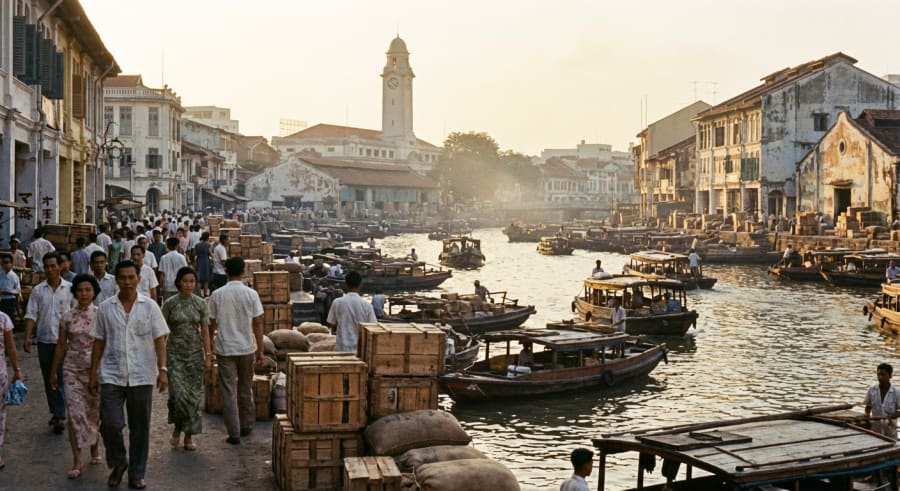 The Singapore River in 1965
# Singapore River (1965 AD)
### **Singapore River: A 1965 Snapshot**
**Major Events:**
The defining event was Singapore's sudden separation from Malaysia and subsequent independence on August 9, 1965. For the bustling river, this meant immense economic uncertainty, as its role as the primary artery for regional trade was now tied to a new, vulnerable nation.
**Architectural/Landscape Changes:**
The landscape was dominated by low-rise shophouses and godowns (warehouses) lining a heavily polluted, congested waterway. Key landmarks like the Fullerton Building (then the General Post Office) and Cavenagh Bridge stood prominent against a skyline yet to be defined by skyscrapers. The river was a functional, working port, not a recreational area.
**Social/Cultural Context:**
The river was a gritty, multicultural hub of intense manual labour. It represented the core of Singapore's entrepôt economy, driven by the hard work of coolies, traders, and boatmen who formed a distinct "river people" community.
**Notable Figures & Activities:**
The most significant activity was **lighterage**: the loading and unloading of cargo from large ships onto smaller bumboats (*tongkangs*) to be brought ashore. The notable figures were the thousands of anonymous labourers and bumboat operators whose tireless efforts formed the backbone of the port's success.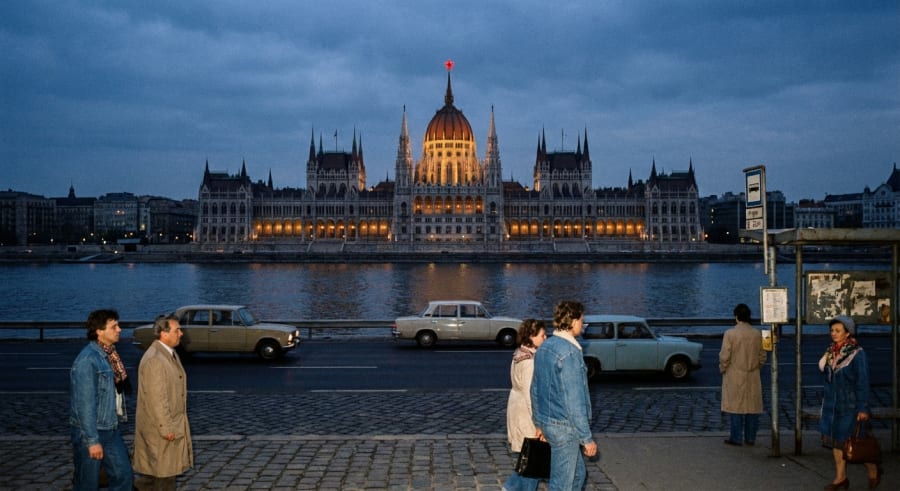 Houses of Parliament in Budapest, 1983
# Houses of Parliament, Budapest, Hungary (1983)
**Hungarian Parliament Building: 1983 Fact Sheet**
In 1983, deep within the "Goulash Communism" of the Kádár era, the Hungarian Parliament Building functioned more as a state symbol than a center of democratic debate.
* **Major Events:** The primary events were the periodic, ceremonial sessions of the National Assembly (Országgyűlés). This single-party legislature served to unanimously approve policies already decided by the ruling Hungarian Socialist Workers' Party. The building also hosted official state visits from leaders of other socialist bloc countries.
* **Architectural/Landscape Changes:** The most defining architectural feature of this period was the large, illuminated red star crowning the central dome, a potent symbol of communist authority installed in 1950. The building underwent routine maintenance, but no major restoration projects were active.
* **Social/Cultural Context:** The Parliament was a paradoxical landmark. While a source of immense national pride for its historical and architectural grandeur, its contemporary role was as a rubber-stamp institution for the one-party state. It was a top tourist attraction, showcasing a grand past within a socialist present.
* **Notable Figures/Activities:** The country's de facto leader was János Kádár. The primary activity within the building was the formal, predictable legislative process, reinforcing state control rather than shaping it through debate.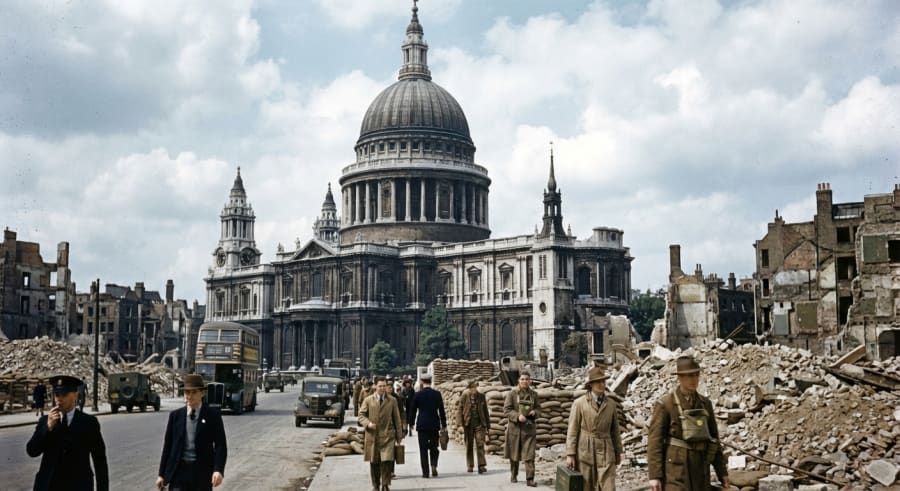 St Paul’s Cathedral in 1944
# St Paul's Cathedral, London (1944)

### **St. Paul's Cathedral: 1944 Fact Sheet**

In 1944, St. Paul's Cathedral stood as a powerful symbol of British resilience in the final full year of World War II.

**Major Events:**
The cathedral was a national focal point for prayer during the D-Day landings in June. That same month, London came under attack from V-1 flying bombs. On June 18th, a V-1 exploded near the cathedral, shattering windows and damaging the Wrena's Altar in the Jesus Chapel, but leaving the main structure miraculously intact.

**Architectural/Landscape Changes:**
The area surrounding St. Paul's was a landscape of devastation, flattened by the Blitz of 1940-41. The cathedral rose amidst acres of rubble, a solitary survivor. Its own priceless stained-glass windows had been removed for safekeeping, bathing the interior in a stark, plain light.

**Social/Cultural Context:**
For Londoners, St. Paul's embodied the defiant spirit of "London can take it." It was a centre for mourning and hope, providing spiritual solace to a war-weary populace enduring rationing, blackouts, and the new V-weapon threat.

**Notable Figures/Activities:**
Dean Walter Matthews presided over services that bolstered national morale. The St. Paul's Watch, the volunteer fire-watchers who famously saved the dome in 1940, remained vigilant against new incendiary attacks.
Repository
To try this project out, check out the repository on GitHub.
Wrapping up
What I find most interesting about this project is how it chains multiple AI capabilities together. Maps grounding, text generation, image generation, vision-based critique, and structured output all work in concert. No single call could produce something this accurate on its own. But by breaking the problem into steps and feeding each step’s output into the next, you end up with something that feels almost like a proper historical reconstruction.
Give it a go. Try your local high street in 1900. Try the Colosseum in BC 80. Try your favourite pub in 1965. The results might surprise you.