Kitsune: a local-first agent runtime
I built a managed-agent runtime that runs entirely on one laptop. In this post I show you how you can set it up.
Kitsune is a local-first agent runtime in TypeScript, about 21,000 lines across roughly 100 files. It runs on one MacBook, and nothing leaves the machine except the calls to Gemini.
No SaaS control plane. No hosted vector database. The model is Gemini via @google/genai, and everything else lives on your disk.
The name is kitsune (狐, also written きつね or キツネ) - a fox from Japanese folklore. In the old stories it grows a new tail roughly every hundred years as it gets older and more powerful, up to nine; the nine-tailed form (九尾の狐, kyūbi no kitsune) is the oldest and strongest. That tracked. It started as a brain and a code sandbox, then every few days I bolted on another tail: memory, then dreaming, then a personal wiki, then schedules, then MCP in both directions. The logo is a nine-tailed fox for a reason.

I would like to be honest about this project. Nothing here is a novel idea. In fact, most of it has been borrowed from other projects. The reason why I wanted to create this project regardless is to learn the pieces that make it up. From streaming LLM responses, to working with skills, sandboxing, MCP servers, integrating memory management, sub-agents and many many other things. Eventually this “personal harness” has become a useful project where, even today, I get a daily brief sent to me via iMessage (the daily brief agent runs on a schedule at 6:30am every morning and reads my calendar, unread emails from various inboxes and sends me a text message with a clear plan for my day).
Please note that this project should solely be used on your machine, and only for experimental purposes. I do not recommend that you deploy this application nor that you run it in production. Use it for experimentation, exploration and learning purposes.
This post is two things: how it’s built, and exactly how to run it. If you only want the setup, skip to Setup.
The four planes
Kitsune keeps the four-plane shape I wrote up in Harness: a local managed agent in four planes, back when the project still went by (the unimaginative name of) “Harness”: a brain that only decides, a session that’s a durable append-only event log and the source of truth, hands as the only things that touch the outside world, and a secret broker that hands the model opaque references instead of raw keys. That post is the why. This one is the tails that grew on top of it, and how to run the whole thing.
Sessions and specialists
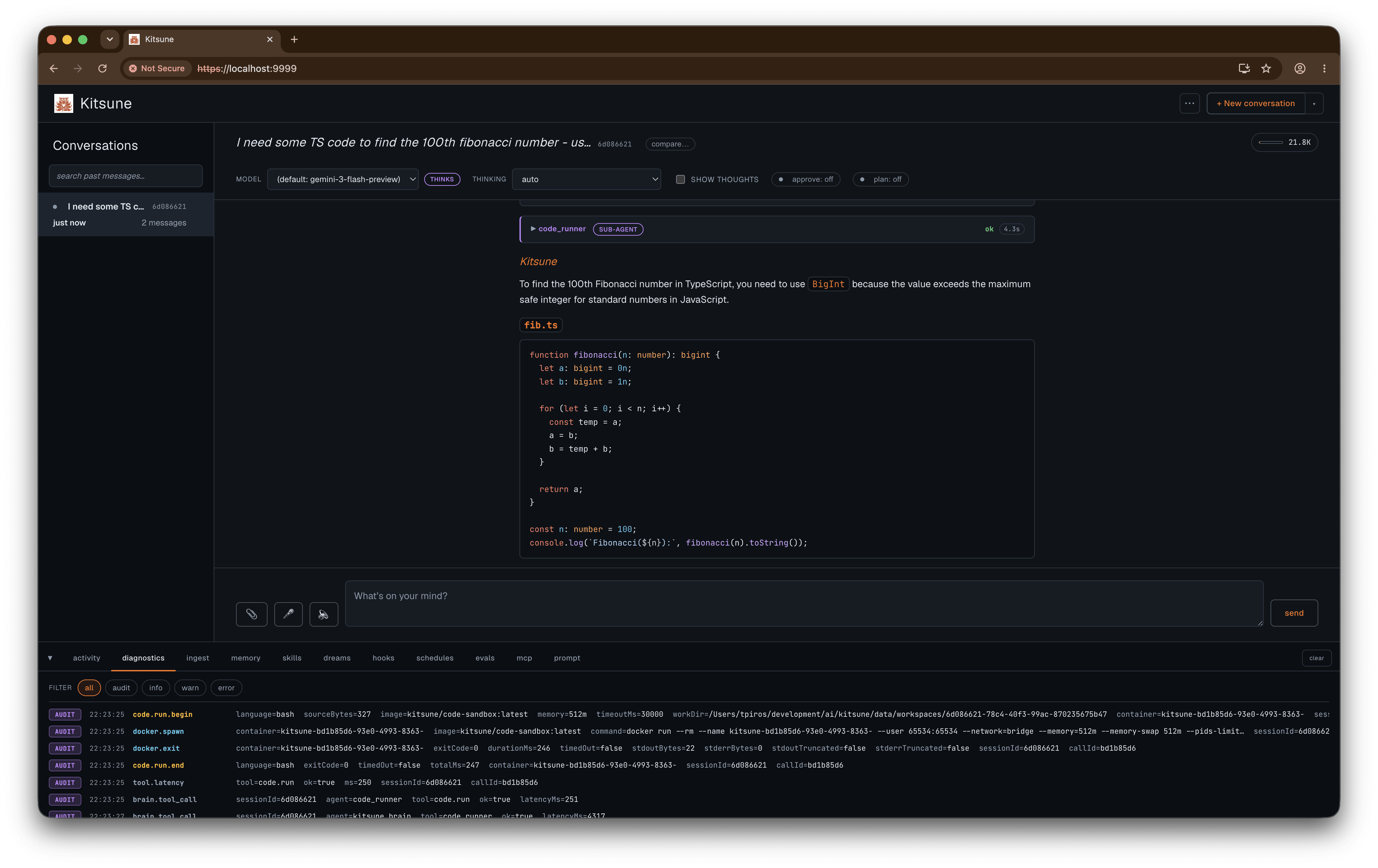
A session is one conversation. You type, the model streams its reply token by token, and every tool call shows up inline as a card you can expand to see the arguments and the result. The model picker and thinking level sit in the session header and change mid-conversation, and a thinks toggle streams the model’s thought-summary as a separate channel.
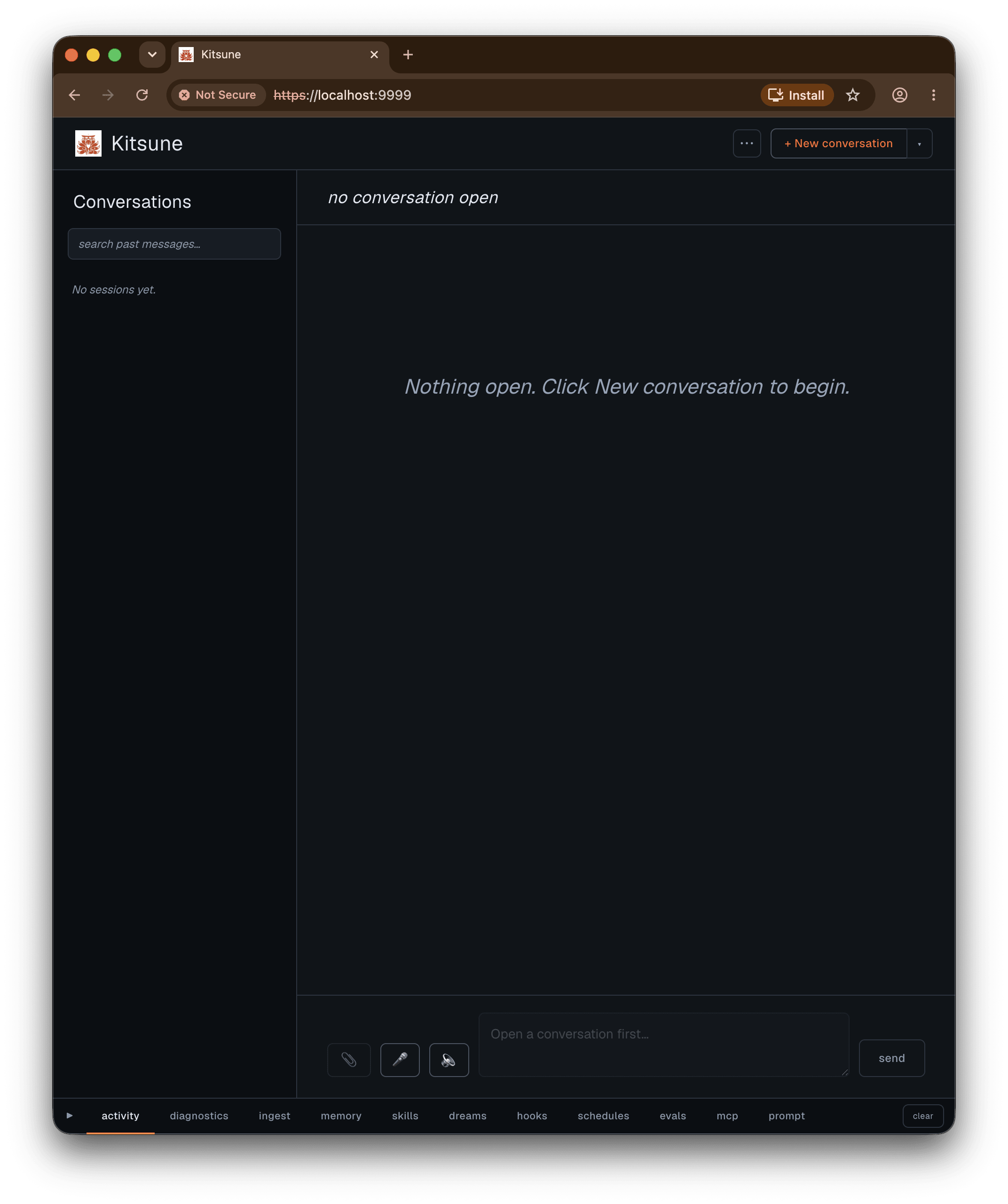
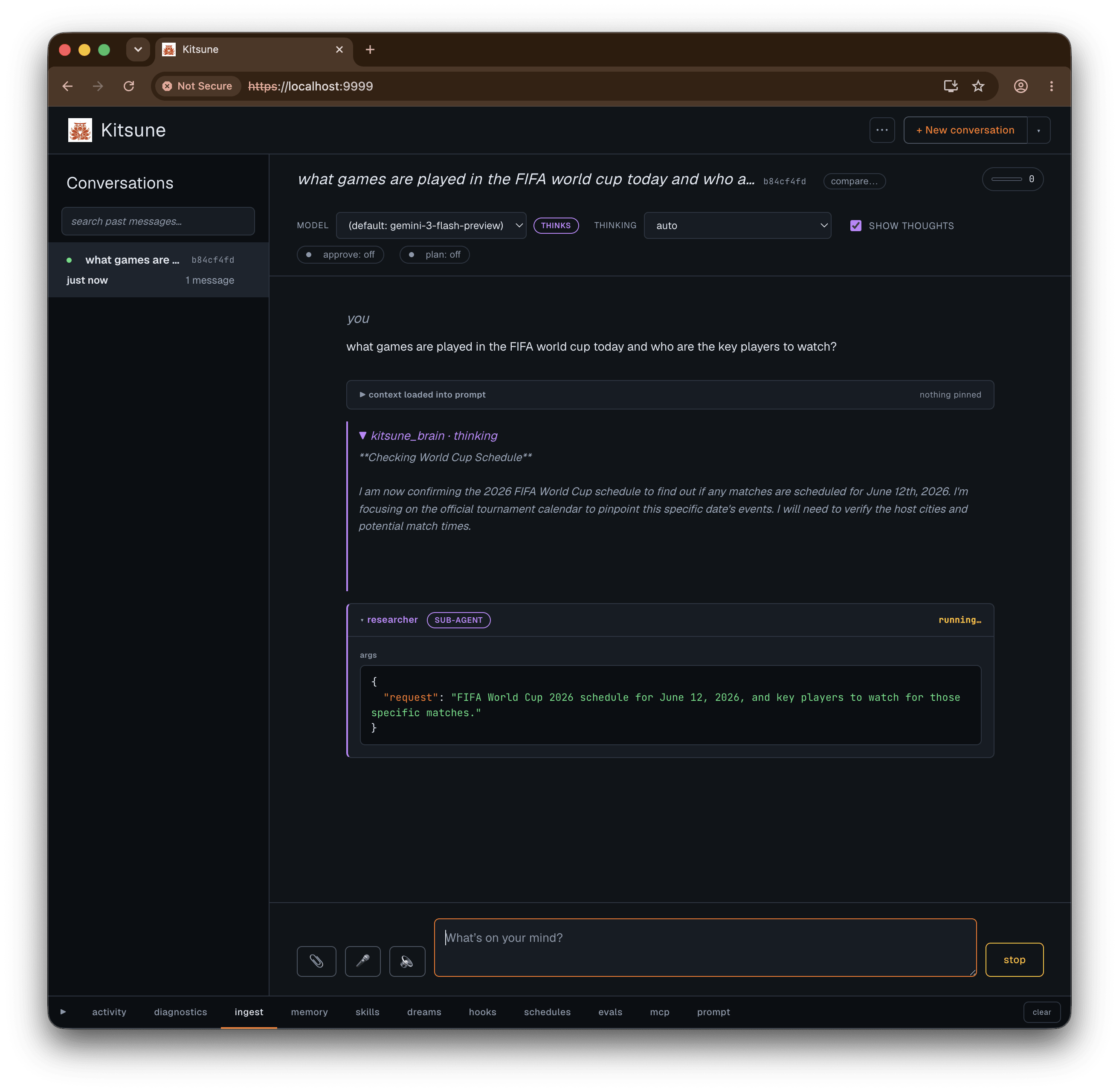
The root agent doesn’t do everything itself. It calls specialists: sub-agents with their own focused instruction and a limited tool set, whose output comes back as a tool result. There are five of them:
researcherdoes web research with Google Search grounding and cites its sources.research_reviewergrades the researcher’s output and returns a structured verdict.placeshandles location and directions through Google Maps grounding.code_runnerruns scripts in the sandbox.code_reviewergrades whatcode_runnerproduced.
Their child tool calls nest under them in the UI, so a research-then-review loop reads as exactly that, and you can see which sub-agent did what.
Tools
Every action the model can take is a hand. The brain never runs anything itself; it calls a registered hand. The built-in set:
code.runruns Python, Node, or Bash in the sandbox.http.fetchdoes raw HTTP for APIs and JSON.web.readfetches a page and returns clean Markdown (Mozilla Readability plus Turndown), usually 10 to 50 times fewer tokens than the raw HTML.memoryreads or mutates the two memory files.session_searchruns full-text search across past sessions.skills.readloads a stored procedure by slug.- the
wiki.*family reads and, with approval, writes a personal markdown wiki.
Anything from a connected MCP server appears as mcp.<server>.<tool> next to these.
The code sandbox
code.run lets the model run Python, Node, or Bash. The model only ever sends {language, source}. It does not get to pick the image, the mounts, the network mode, or the user. Kitsune picks all of that.
Each call runs in a fresh Docker container as uid 65534 (non-root), under a read-only root filesystem, with a per-session /work bind mount that persists between calls, --memory, --cpus, and --pids-limit caps, and Docker’s default seccomp profile with capabilities dropped. Network is off or on per config (bridge or none). The entrypoint execs the interpreter and nothing else.
The integration tests pin the two things that matter: code runs as a non-root uid, and --network=none actually blocks the network.
Memory that survives sessions
Two text files, MEMORY.md and USER.md, get injected into every turn’s system prompt. USER.md is facts about you (role, preferences, the things you keep having to repeat). MEMORY.md is facts about the world the agent works in (project conventions, environment, durable facts). The model edits them through a memory hand. You can also write to them yourself without involving the model: select any text in a reply and a small popover offers to save the selection straight to MEMORY or USER.
Then there’s dreaming. When a conversation goes idle, a background pass reads the transcript and proposes durable memories and reusable skills. Nothing lands automatically. Every proposal is a card you accept or reject. It’s a two-phase mem0-style flow: extract candidates, then reconcile each one against what’s already stored (embed, score by cosine similarity, and only call the model to decide add-or-dedupe-or-supersede when something looks close).
Memory is trust-on-write: whatever the model writes lands in the next prompt verbatim. The guardrails are that every write is audited, the files are plain text you can read and edit, and you can gate the memory tool behind a per-call approval prompt.
The brain: a personal wiki
Memory holds the model’s working notes. The brain is a curated knowledge base you own: a local markdown wiki the agent reads from and, with your approval, writes to. It’s the personal-wiki idea (the kind Andrej Karpathy has written about, a knowledge base you keep feeding rather than re-googling) wired straight into the agent’s loop.
It lives in a brain/ folder, or wherever KITSUNE_BRAIN_DIR points, and the wiki.* tools only register when that folder exists. The shape:
brain/
├── raw/      immutable source files, by type: articles, books, papers, podcasts, repos
└── wiki/     distilled markdown: an index.md, an append-only log.md,
              and concepts/, entities/, sources/, synthesis/
Pages cite each other with [[slug]] links. Claims carry a tag, [Fact], [Inference], or [Unsupported], so provenance stays visible. The agent never edits anything in raw/; those are the source record. When a new source contradicts a page, the agent logs the disagreement on the page instead of quietly overwriting it.
Ingesting
Three ways in, increasing in how much you hand off.
- By hand. Write the markdown yourself and update
index.md. - Drop a raw file. Copy a source into the matching
raw/subdirectory, open a session from a Brain template (a template whose body is the wiki rulebook), and ask what’s new to ingest. The agent lists what’s inraw/, reads the file, drafts a source summary plus any concept and entity updates, and proposes each as awiki.write. - Paste a URL. From a Brain session, “ingest https://…” and the agent pulls the page with
web.read, classifies it, and drafts the same set of pages.
Every write pauses for approval with the full proposed body in the card, so nothing hits disk until you say so. For a source that touches several pages, turn on plan mode first: the planner drafts the whole ingest as one plan you approve once, then the writes flow through one body-review at a time.
Querying
Ask about something and the agent calls wiki.find to read the index, wiki.get to pull the relevant pages, and answers with [[slug]] citations. Those citations render as real links in the conversation; click one and it opens that page in the graph. The wiki index also rides along in every turn’s context, so the model starts each turn already knowing what the brain holds.
The graph at /brain
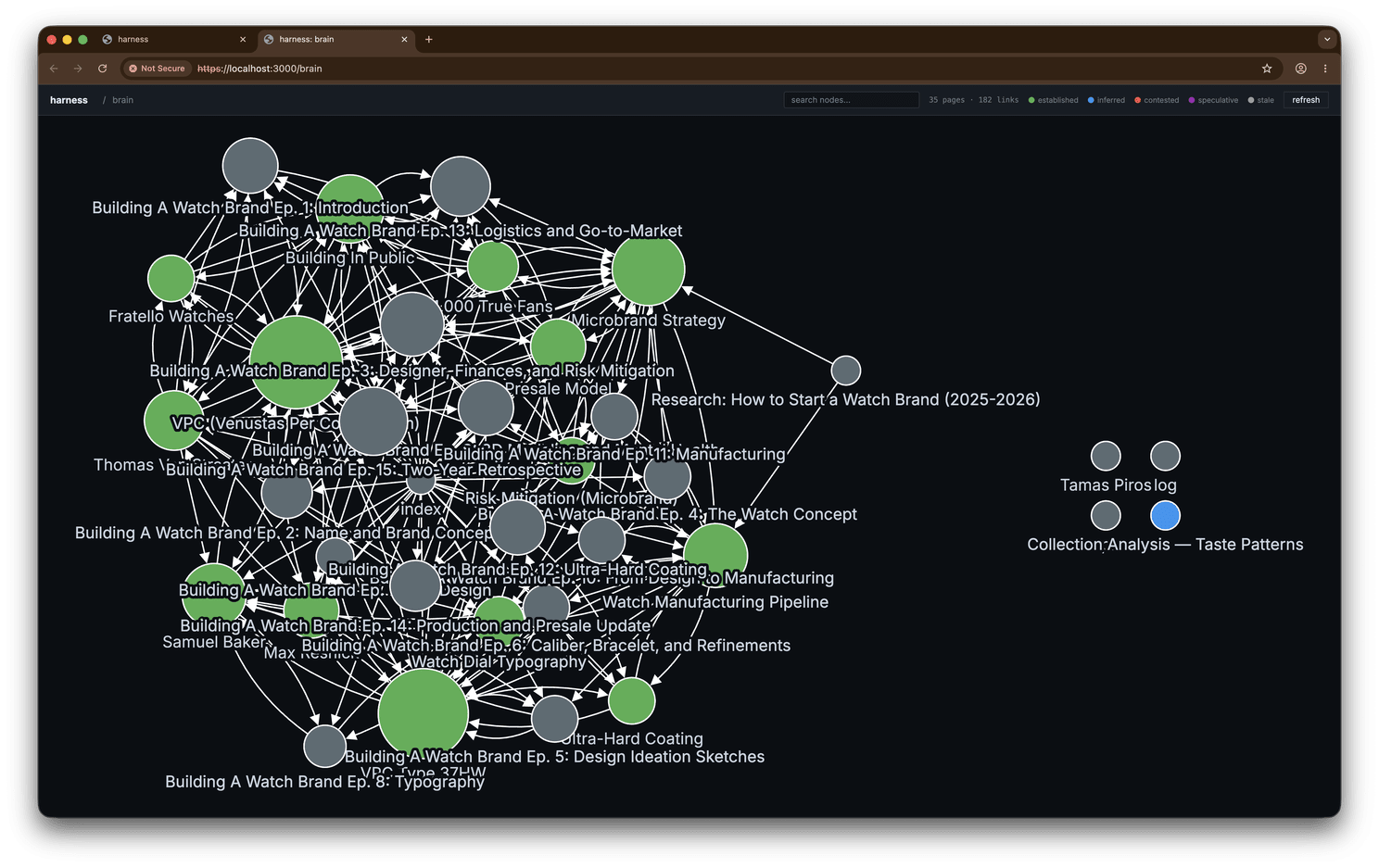
/brain is a standalone force-directed graph of every page, edges drawn from the [[wikilinks]], nodes coloured by epistemic status and sized by how many pages link to them. Click a node and a panel slides out with its frontmatter, its backlinks (every page pointing at it), and the full rendered body. There’s live search, and the citation links from chat deep-link straight to a node.
Templates
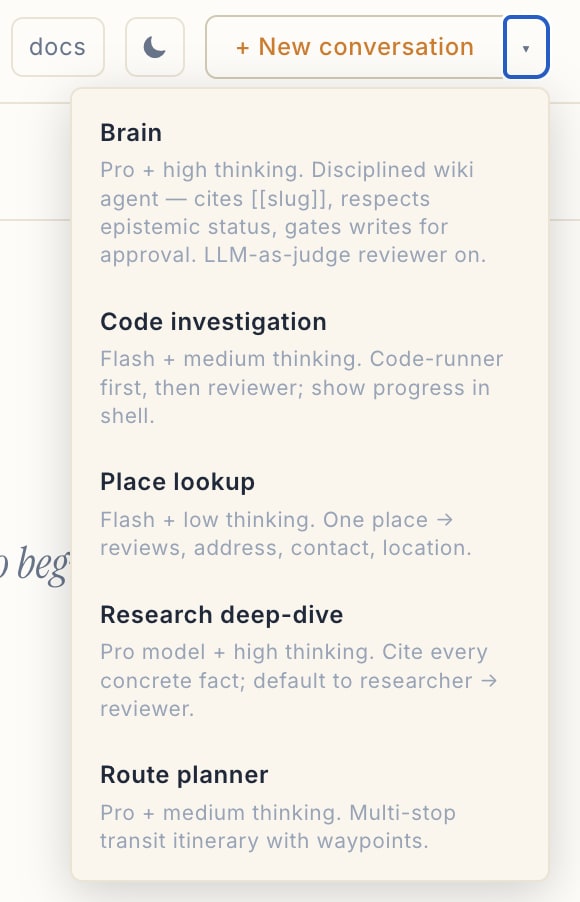
A template pre-stages a session with a model, a thinking level, and a system-prompt body that gets injected into the root agent every turn. They live as markdown files in data/templates/, one per file: YAML frontmatter on top, the prompt body below. The slug is the filename. Only name and description are required; the rest is optional.
---
name: Research deep dive
description: Multi-source web research with strict citations.
model: gemini-flash-latest
thinkingLevel: high
reviewer: true
starterMessage: "Research question: "
---
Use the researcher specialist for every factual claim. Prefer primary
sources, corroborate anything important across two of them, and cite
inline. After drafting, call research_reviewer and revise before replying.
Drop that file in data/templates/ and it shows up in the new-session picker right away; the directory is read live. Beyond the fields above, the frontmatter also takes showThoughts, compactInstructions (extra instructions for the summarizer when the session compacts), and hidden (loadable by slug but kept out of the picker). Kitsune ships with none, so the templates you have are the ones you write.
Human in the loop
Two interlocks, and they compose.
Plan mode adds a planning turn before any execution. The turn runs through a constrained planner that only has read-only research tools: researcher, research_reviewer, places, session_search, skills.read, and the MCP catalog tools. It can’t run code, write memory, or fetch URLs directly. It researches the task, then submits a numbered plan with a summary and risk notes. You approve or reject the plan as a whole, and on approval the full agent runs it with its complete toolset.
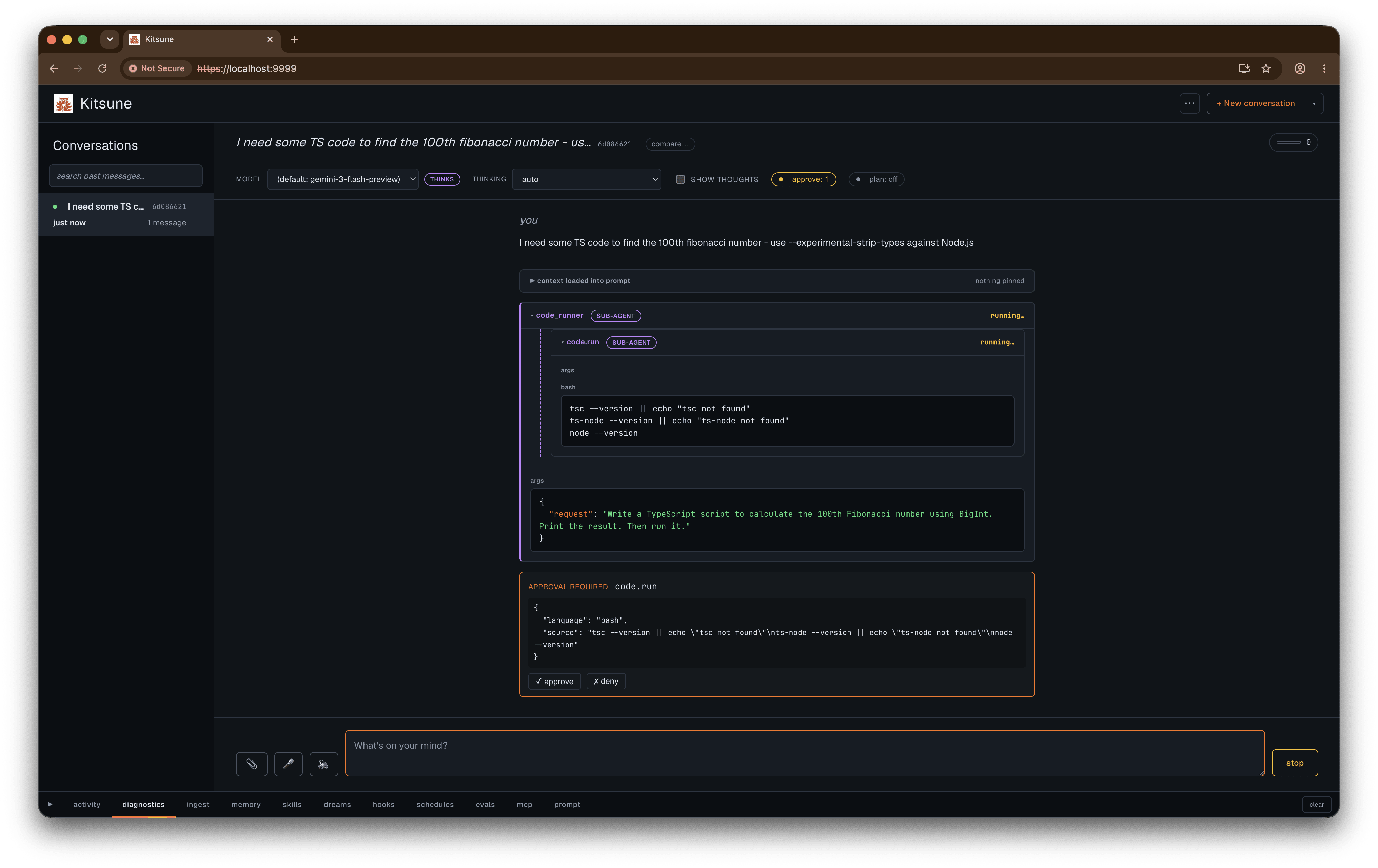
The approval gate pauses individual tool calls. List the tools you want gated (per session, or as a default for new sessions with KITSUNE_REQUIRE_APPROVAL=code.run,http.fetch), and each matching call blocks on an approve-or-deny card before it runs. Plan mode pre-approves the strategy; the gate checks each side effect. The wiki write tools are always gated, regardless of the list.
Staying grounded
A few things sit between you and a confidently wrong answer.
A reviewer can run after every turn: a second model, usually a tier up from the one answering, that sees your message, the reply, and all the tool calls and results from the turn. It returns a structured verdict (ok or issues, with a reason and a typed list of any problems: hallucination, overconfident, inaccurate, unsupported) and renders as a collapsible card under the reply, green for ok, amber for issues. Turn it on per session, or set reviewer: true in a template.
When your message contains URLs, Kitsune fetches them with web.read before the model generates and injects the content into the prompt, capped at three URLs, so the model answers from the real page. Before every turn it also runs a quick session_search over your prompt and pulls the top few matches from past conversations into context, so the model starts already aware of relevant history.
Long sessions compact themselves. When the running token count crosses about 80% of the model’s context window, the next turn flushes durable facts to memory, summarizes the older middle of the conversation, and keeps the most recent handful of turns verbatim. There’s a compact now button too, where you can say what to preserve.
Proactive and connected
Schedules make it act without you typing. A scheduled job spawns a session and runs a turn on a timer, with the same tools, memory, and reviewer as any conversation, so a morning brief or a recurring check lands in the sidebar on its own. Triggers are either an interval or a daily time.
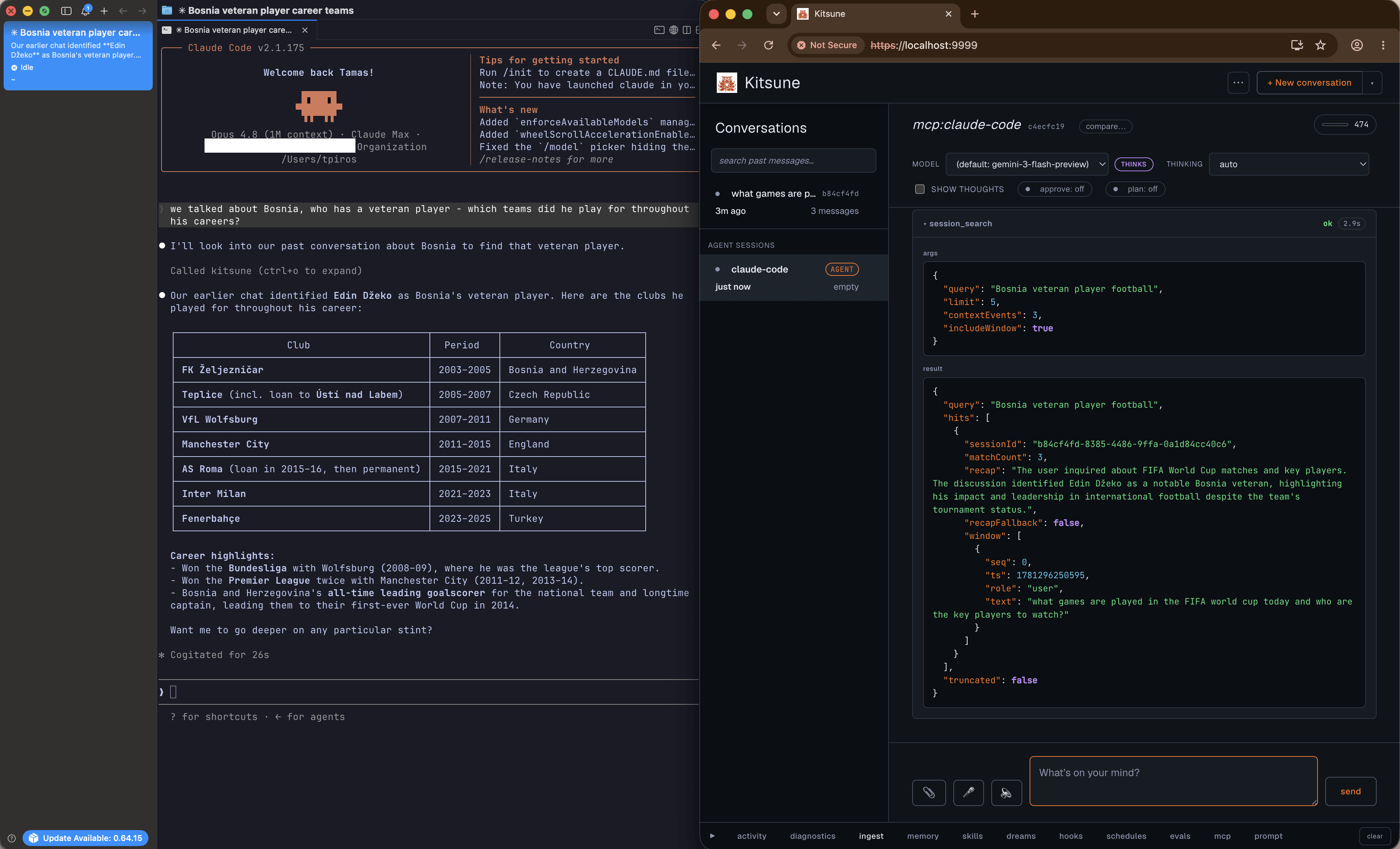
MCP works in both directions. Kitsune connects to external MCP servers listed in data/mcp/servers.json and registers their tools as mcp.<server>.<tool>, which the model reaches through three meta-tools (mcp.list, mcp.describe, mcp.call) so the prompt cost stays flat no matter how many servers you stack. And npm run mcp-serve turns Kitsune itself into an MCP server, so Claude Desktop, Cursor, or any client can call its hands through a thin bridge to the running app.
The PWA and notifications
The UI is a progressive web app: a manifest, a service worker, and a full icon set, so you can install Kitsune to your home screen or dock and run it like a native app.
That matters most for schedules. A scheduled brief doesn’t have to stay in the browser. Each schedule carries a deliver target, and there are two channels.
Web push goes to the installed PWA. Enable notifications from the ⋯ menu (the click matters, browsers only allow the subscription from a user gesture), and a morning brief lands as a real push notification on your phone with the app closed. It needs a VAPID keypair in the environment.
iMessage, on macOS, texts the brief to yourself. It drives Messages.app through osascript, so it needs Messages signed into iMessage and Automation permission for the node process (System Settings, Privacy & Security, Automation). Messages can’t render markdown, so Kitsune maps bold and italic to the Unicode Mathematical Sans-Serif codepoints, which still come through styled in the thread.
Making it yours
A lot of Kitsune is editable while it’s running, mostly from the console panes along the bottom of the UI.
Memory is directly editable. The memory tab lists both files; click any entry to rewrite it inline, add a new one, or delete it. A tidy pass also proposes consolidations (merge duplicates, drop stale entries, move a fact to the right file) for you to accept or reject.
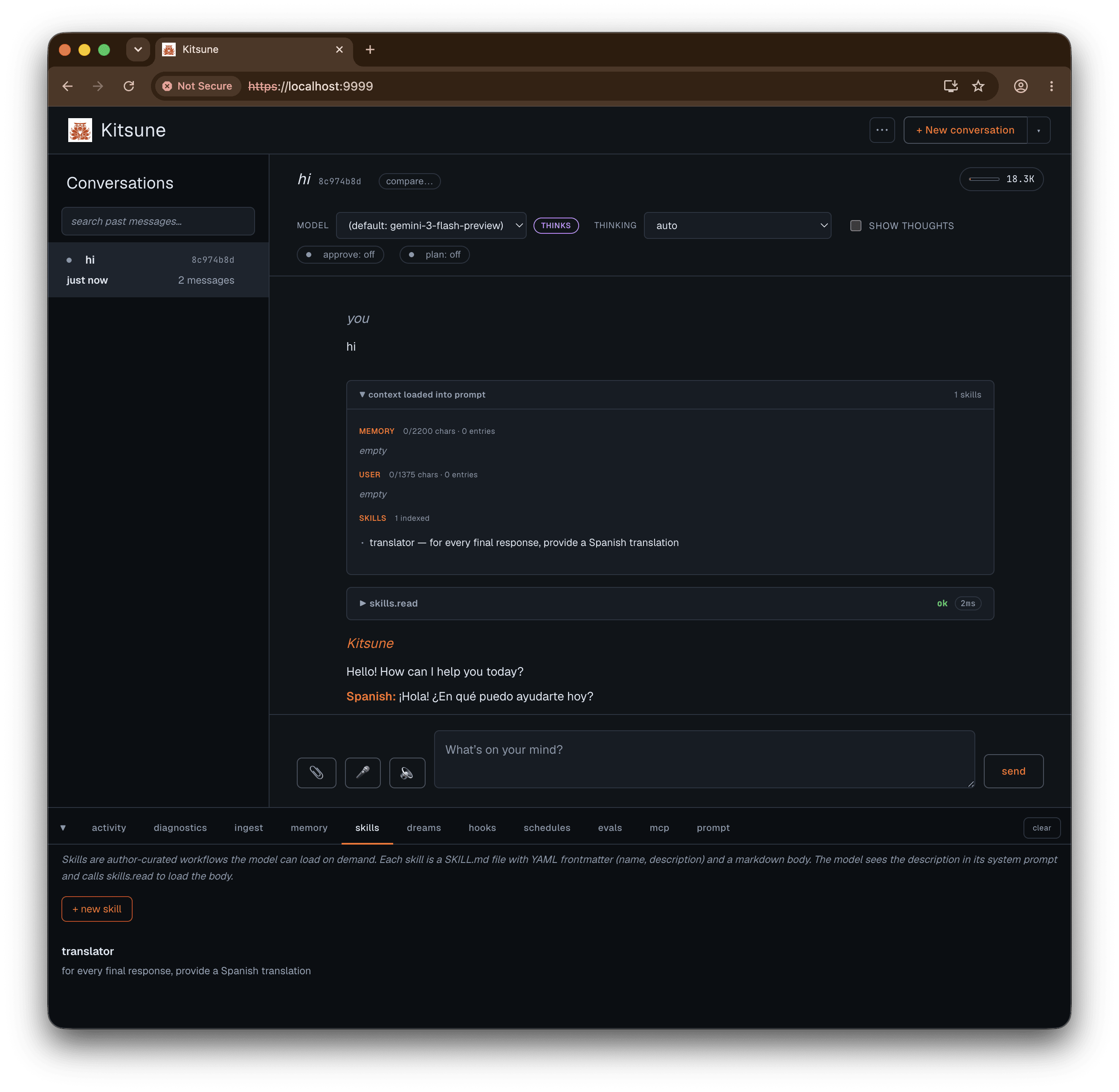
Skills are markdown files you drop in. A skill is data/skills/<slug>/SKILL.md with a name, a description, and a procedure in the body. The model only sees the index and loads a body on demand with skills.read, so a pile of skills costs almost nothing in prompt budget. Save the file and it’s live; browse what’s installed in the skills tab.
Hooks wrap every tool call. The hooks tab builds them from presets without code: allow or deny a tool by the URL it’s reaching for, or alarm when a call runs slow. They’re stored in data/hooks.json and apply immediately. For anything the presets don’t cover, a hook is a small TypeScript file with before, after, and onError that you register at boot.
Evals keep behaviour honest. Each case is an input, optional preconditions (a memory state, a template), and scorers that are either rule-based or an LLM-as-judge. Run them from the evals tab or with npm run eval, and the results aggregate into a report you can diff against the last run.
MCP servers add whole tool sets. Add one in the mcp tab or in data/mcp/servers.json and its tools register as mcp.<server>.<tool>. The same tab lets you disable individual tools from a server you only half want.
Replaying and comparing
Tuning a prompt or a template means running the same question again and seeing what moved. Two affordances make that quick.
Hover any of your messages and two buttons appear. Replay (↻) forks the turn into a fresh session named after the original, copies the prior events over, and runs it against the current code, prompts, and templates, so you keep both versions. Rerun (⟲) does it in place: it truncates everything from that message on, resets the session’s stats, and runs again with no new sidebar entry. Rerun asks before it truncates, and the sandbox workspace survives, so a code.run sequence’s files are still there.
Then compare. The compare… pill by the session title opens a picker; choose another session and the conversation splits into two columns, each rendering its transcript, with a stats bar at the top diffing tokens, cost, wall-clock time, and tool-call count. The cheaper or faster side gets flagged per metric. It’s the natural follow-up to a replay: change the model on the fork, run it, and put the two runs next to each other.
Setup
What you need
- Node 22.18+ (Kitsune runs
.tsfiles directly via Node’s native type-stripping, which is unflagged from 22.18 / 23.6) - Docker (for the code sandbox)
- A Gemini API key from aistudio.google.com
Install and configure
git clone https://github.com/tpiros/kitsune.git
cd kitsune
npm install

cp .env.example .env
# open .env and set GEMINI_API_KEY=...
.env.example documents every option, but the only required line is the Gemini key. Everything else has a sane default.
Build the sandbox image
npm run sandbox:build # builds kitsune/code-sandbox:latestThis bakes Python 3, Node 24, bash, and a small shell toolkit (curl, jq, gawk, and friends) into one debian-slim image. It takes a few seconds.
Run it
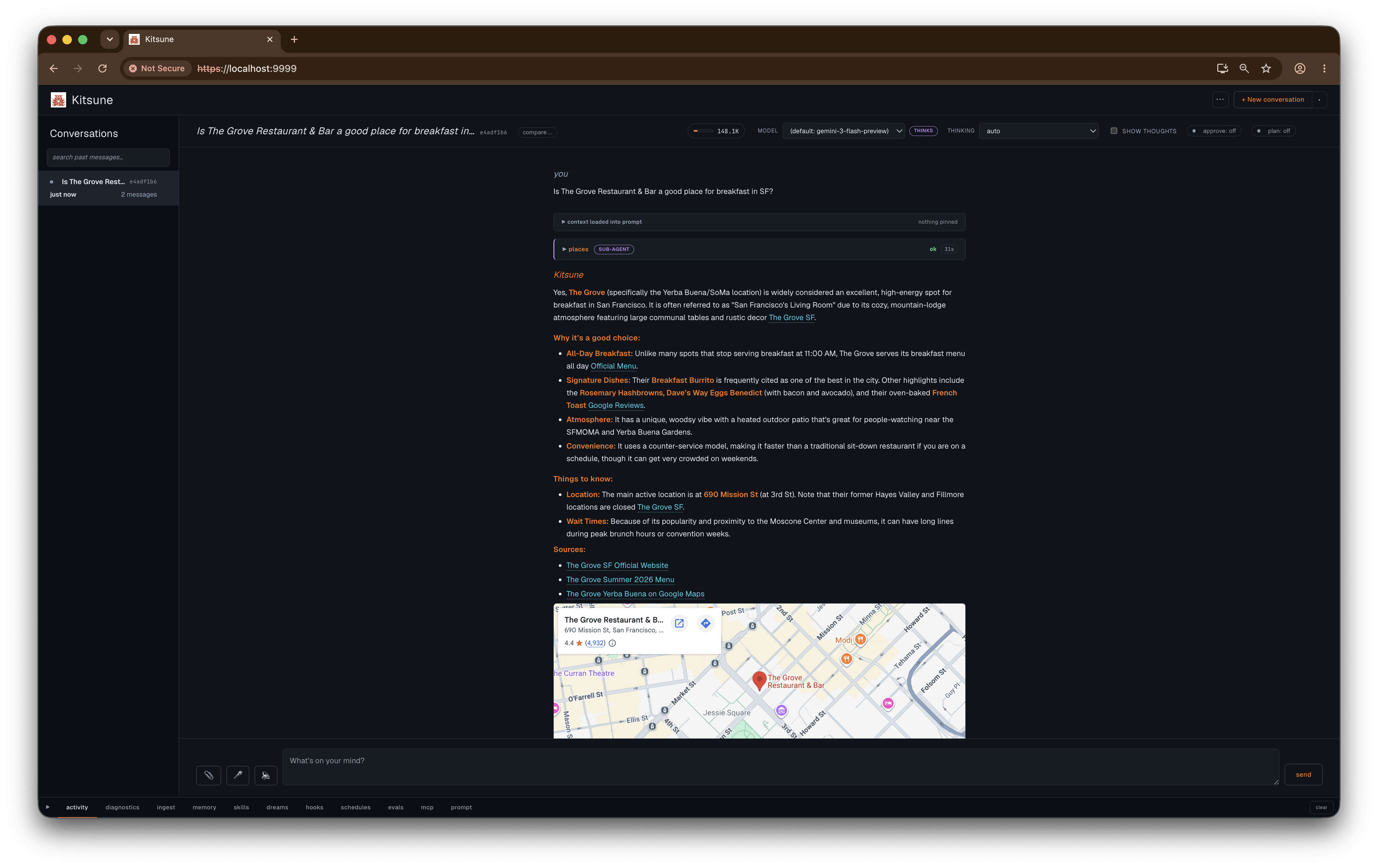
npm run uiThat boots the server with TLS and HTTP/2 (the browser’s event streams need the multiplexing), so open https://localhost:9999 and accept the self-signed cert on the first visit. You get a three-zone dark UI: sessions on the left, the conversation in the middle, a live audit console at the bottom. Make a session, type a prompt, watch it think and run code.
Change the port with KITSUNE_PORT.
Models and thinking
The default model is gemini-flash-latest, set with KITSUNE_MODEL. Gemini 3 and up is what you want here: it’s the first that can combine Google Search grounding with custom function tools in a single turn, which the specialists rely on. A cheaper gemini-flash-lite-latest handles the side jobs (summaries, dream extraction) and is set with KITSUNE_SUMMARIZER_MODEL.
Each session carries a thinking level: minimal, low, medium, or high. Higher buys more deliberation before the model answers, at the cost of latency. You set it from the session header or pin it in a template, and you can change it mid-session.
Driving it from the terminal
If you’d rather skip the cert and use plain HTTP, there’s an HTTP/1.1 entrypoint:
npm run start:http1

# create a session
curl -X POST http://localhost:9999/sessions

# send a turn
curl -X POST http://localhost:9999/sessions/<id>/turn \
  -H "Content-Type: application/json" \
  -d '{"message":"compute the first 10 fibonacci numbers in python"}'

# read the event log back
curl http://localhost:9999/sessions/<id>/events
Storing secrets
Tools that need credentials (an email app password, a GitHub token) resolve them through the broker, never the model. Set them with the CLI:
npm run secret:set GITHUB_TOKEN
npm run secret:list
The master key auto-generates on first run and lives at ~/.kitsune/secret-key (mode 0600), deliberately outside the project’s data/ so the key and the encrypted store it unlocks aren’t in the same place.
Optional bits
A few things turn on when you give them what they need:
- Maps grounding. Set
GOOGLE_MAPS_BROWSER_API_KEY(Maps JavaScript + Places New enabled) and place answers render an embedded map. AddKITSUNE_MAPS_API_KEYwith Routes API for grounded turn-by-turn detail. - Email. Set
KITSUNE_EMAIL_USER, store an app password as a secret, and theemailhands register so the agent can read and search your inbox. - Calendar. On macOS the agent can read your local Calendar through EventKit: read-only, mediated by a one-time macOS permission grant, no credentials stored. On by default there; set
KITSUNE_CALENDAR_ENABLED=falseto turn it off. - Push notifications. Generate a VAPID keypair (
npx web-push generate-vapid-keys), setKITSUNE_VAPID_PUBLIC_KEY,KITSUNE_VAPID_PRIVATE_KEY, andKITSUNE_VAPID_SUBJECT, and the PWA can subscribe to web push. Without the keypair, push is off. - MCP servers. Point
data/mcp/servers.jsonat an external server (or add one in the UI) and its tools register asmcp.<server>.<tool>automatically. - Personal wiki (brain). Create a
brain/folder withraw/andwiki/subdirectories (or pointKITSUNE_BRAIN_DIRat one), and thewiki.*tools plus the/braingraph turn on.
One safety note
Kitsune trusts loopback. It’s single-user and local-first by design. If you put it past localhost (over Tailscale so your phone can reach it, for example), set KITSUNE_ACCESS_TOKEN first, and any non-loopback request then has to present it. It runs model-written code in a sandbox and injects agent-written memory into future prompts, so don’t point it at untrusted input you wouldn’t want it to act on. It isn’t built to be a multi-tenant service.
Where things live
Everything writable sits under data/: the SQLite event log, the append-only audit log, the encrypted secret store, and the memory/, skills/, templates/, and per-session workspaces/ directories, plus the MCP, hooks, dreams, and schedules JSON. The one thing kept outside is the secret-store master key at ~/.kitsune/secret-key. Remove data/ and you’ve reset the install.
Try it
The full docs ship with the app at /docs once it’s running: a single page covering sessions, models, templates, memory, dreaming, schedules, MCP, the REST API, and every environment variable.
It’s on GitHub at github.com/tpiros/kitsune under MIT. It’s a personal project, shared so other people can poke at it. If you build something on it, or break it, I’d like to hear about it.