Why How You Split Your Documents Matters More Than You Think
Before you reach for a more powerful embedding model or a larger context window, look at what you're actually feeding into a RAG pipeline. Sometimes the highest-leverage improvement isn't a better model but rather it's a better split.
You’ve built a RAG pipeline. PDF loaded, embeddings generated, vector store humming along. You ask it a simple question: “How many weeks of parental leave do I get as a Team Lead with 3 years of service?” The answer comes back vague, incomplete, or flat-out wrong.
The information is right there in the document. So what broke?
Your chunking strategy. Almost every time, it’s how you split the document in the first place.
This post walks through building a RAG system that compares two chunking strategies side by side: naive fixed-size chunking versus layout-aware chunking. The difference matters far more than most tutorials let on.
The Chunking Problem Nobody Talks About
Most RAG tutorials glaze over chunking. They’ll show you a quick text.slice() or a LangChain RecursiveCharacterTextSplitter and sprint towards the “interesting” parts: embeddings, vector databases, prompt engineering. But chunking is the interesting part. It’s where things quietly fall apart.
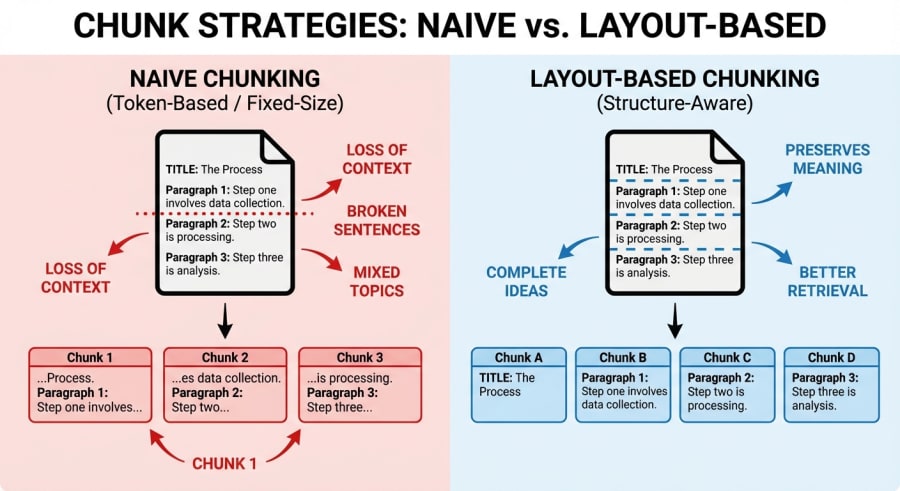
When you chunk a document naively (splitting it into fixed-size character blocks) you’re making an implicit assumption: that semantic boundaries align with character counts. They don’t. A 250-character window doesn’t care that it just sliced a table row in half, ripped a policy title from its description, or split “12 weeks of paid leave” across two chunks where one says “12 weeks of” and the other says “paid leave for employees who…”.
The retrieval step then dutifully finds the most similar chunk to your query, but that chunk is missing half the answer. The LLM does its best with what it gets. Fragmented context in, hallucinated answers out.
Two Strategies, One Pipeline
To make this concrete, I built a system that runs both chunking strategies through an identical RAG pipeline and compares the results. The stack is intentionally lean: Node.js, Google’s Gemini API for embeddings and generation, and Vectra for local vector storage. No frameworks, no orchestration layers.
The pipeline follows a clean flow:
- Parse a PDF document
- Chunk it using both strategies
- Generate embeddings for all chunks
- Index everything in a vector store
- Run the same query against both chunk sets
- Compare the answers
Let’s look at each chunking strategy.
The Naive Approach: Fixed-Size Windows
The naive chunker does exactly what the name suggests. It slides a fixed-size window across the entire document text, producing uniform chunks with a small overlap to avoid hard boundary cuts:
const CHUNK_SIZE = 250;
const OVERLAP = 25;

export function naiveChunk(documents) {
  const chunks = [];
  let globalIndex = 0;

  for (const doc of documents) {
    const text = doc.text;
    const source = doc.filename;
    let chunkIndex = 0;

    for (let i = 0; i < text.length; i += CHUNK_SIZE - OVERLAP) {
      const end = Math.min(i + CHUNK_SIZE, text.length);
      const content = text.slice(i, end);

      chunks.push({
        id: `naive-${globalIndex}`,
        content: content.trim(),
        metadata: { source, chunkIndex, type: 'naive' }
      });

      globalIndex++;
      chunkIndex++;
    }
  }

  return chunks;
}
Simple, predictable, fast. Also completely blind to the document’s structure. A table cell, a heading, a list item: they’re all just characters in a string.
The Layout-Aware Approach: Structure-Preserving Chunks
The layout-aware chunker takes a fundamentally different tack. Instead of treating the document as a flat string, it parses the text into semantic sections by detecting structural elements: headers, tables, lists, and paragraph boundaries.
The core of the strategy is a parseIntoSections function that iterates through lines and classifies them:
function isHeader(line) {
  if (/^##\s+[^#]/.test(line)) return true;
  if (/^\d+\.\s+[A-Z]/.test(line)) return true;
  if (/^[A-Z][a-zA-Z\s]+\d{4}$/.test(line)) return true;
  if (
    /^[A-Z][a-zA-Z\s]+$/.test(line) &&
    line.length > 20 &&
    line.length < 60 &&
    !line.match(/Package|Notes|Type|Structure|Bonus/)
  ) {
    return true;
  }
  return false;
}

function isTableRow(line) {
  if (/\s{2,}/.test(line.trim()) && line.trim().length > 10) return true;
  if (line.includes('|')) return true;
  if (line.includes('\t')) return true;
  return false;
}

function isListItem(line) {
  return /^[\s]*[•\-\*]\s/.test(line) || /^[\s]*\d+[.)]\s/.test(line);
}
Each header triggers a new section. Table rows get grouped together. List items stay with their parent content. The result is a set of chunks where each one represents a coherent semantic unit (a complete section, a full table, an entire list) rather than an arbitrary slice of characters.
When the parsed sections are assembled into chunks, they carry rich metadata about what they contain:
chunks.push({
  id: `layout-${globalIndex}`,
  content: sectionContent.trim(),
  metadata: {
    source,
    chunkIndex,
    type: 'layout-aware',
    section: currentHeader,
    layoutInfo: {
      isHeader: section.type === 'header',
      isTable: section.type === 'table',
      isList: section.type === 'list',
      section: currentHeader,
    },
  },
});
That metadata isn’t decorative. It enables downstream filtering, debugging, and more sophisticated retrieval strategies.
The Shared Pipeline
Both sets of chunks flow through the same embedding and retrieval pipeline. Embeddings are generated using Google’s gemini-embedding-001 model, processed in batches of 10 to respect rate limits:
export async function generateEmbeddings(chunks) {
  const batchSize = 10;
  const vectorChunks = [];

  for (let i = 0; i < chunks.length; i += batchSize) {
    const batch = chunks.slice(i, Math.min(i + batchSize, chunks.length));

    const embeddingPromises = batch.map(async (chunk) => {
      const result = await ai.models.embedContent({
        model: 'gemini-embedding-001',
        contents: chunk.content,
      });

      return {
        ...chunk,
        embedding: result.embeddings[0].values,
      };
    });

    const batchResults = await Promise.all(embeddingPromises);
    vectorChunks.push(...batchResults);

    if (i + batchSize < chunks.length) {
      await new Promise((resolve) => setTimeout(resolve, 100));
    }
  }

  return vectorChunks;
}
Both chunk types get indexed into the same Vectra vector store. At query time, the RAGPipeline class embeds the user’s question, searches for similar chunks, filters by chunking type, and passes the retrieved context to Gemini for generation:
export class RAGPipeline {
  constructor(vectorStore) {
    this.vectorStore = vectorStore;
  }

  async query(question, chunkingType, topK = 3) {
    const queryEmbedding = await embedQuery(question);

    const allResults = await this.vectorStore.search(queryEmbedding, topK * 2);

    const retrievedChunks = allResults
      .filter((result) => result.chunk.metadata.type === chunkingType)
      .slice(0, topK);

    const context = retrievedChunks
      .map((result, idx) => `[${idx + 1}] ${result.chunk.content}`)
      .join('\n\n');

    const prompt = `You are a helpful assistant. Answer the question based only on the provided context.

Context:
${context}

Question: ${question}`;

    const response = await ai.models.generateContent({
      model: 'gemini-2.5-flash',
      contents: prompt,
    });

    return {
      query: question,
      retrievedChunks,
      generatedAnswer: response.text,
      chunkingType,
    };
  }
}
The key detail here is topK * 2 followed by the filter. Since both chunk types coexist in the same index, we over-fetch and then narrow down to the requested strategy. Both strategies work from the same vector space; it’s a fair comparison.
Why the Difference Matters
When you run a query like “How many weeks of parental leave do I get as a Team Lead with 3 years of service?” against an employee benefits PDF, the naive chunker might retrieve a chunk that starts mid-sentence: “…for employees in Tier 2 positions. Parental leave entitlement is based on”, cutting off right before the actual answer. The embedding matched well because the words “parental leave” and “Tier 2” are present. But the chunk is incomplete.
The layout-aware chunker, by contrast, retrieves the full parental leave section (header, table, and all) because it kept that semantic unit intact during chunking. The LLM gets a complete context and produces a complete answer.
That’s the difference between a RAG system that works in demos and one that works in production.
Here’s what both strategies produce when you run them side by side:
The naive chunker retrieved a fragment. No base entitlement, no way to compute the answer. The layout-aware chunker pulled the entire section, and the LLM nailed the calculation.
A Few Takeaways
Chunking is retrieval design. The way you split your documents determines what your retrieval step can find. No amount of prompt engineering compensates for a chunk that’s missing half the answer.
Structure-aware doesn’t mean complex. The layout-aware chunker here is pattern-based: regular expressions detecting headers, tables, and lists. No vision model, no document AI service. Simple heuristics go a long way when the alternative is completely ignoring structure.
Metadata pulls its weight. Tagging chunks with their structural type (table, list, header, section name) opens the door to filtered retrieval, better debugging, and hybrid strategies where you might weight table chunks differently from prose.
Test with real queries. The side-by-side comparison approach (running the same question through both strategies) is the fastest way to spot where your chunking falls apart. Bolt this into your evaluation pipeline early.
Wrapping Up
RAG has become table stakes for building AI applications that reason over documents. But the quality of your RAG system lives and dies in the details most people skip over. Chunking is one of those details.
Before you reach for a more powerful embedding model or a larger context window, look at what you’re actually feeding into the pipeline. Chances are, the answer was split across two chunks and neither one made the cut.
Sometimes the highest-impact improvement isn’t a better model. It’s a better split.