Chapter 1Foundations
An LLM is not a function
25 min read · 3 of 22
AI’s on every product roadmap, in every job description, in every standup. Whether you wanted in or not, your team’s been told to ship something with it. The pressure to add it is universal. The path to actually doing so isn’t.
Provider docs cover their corner of the API. Threads on X cover what worked for one person yesterday. Academic papers explain architecture you weren’t asked to implement. Conference talks cover the demo. None of them cover what you actually need: what to build first, what do all these new terms mean, what is useful, and when. All of this can be overwhelming. And here’s what I have observed: people in the AI space assume that developers are already familiar with the basics, that they are able to keep up with the pace. This couldn’t be further from the truth. I clearly remember, at an in-person event, someone asking me whether they should use RAG or MCP. While I explained what both are, it became evident that there was very little understanding behind these terms. And the fault lies with the flood of information, which, as I said before, is just overwhelming, and never with the person who asked the question.
You’re exactly where the field puts most working developers right now.
Most books teaching LLMs either assume you’ve already done the work, or bury the explanation under so much theory that you give up before chapter two. A math chapter. Then transformer architecture. Then sampling theory. By the time you actually call an API, you’ve spent four weekends not building anything.
Of course, if you are curious about the inner workings of LLMs, I invite you to read those books that go deep into this topic. It is truly a fascinating world, but often, it’s way too advanced for the purposes of what most developers would want to use LLMs for.
This book starts with one mental model. Once you have it, every other concept extends it.
What you’ll build
By the end of this chapter you’ll have run a seven-line script that hits Gemini and prints a response. That script is the seed, and every later chapter grows it into a working assistant: Chapter 2 adds a system prompt, Chapter 3 makes it return typed JSON, Chapter 4 gives it tools, Chapter 5 teaches it to read your project’s AGENTS.md, and the RAG bonus chapters plug retrieval into it. So this chapter has one job: install the mental model that makes the rest of that build make sense.
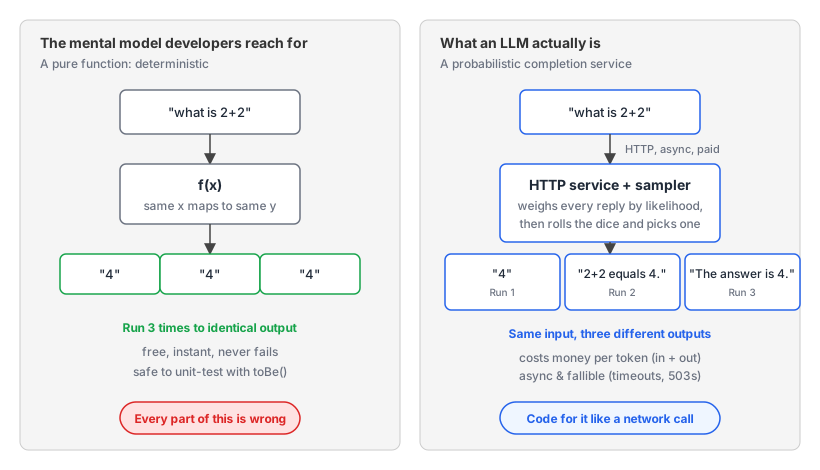
An LLM is a probabilistic completion service. You give it context (text, or even images, audio); it samples from a learned probability distribution and returns what’s most likely to come next. It’s not a function in the programming sense. Same input doesn’t always give the same output. Every call is async and fallible. Every hosted call costs money.
This chapter walks through your first API call line by line, shows what tokens are (the integer layer underneath text), and explains the model size variants you’ll see across providers.
If you skipped Chapter 0, go back. The rest of this chapter assumes Node 24, a working GEMINI_API_KEY, and a code/chapter-01/ folder you can run TypeScript in (cloned from the companion repo, github.com/tpiros/ai-engineer-book).
Concept 1: The Service Model
The most expensive misconception about LLMs is that they’re functions. Almost every developer’s first mental model is the same: text in, text out, same input gives same output. Pure, deterministic, predictable: the kind of thing you write a unit test for and commit. Every part of that is wrong, and not noticing will cost you more time than any other mistake in this book.
An LLM is an HTTP service with a slot machine wired into the response path. You feed in some text. Inside, the machine spins. It weighs every possible response by how likely it is given your input, then samples one of them. The dice roll happens inside the box; you only see the result. A calculator or a database lookup would hand back the same answer every time; this is a coin-flipper-on-a-server that’s been trained to flip coins biased toward useful answers.
Three things developers usually find surprising about it.
1. Same input doesn’t always give the same output. The model is sampling from a probability distribution. The same prompt, run three times, can produce three different responses. You can pull the variance way down by setting temperature: 0, but you can’t fully eliminate it.
2. Every call costs money. You pay per token, both for what you send (input tokens) and what you receive (output tokens). The Gemini free tier from Chapter 0 waives the bill but keeps the meter running: usage is still counted and rate-limited in tokens, so the mental model holds. There are, however, models you can self-host (edge AI models) and experiment with absolutely free. We won’t be covering these in this book but a good way to get started is by downloading a tool called LM Studio or Ollama.
3. Every call is async and fallible. Treat it as a network call. It takes anywhere from 200ms to several minutes depending on the model and the question. It can fail mid-stream, time out, run out of memory. Hosted models add rate-limiting and 503s on top. Local models through Ollama or LM Studio dodge those, but they’re still async, still slow by normal-code standards, still capable of crashing your inference server.
Your code needs to behave like it’s calling an external service, because it is, even when “external” means “the Ollama process running on your laptop.”
Open code/chapter-01/first-call.ts and follow along. Here’s the whole file:
import { GoogleGenAI } from "@google/genai";

const ai = new GoogleGenAI({});

const response = await ai.models.generateContent({
  model: "gemini-3.5-flash",
  contents: "Write a six-word story about a stormtrooper's first day on the job.",
});

console.log(response.text);
Five things happen here. Worth walking through each, because every Gemini call you write for the rest of the book is a variation on this.
Line 1. import { GoogleGenAI } from "@google/genai". The official Google AI SDK for TypeScript. One named export (the client class) is all you need to call the API. Other things live under it (ai.models, ai.files, ai.live), but you reach them through this object.
Line 3. new GoogleGenAI({}). Creates the client. With no apiKey passed, the SDK reads GEMINI_API_KEY from the environment automatically; that variable arrives via Node’s --env-file=.env flag at runtime (Chapter 0), so we never write the literal key in source. The client is cheap to create. No network calls happen here.
Lines 5-8. ai.models.generateContent({ model, contents }). The actual API call. Two parameters: the model identifier (chosen from the lineup we’ll cover later this chapter) and the contents to send. contents: "..." is shorthand for “one user message containing this text.” We’ll see the longer multi-turn shape in Chapter 2.
The await matters. This is a network call. The function returns a Promise. If you forget the await, you get a Promise object instead of a response and your code will look subtly broken.
Line 10. console.log(response.text). The response object has a lot in it: usage metadata, finish reason, function-call requests. For now we only want the text. The .text getter assembles it from the response’s parts.
Run it from code/chapter-01/:
npm run storyYou get a six-word story. Probably. The model produces text that’s most likely to fit “six-word story about a stormtrooper’s first day”; it usually nails the form but doesn’t always count six words exactly. That “predict the most likely continuation” doesn’t mean “follow your instructions exactly” is a thing we’ll spend Chapter 2 fixing.
For me the output was the following:
Shiny white armor. Missed every shot.That’s an LLM call. Nothing else is hiding underneath the SDK. Every concept in this book builds on this seven-line script.
Common confusion: “I’ll just write a unit test for it.” You might think: sure, the model is probabilistic, but I can expect(llm("what is 2+2")).toBe("4") and ship. You can’t. Even a question that obvious samples different surface forms ("4", "The answer is 4.", "2+2 equals 4.", "4 is the answer."), and your .toBe("4") fails on three of them.
The fix is a different kind of test. Chapter 10 (Evals) is the systematic answer. For now, the discipline: stop reaching for unit-test reflexes on LLM calls. They live in the world of probabilistic systems. The rest of the book is engineering on top of that fact.
Concept 2: Sampling
You ran the story script three times and got three different stories. You set temperature: 0 and the variance shrank but didn’t vanish. Why?
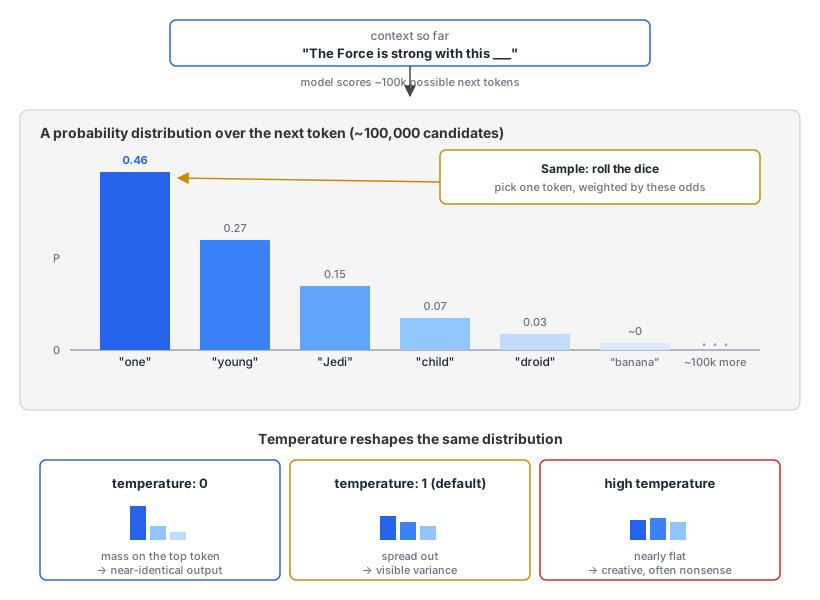
The mechanism is sampling. At every step, the model has a vocabulary of a couple of hundred thousand possible next tokens. It assigns a probability to each one, weighted by the context so far. Then it picks one according to those probabilities, randomly. Same context, same weights, similar but not identical draws.
Lower temperature and the probability mass concentrates on the top few tokens, so the same prompt produces near-identical outputs. Raise it and the distribution spreads: weirder, more creative, sometimes nonsense.
In code/chapter-01/same-prompt-three-times.ts:
import { GoogleGenAI } from "@google/genai";

const ai = new GoogleGenAI({});

for (let i = 1; i <= 3; i++) {
  const r = await ai.models.generateContent({
    model: "gemini-3.5-flash",
    contents: "Write a one-sentence story about Han Solo trying to charm Princess Leia.",
  });
  console.log(`Run ${i}:`, r.text?.trim());
  console.log("---");
}
A loop, calling the same prompt three times, printing each output. Run it:
npm run sampleYou get three different one-sentence stories from the same prompt, and that variance is the point.
Run 1: Han leaned against the Millennium Falcon’s bulkhead with a rakish smirk, telling the unimpressed Princess that she could stop pretending to hate his company since they both knew he was the most charming scoundrel in the galaxy.
---
Run 2: Han leaned against the bulkhead with a rakish, lopsided grin, informing the unimpressed princess that while he might be a scoundrel, he was clearly the only one in the galaxy who could keep her from getting bored.
---
Run 3: Han leaned against the bulkhead of the Millennium Falcon with a rakish, lopsided grin, betting that the Princess’s sharp insults were just her way of hiding how much she truly adored a scoundrel.
---
Common confusion: “I tried this and got the same answer every time.” You will, sometimes. The variance you see depends on how much room your prompt leaves for it. Replace the Han Solo prompt with "Give me a single English word that means 'happy'." Run it a few times. You may see “joyful” every time.
The temperature’s still the default 1.0. The probability mass is concentrated on one answer, so random sampling picks it overwhelmingly. The variance lives in the distribution; the distribution just doesn’t have much room.
Not to be confused with prompt caching, which providers offer to cut cost and latency. That caches the input processing only; the answer is still sampled fresh on every call. A store that hands back an identical answer for a repeated prompt is a separate response cache you’d add yourself (Chapter 14), not something the model does on its own.
This is prompt entropy. Open-ended prompts (creative writing, brainstorming) show variance loudly. Tightly constrained prompts (single-word answers, narrow factual lookups) can hide it. Both behaviours are the model doing exactly what you asked. Don’t judge whether sampling is “working” by looking at one prompt. Try a creative one if you want to see the variance with your own eyes.
A second confusion worth pre-empting: temperature: 0 gets you “as deterministic as the API offers,” not byte-identical output. There’s residual non-determinism from how inference is parallelised on the GPU. The order of operations across many cores can vary by tiny rounding amounts, and that occasionally tips one token over another.
Don’t bet your test suite on temperature: 0 returning byte-identical output across runs. Use it as a strong nudge. (Thinking Machines Lab’s Defeating Nondeterminism in LLM Inference is the canonical writeup; it walks through the floating-point and batch-invariance issues that make naive temperature: 0 not enough.)
Concept 3: Tokens
Tokens are the unit the model thinks in, the unit you pay in, and the unit the context window’s measured in. They’re also where about half of your “why is the model misbehaving?” questions get answered. If LLMs spoke English this section wouldn’t exist, but they don’t.
The model has a private alphabet of word-fragments, sitting somewhere between letters and whole words: bits of text that compress common patterns efficiently. Each fragment has a unique number assigned to it. The model only ever sees and produces those numbers.
Tokenisation is the bridge: a function that turns your English string into a sequence of integers (when you send a request), and turns the model’s integer output back into English (when you read the response). The SDK hides this layer most of the time. There are scenarios where you need to look at it directly: cost calculation, context-window debugging, long-prompt design.
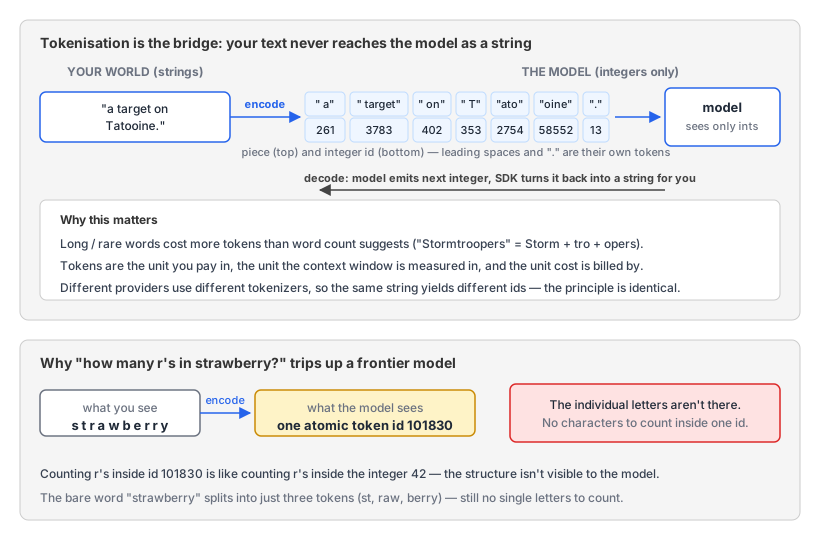
Token. The unit of input and output for an LLM. Roughly a word-fragment: common short words are usually one token, longer or rarer words split into several. A space and a punctuation mark are usually their own tokens. Different models tokenize slightly differently, but every modern provider uses some variant of this scheme.
Install one package:
npm install js-tiktokenThen in code/chapter-01/tokenize.mjs:
import { Tiktoken } from "js-tiktoken/lite";
import o200k_base from "js-tiktoken/ranks/o200k_base";

const enc = new Tiktoken(o200k_base);

const sentence = "Stormtroopers never hit a target on Tatooine.";
const ids = enc.encode(sentence);
const pieces = ids.map((id) => enc.decode([id]));

console.log(`${ids.length} tokens`);
console.log("ids:    ", JSON.stringify(ids));
console.log("pieces: ", JSON.stringify(pieces));
Walking through this. Tiktoken is the class that does the encoding and decoding. o200k_base is one of OpenAI’s published tokenizers, the one used by GPT-4o and the GPT-5 family. (Yes, we’re using OpenAI’s tokenizer to inspect tokens for a Gemini-default chapter. The principle’s the same; the specific token IDs differ. More on that in a moment.)
new Tiktoken(o200k_base) constructs an encoder using that vocabulary. enc.encode(sentence) turns the string into the integer sequence the model would see. enc.decode([id]) turns one integer back into its string fragment, and we map every id through it so we can see what each token is in human-readable form.
Run it:
$ npm run tokenize

12 tokens
ids:     [74601,33770,88391,3779,7103,261,3783,402,353,2754,58552,13]
pieces:  ["Storm","tro","opers"," never"," hit"," a"," target"," on"," T","ato","oine","."]
Three things worth seeing.
The model never sees "Stormtroopers never hit a target on Tatooine." as a string. It sees the twelve integers [74601, 33770, 88391, 3779, 7103, 261, 3783, 402, 353, 2754, 58552, 13]. Each integer is an index into the vocabulary the model was trained with. When the model generates a response, it generates the next integer; the SDK turns that integer back into a piece of text for you.
Stormtroopers splits into three pieces (Storm, tro, opers). Tatooine also splits into three (T, ato, oine). Long or uncommon words cost more tokens than you’d guess from word count alone, and the tokenizer’s idea of “common” reflects what was in its training corpus, not what feels common to you. The leading space on never is part of the token, not separate. Punctuation gets its own token (. is id 13).
This is OpenAI’s tokenizer (the encoding called o200k_base), used by GPT-4o and the GPT-5 family. Other providers and older OpenAI models use different encodings; same principle, different specific token IDs. For an exact Gemini count on a specific string, the @google/genai SDK has a countTokens method that calls Google’s API. We use js-tiktoken here because it runs locally with no network call and the conceptual lesson is identical.
The strawberry test
Here’s the famous one. Ask a frontier model “How many r’s are in the word strawberry?” and there’s a real chance it answers “two.” It’s a well-documented failure mode with its own research paper (“Why Do Large Language Models (LLMs) Struggle to Count Letters?”, Fu et al., 2024) and its own busy OpenAI community thread.
Why? Look at how the question tokenises. Drop this into tokenize.mjs:
const sentence = "How many r's are in strawberry?";Output:
8 tokens
ids:     [5299,1991,428,885,553,306,101830,30]
pieces:  ["How"," many"," r","'s"," are"," in"," strawberry","?"]
The word strawberry arrives as a single atomic token (id 101830). Counting r’s inside that token is like counting r’s in the integer 42. The structure isn’t there.
Encode the bare word "strawberry" (no leading space) and you get three tokens: st, raw, berry, ids [302, 1618, 19772]. Still no individual letters. The model can sometimes get the count right by reasoning about what it knows about the spelling, but “sometimes gets it right after thinking” is a different thing from “reliable tool for this.” Don’t build a feature on letter-counting through tokens.
Common confusion: “tokens are just words, right?” A single English word can be one, two, or three-plus tokens (Hello is one, Refactoring is two, Stormtroopers is three). A single token can span one character (a space, a comma) or many (actoring is one token, eight characters; it’s the second half of Refactoring). And non-text inputs tokenise too: images and audio at fixed rates per pixel-tile or per second of audio. Chapter 4 covers the rates when we add tool use; for now, “token” doesn’t only mean “fragment of English text.”
Concept 4: The model lineup
Open Google’s Gemini docs and you’ll see at least five model identifiers: gemini-3.1-pro-preview, gemini-3.5-flash, gemini-3.1-flash-lite, plus older variants (gemini-2.5-pro, gemini-2.5-flash, etc.). Anthropic’s docs show Opus, Sonnet, Haiku, each with a version number. OpenAI’s a small forest of GPT-5 variants.
Which one to pick? You can’t write code without choosing one, so this is the third decision you make on every API call (after “which provider” and “what’s my prompt”). Worth knowing the pattern.
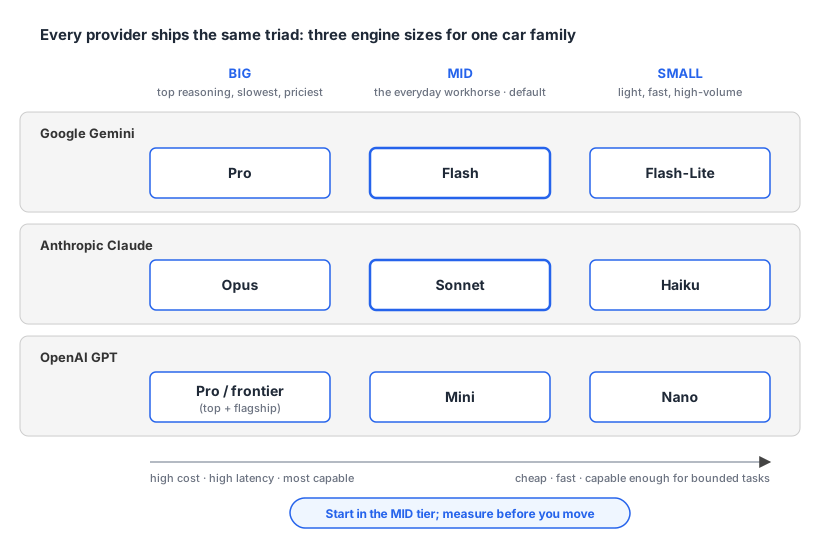
Model lineups across providers all follow the same shape: three engine sizes for the same car family. The big engine is most powerful, slowest, most fuel; you use it when the journey is hard. The mid engine is almost as powerful and much more efficient; it’s the everyday workhorse. The small engine is light and fast, slightly less powerful; you use it for short, high-volume trips. Every provider ships this triad. The naming varies; the trade-off doesn’t.
Google’s lineup, with the exact strings to pass as the model parameter:
- Gemini 3.1 Pro (big).
gemini-3.1-pro-preview. Top reasoning, highest cost, slowest. The reasoning depth is a per-call setting (Concept 7 below). - Gemini 3.5 Flash (mid).
gemini-3.5-flash. The default workhorse. What this book uses. (gemini-3.6-flashis the newest stable Flash as I write this; the book pins 3.5.) - Gemini 3.1 Flash-Lite (small).
gemini-3.1-flash-lite. About $0.25 per million input tokens at the time of writing; cheapest in the family.
A note on the -preview suffix. Flash and Flash-Lite have gone GA, but Pro still carries the -preview suffix as I write this. When it goes GA, Google drops the suffix. If a code sample fails with “model not found,” check Google’s model list for the current id. The fallback for “I want stable, today” is the previous generation: gemini-2.5-flash, gemini-2.5-pro, gemini-2.5-flash-lite.
The other two big providers use the same big/mid/small idea with different vocabulary.
Anthropic Claude. Tier names: Opus (big), Sonnet (mid), Haiku (small). Currently Claude Opus 5, Sonnet 5, and Haiku 4.5 are the latest in each tier.
OpenAI GPT-5. Size suffixes: GPT-5.5 Pro (top), GPT-5.5 (frontier mid), GPT-5.4 Mini (smaller), GPT-5.4 Nano (smallest). The frontier moves first; Mini and Nano follow a release cycle behind.
When someone says “use the small model for this,” they mean: pick the cheap, fast variant of whatever provider you’re on. There are some situations when you pick: “pro” type models when the task compounds across steps and one bad inference cascades (planning, multi-hop synthesis, code review, anything where you’d want a senior engineer thinking carefully). “Flash-Lite” type when the task is bounded and you’re running it at volume where cost and latency dominate the ceiling on capability (classifiers, routers, simple extraction, intent labelling). And a viable default is “flash” type.
Common confusion: “always pick the biggest model.” The temptation, especially when starting out, is to pick Pro (or Opus, or GPT-5.5 Pro) for everything. It’s more accurate; why not? Three reasons.
First, cost. The gap has narrowed (Gemini 3.1 Pro runs about 1.3x Flash per token, Claude Opus about 1.7x Sonnet), and Pro doubles its input rate once your prompt passes 200k tokens. For a workload calling the API thousands of times a day, “pick the biggest” still turns into a real bill fast.
As a quick side note here, the per token intelligence (cost per intelligence) is actually going down, which is great news. Artificial Analysis measures and tracks this: for example if you were happy with GPT 5.4 mini (xhigh)‘s level of intelligence (and you don’t want to change to GPT 5.5 (xhigh)), the cost per intelligence is a lot less. The exact figures drift week to week, so check the live tracker rather than any number I could print here.
If you are interested in knowing which models are best for coding, I also highly recommend that you look at the DeepSWE benchmarks. I found this to really reflect my own experiences when it comes to using various models for a variety of coding tasks.
Second, latency differential is also large. Pro models think for longer, often noticeably. A user-facing chat where each response takes 8 seconds feels broken. The same chat at 2 seconds feels live. Use Flash for anything user-facing unless quality is genuinely the bottleneck.
Third, the smaller model is often as good. For routine tasks (classification, formatting, extraction, simple Q&A), Flash and Flash-Lite get the same answers as Pro. You only need Pro when the task involves multi-step reasoning, careful instruction-following, or domain expertise. Chapter 10 (Evals) has the measurement methodology.
For this chapter, and for most early chapters, Flash is the right default. Switch up to Pro when you’ve measured a quality lift; switch down to Flash-Lite when you’re in a high-volume routine workload and cost matters.
Concept 5: Tokens are the unit of cost
You now know what a token is. Time for the practical consequence: they’re the unit you pay in. Every model provider charges per token, both for input and output, and uses tokens to cap how much text you can send in one call (the context window). The math is arithmetic, but unfamiliar. Worth doing once explicitly so it lives in your head.
Cost per call.
(input_tokens × input_price_per_token) + (output_tokens × output_price_per_token). Provider pricing is usually quoted per million tokens. So a call sending 4,000 input tokens and getting 1,000 output tokens, on Gemini 3.5 Flash ($1.50/M input, $9.00/M output):4000 × $1.50/1M + 1000 × $9/1M = $0.006 + $0.009 = $0.015per call.
A concrete worked example. Suppose you want to send the entire text of Moby Dick to a model as input, maybe to ask “what are the recurring themes?”
Step 1: word count. Moby Dick is around 210,000 words.
Step 2: convert to tokens. Google’s official rule of thumb is 100 tokens for every 60 to 80 English words. So 210,000 words = somewhere between 260,000 and 350,000 tokens.
Step 3: pick a model and rate. Gemini 3.1 Flash-Lite is $0.25 per million input tokens. So: ~300,000 × $0.25 / 1,000,000 = ~$0.075. Roughly 7-8 cents.
Step 4: bigger model? Gemini 3.5 Flash is $1.50 per million input. Same input on Flash: ~40-50 cents. Gemini 3.1 Pro is $2.00 per million input (for prompts ≤200k tokens) or $4.00 (above). 350k tokens of Pro input: ~$1.40. So sending Moby Dick to Pro is roughly 20x the cost of sending it to Flash-Lite.
Cheap either way. The expense comes from volume: doing it ten thousand times a day inside an agent that doesn’t know when to stop. Chapter 6 (Agent patterns) and Chapter 14 (Observability, cost, and deploy) cover budgeting properly. For now, the discipline is to know roughly what every call costs you.
Concept 6: Context window
The flip side of “tokens are the unit of cost” is “tokens are the unit of capacity.” You can’t send more tokens to the model than its context window allows. Knowing the limit means knowing what kind of inputs are realistic.
Think of the context window as the model’s working memory. Whatever you put inside the window is what the model considers when generating the next token. Things outside the window (earlier in a long conversation, in a separate document) don’t influence the response.
For Gemini 3.5 Flash, the window is 1 million tokens. For comparison, the original GPT-3 had a 2,048-token window. Nearly three orders of magnitude larger inside five years.
Common confusion: “more context = better answer.” Not reliably. There’s a known degradation pattern called lost in the middle: for long contexts, models attend more to the start and end of the input than to the middle. Chapter 2 covers it properly. For now: filling the window because you can often hurts.
For this chapter, the practical takeaway: don’t worry about the window. Your prompts are far below it. The RAG bonus chapters bring it back as a real constraint when we start retrieving context.
Concept 7: Thinking levels
Gemini 3 models can spend extra tokens on internal reasoning before producing visible output. You don’t see those tokens in response.text, but you pay for them as output tokens, and on hard problems they raise answer quality noticeably. The dial that controls how much internal thinking happens is thinkingLevel. Gemini 3.5 Flash supports four levels: minimal, low, medium, high, and defaults to medium. Gemini 3.1 Pro drops minimal and defaults to high. The level is a ceiling; within it, the model picks dynamically based on problem complexity.
const response = await ai.models.generateContent({
  model: "gemini-3.1-pro-preview",
  contents: "Plan a route for a delivery driver visiting these 12 addresses, optimising for fuel cost.",
  config: {
    thinkingConfig: {
      thinkingLevel: "high",
    },
  },
});
When to touch this dial:
minimal(Flash only): high-throughput simple tasks where the answer doesn’t benefit from reasoning. Classification, formatting, single-fact lookup.low/medium: trade off cost for depth on tasks that benefit from some thinking but don’t need the full budget.high: Pro’s default; Flash defaults tomedium. On hard problems, leave Pro here.
You can also peek at a summary of the model’s reasoning by setting includeThoughts: true in thinkingConfig. That’s the surface in the @google/genai SDK version this book pins; Google’s docs now describe the same feature as thought summaries. The response then includes a thought part alongside the visible answer. Useful for debugging weird answers. It doesn’t change what you pay: thinking tokens are billed as output either way; this setting only controls whether you see them. See Google’s thinking docs for the current parameter surface.
The other providers ship the same idea under different names. OpenAI’s GPT-5 family takes a reasoning.effort parameter (none / low / medium / high / xhigh). Current Claude models use adaptive thinking plus an effort level (low through max); the older thinking.budget_tokens knob only survives on models before Claude 4.7. The pattern’s converged: every frontier model now lets you control how much it deliberates per call.
The starting point
Save the slightly extended version of first-call.ts as code/chapter-01/assistant.ts. This is the seed every later chapter grows:
import { GoogleGenAI } from "@google/genai";

const ai = new GoogleGenAI({});

const question = process.argv.slice(2).join(" ");

if (!question) {
  console.error(
    "Usage: node --env-file=.env --strip-types assistant.ts <your question>"
  );
  process.exit(1);
}

const response = await ai.models.generateContent({
  model: "gemini-3.5-flash",
  contents: question,
});

console.log(response.text);
Run it from code/chapter-01/:
node --env-file=.env --strip-types assistant.ts "Why did Anakin really turn to the dark side?"What it can’t do yet: return structured data, use tools, search the web, remember anything across calls, find your project’s docs, refuse to hallucinate, cap its own cost. Each is the topic of a later chapter. The book closes them one at a time, in the order that makes the next gap easier to close.
Next up in Chapter 2: Prompting that works. The seven-line script sends a raw question and hopes. Chapter 2 turns that into deliberate prompting: the Continuation Test, the anatomy of a prompt that works, system versus user prompts, few-shot examples, and the generation parameters worth touching.