BonusBonus
Rebuilding the Chapter 14 assistant on ADK
26 min read · 21 of 22
What this chapter does
Chapter 14 ended with an autonomous research-and-writing assistant. Roughly 860 lines of TypeScript: a custom Agent class, an asTool wrapper for agent-as-tool composition, a closure-bound FunctionTool for per-request role context, and a hand-rolled audit log. The shape is real and portable; the line count is what it is.
This bonus chapter rebuilds the same orchestrator on Google’s Agent Development Kit (ADK). Same four specialists, same agent-as-tool pattern, same Docker sandbox, same input/output behaviour for a research-with-code question.
The difference is everything under the orchestration: ADK supplies the Agent class, the tool-wrapping helper, the session state, a memory service that recalls past sessions, and a callback hook that gates tool calls before they fire. The rebuild is 345 lines.
The point of the fifteen chapters that precede this one was to build the components of an agent framework from first principles: the runtime loop, the brain/hands/session split, memory layers, evals, filters, sandboxing, planner/executor, A2A. ADK is one such framework. It ships those same components, already wired together, behind a clean SDK.
This chapter exists so you can recognise what ADK is doing for you, because you’ve already built the equivalent yourself. Reach for ADK (or one of its alternatives: LangChain / LangGraph, Vercel AI SDK, Mastra, OpenAI Agents SDK, Anthropic Claude Agent SDK) once the components are familiar; the right kit is faster to ship on and easier to read for a teammate who already knows it.
Start with one of them before you understand the underlying parts and you get a black box that’s hard to debug when it does something you didn’t expect. Build the parts first, then trade them in for whichever kit fits your stack.
The code lives in code/chapter-bonus/. Two commands to run it:
$ cd code/chapter-bonus && npm install && npm run build:sandbox  # one-time
$ npm run ask -- <dev|user> <user_id> "your question"
dev enables the execute_code tool inside the sandbox; user is denied at the ADK callback layer before the handler runs.
What ADK ships that Chapter 14 built by hand
Direct one-for-one swaps:
| Chapter 14 (raw SDK) | ADK equivalent | What goes away |
|---|---|---|
Custom Agent class wrapping the function-call loop | LlmAgent | ~80 lines of loop + dispatch |
asTool(name, desc, agent, inputDesc) helper | new AgentTool({ agent }) | ~20 lines, plus the name/description duplication |
Closure-bound makeExecuteCodeTool(role) factory + userId-scoped memory calls in the runner | FunctionTool + ADK session state read inside the handler | The factory-per-request boilerplate |
Manual Map<userId, count> per-user budget | Event.usageMetadata.totalTokenCount summed per-user | The custom map and the wrapper |
| SQLite memory + custom embedding + recall + extractor | InMemoryMemoryService (or VertexAiMemoryBankService in production) + the built-in LOAD_MEMORY tool | ~120 lines of memory machinery |
Hand-rolled audit({event, ...}) writes | Runner events stream + usageMetadata per call | The audit log file (still useful for jq queries, but nothing depends on it) |
| Inline role check at the top of every tool handler | beforeToolCallback hook on the specialist agent | Authz scattered across handlers |
googleSearch: {} passed as built-in tool to raw generateContent | GOOGLE_SEARCH constant added to the agent’s tools array | One config object, same primitive |
The Docker sandbox stays. ADK’s Python package ships GkeCodeExecutor (Google Kubernetes Engine, gVisor-isolated, ephemeral pods), and the TypeScript package added AgentEngineSandboxCodeExecutor (Vertex AI Agent Engine, server-side sandboxed) in 1.5.0; both require GCP infrastructure (GKE Code Executor for ADK). For a portable build, the raw Docker invocation from Chapter 12 is the right level of isolation and it works the same way whether ADK wraps it or not.
The rebuild, end-to-end
The whole assistant.ts reads as a list of declarations, then one runAssistant() function. There are no closures and no factory functions; the session state propagates role and userId through the runner, and tools read them via context.state.get(...).
The execute_code tool
import { FunctionTool } from "@google/adk";
import { z } from "zod";
import { runInDocker } from "./sandbox.ts";

const executeCodeTool = new FunctionTool({
  name: "execute_code",
  description:
    "DEV ONLY. Run a small JavaScript or TypeScript snippet in a Docker sandbox (--network=none, --read-only, capped memory/CPU, 30s wall clock). Returns stdout, stderr, exit code, duration.",
  parameters: z.object({
    language: z.enum(["js", "ts"]),
    snippet: z.string().describe("The code to execute. Keep under 200 lines."),
  }),
  execute: async (args) => {
    return runInDocker(args.snippet, args.language, { timeoutMs: 30_000 });
  },
});
There’s no role check inside the handler. It runs the sandbox and returns the result; the role gate moves to a callback (below).
One reason that matters: in Chapter 14 the role check appeared at the top of every privileged tool. With ADK you write it once per agent.
The four specialists
Each specialist is an LlmAgent, ADK’s equivalent of Chapter 6’s Agent class. It wraps the model + system instruction + tools and runs the function-call loop internally. We declare each specialist once and pass it to AgentTool below to expose it as a callable.
const researchScout = new LlmAgent({
  name: "researchScout",
  model: "gemini-3.5-flash",
  description:
    "Gathers research sources for a given topic via live Google Search and HTTP fetch. Returns ~150 words of findings with at least two source URLs.",
  instruction: `<role>You scout the web for sources on a topic the orchestrator hands you.</role>

<constraints>
1. Use google_search for open-ended discovery; use http_fetch for specific URLs.
2. http_fetch has a 10-second timeout; if a host is dead, try a successor or fall back to google_search.
3. Return ~150 words of relevant findings with at least two source URLs cited in parentheses.
4. Output is raw research material, not a final answer.
</constraints>`,
  tools: [GOOGLE_SEARCH, httpFetchTool],
  generateContentConfig: {
    toolConfig: {
      functionCallingConfig: { mode: "AUTO" as never },
      includeServerSideToolInvocations: true,
    },
  },
});
GOOGLE_SEARCH is the same primitive Chapter 6’s pattern 1 used. The generateContentConfig.toolConfig.includeServerSideToolInvocations field is the same flag the raw build needs when mixing built-in grounding with a function tool. ADK exposes the plumbing in the config object rather than hiding it.
contentValidator and codeAuthor are similar: an LlmAgent with a tight instruction. codeVerifier is different, because it owns the role gate.
The role gate as a callback
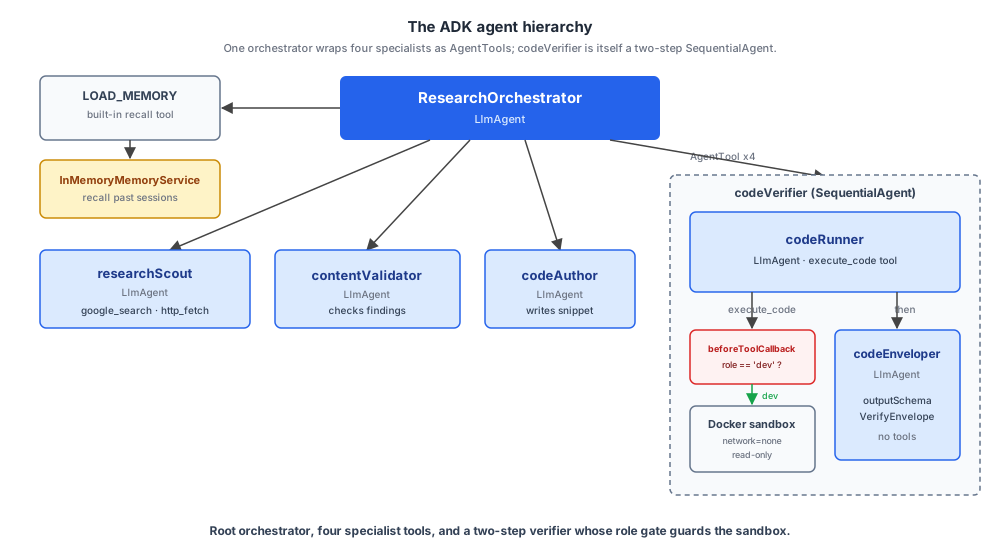
codeVerifier ends up as a two-agent SequentialAgent: codeRunner calls the sandbox, codeEnveloper classifies the outcome into a typed envelope. The role gate lives on codeRunner, the runner that owns the privileged tool.
const codeRunner = new LlmAgent({
  name: "codeRunner",
  model: "gemini-3.5-flash",
  description: "Runs a JS/TS snippet in a Docker sandbox. Dev role only.",
  instruction: `<role>You run a JS/TS snippet in an isolated Docker sandbox and describe what happened.</role>

<constraints>
1. Extract the code from the input (look for a fenced code block).
2. Call execute_code with the matching language ("js" or "ts").
3. After the tool returns, describe what happened in 2-3 sentences plus an optional fenced stdout/stderr block. A downstream formatter classifies the outcome from the raw tool result, so do NOT pattern-match the result's fields yourself.
</constraints>`,
  tools: [executeCodeTool],
  beforeToolCallback: async ({ tool, context }) => {
    if (tool.name !== "execute_code") return undefined;
    const role = context.state.get<string>("role");
    if (role !== "dev") {
      console.error(`[adk callback] execute_code blocked for role=${role ?? "(unset)"}`);
      return {
        ok: false,
        error: "permission_denied",
        reason: `role '${role}' cannot call execute_code`,
      };
    }
    return undefined;
  },
  afterToolCallback: async ({ tool, response, context }) => {
    if (tool.name === "execute_code") {
      context.state.set("last_tool_result", response);
    }
    return undefined;
  },
  outputKey: "code_run_reply",
});
This is the single largest readability win of the ADK version. beforeToolCallback is ADK’s hook for gating a tool call before the handler runs. The callback receives the tool name, the args the model wants to pass, and a context whose state is the session state we attached when creating the session (more below).
The signature is small: return undefined to allow the call; return a result object to block it and supply the result the model will see. Instead of a thrown exception, the model gets a tool result that says “permission denied” and continues from there.
Two other hooks do real work here. afterToolCallback captures the raw tool response (whether the handler ran or the before-callback returned an early permission-denied dict) into session state as last_tool_result. outputKey: "code_run_reply" writes the runner’s final text reply to state.code_run_reply.
One mechanism note on how the next agent sees those values. ADK injects state into an instruction only through {key} placeholders; naming a key in prose (as the enveloper’s instruction below does) doesn’t substitute anything. What actually carries the data is shared session history: with the default includeContents, the enveloper’s context includes codeRunner’s raw execute_code function response, so the classification rules bind to real data. Set includeContents: 'none' and you’d need the {...} placeholders instead.
The Chapter 14 raw build had the role check inline in the tool factory:
function makeExecuteCodeTool(role: Role): { tool: FunctionTool; lastResult: () => unknown } {
  let lastResult: unknown = null;
  const tool: FunctionTool = {
    declaration: { ... },
    handler: async (args) => {
      if (role !== "dev") {
        lastResult = { ok: false, error: "permission_denied", reason: ... };
        return lastResult;
      }
      // ... actually run the sandbox; lastResult = result
    },
  };
  return { tool, lastResult: () => lastResult };
}
The factory existed because the handler needed access to role and the raw Agent type didn’t pass per-request context to handlers. The lastResult closure flag also existed because the downstream formatVerifyOutcome step needed the raw tool result, not the agent’s paraphrase. ADK’s session state and afterToolCallback together replace both: the role gate goes in one callback on the agent that owns the privileged tool, and the raw tool result lands in state.last_tool_result for downstream code to read.
The typed envelope via SequentialAgent
codeRunner only runs the snippet and describes what happened in prose. The orchestrator wants something it can dispatch on: a typed { outcome, user_message } enum it can read as a structured field. Chapter 14 produced this envelope from a small Gemini call constrained by a Zod schema (formatVerifyOutcome); the ADK-native version is a second LlmAgent with outputSchema set on it.
const VerifyEnvelope = z.object({
  outcome: z.enum(["executed", "denied", "error"]),
  user_message: z.string(),
});

const codeEnveloper = new LlmAgent({
  name: "codeEnveloper",
  model: "gemini-3.5-flash",
  description: "Classifies a code run into a typed VerifyEnvelope.",
  instruction: `<role>You translate a code-runner result into a structured envelope.</role>

<constraints>
1. Session state contains:
   - state.code_run_reply: the runner's free-text description of what happened.
   - state.last_tool_result: the raw JSON the execute_code tool returned (or null if no tool call happened).
2. outcome="denied" iff last_tool_result has error="permission_denied".
3. outcome="executed" if last_tool_result has ok=true (the snippet ran; exit code may still be non-zero).
4. outcome="error" if last_tool_result has ok=false with any other error.
5. user_message is the code_run_reply, trimmed to 5 sentences max.
6. Return strict JSON matching the schema.
</constraints>`,
  outputSchema: VerifyEnvelope,
});

const codeVerifier = new SequentialAgent({
  name: "codeVerifier",
  description: "Two-step: codeRunner calls execute_code (Docker sandbox; dev only), then codeEnveloper classifies the outcome into { outcome, user_message }.",
  subAgents: [codeRunner, codeEnveloper],
});
Setting outputSchema on an LlmAgent constrains the model to emit Zod-validated JSON. ADK enforces this via constrained decoding the same way Gemini’s responseJsonSchema does (Chapter 3).
The constraint comes with two caveats on this build’s @google/adk 1.1.0. First, agent transfer: ADK logs a warning on construction (outputSchema cannot co-exist with agent transfer configurations), then forces disallowTransferToParent=true / disallowTransferToPeers=true. An agent with outputSchema can’t hand off to its parent or peers. Second, tools: the Gemini API rejects a response schema mixed with function declarations, and ADK 1.1.0 passes both straight through, so the model that emits the envelope can’t also call tools.
That’s why the verifier is two agents. codeRunner needs tools (it calls execute_code), so it can’t have outputSchema. codeEnveloper needs outputSchema (it emits the typed envelope), so it can’t have tools. ADK 1.5.0 (July 2026) works around the tools half by injecting a synthetic set_model_response tool, so there the split becomes a design choice; it’s still a good one, because each agent keeps one job.
The pattern is to split the work across two LlmAgents, chain them with SequentialAgent, and share context between them via session history plus outputKey and afterToolCallback. The orchestrator sees the SequentialAgent (codeVerifier) as a single tool via AgentTool({ agent: codeVerifier }); the typed JSON is the chain’s final output.
The raw-SDK version of this is the formatVerifyOutcome function from Chapter 13: same shape, less ceremony (one extra Gemini call, no separate agent declaration). ADK trades that ceremony for the rest of the framework’s machinery (session state, callbacks, the typed envelope falling naturally out of an LlmAgent with outputSchema). Once you’ve already paid for ADK, the second agent is essentially free.
The orchestrator
const orchestrator = new LlmAgent({
  name: "ResearchOrchestrator",
  model: "gemini-3.5-flash",
  description: "Autonomous research-and-writing assistant. Picks specialists per turn.",
  instruction: `<role>You are an autonomous tech research-and-writing assistant...</role>

<constraints>
1. Decompose the user's question into 1-3 research subtopics.
2. Call researchScout with a focused query.
3. Call contentValidator with { question, findings }.
4. If validator returns { ok: false, gaps: [...] }, call researchScout again with a sharper query. At most one re-scout per subtopic.
5. If a code example is warranted: call codeAuthor, then codeVerifier. codeVerifier returns { outcome: "executed" | "denied" | "error", user_message: string }. Re-author once on outcome="error"; note the limitation if outcome="denied".
6. You may call load_memory if you need recall across past sessions.
7. Compose the final brief (~250 words, cite URLs, end with Confidence tag).
</constraints>`,
  tools: [
    new AgentTool({ agent: researchScout }),
    new AgentTool({ agent: contentValidator }),
    new AgentTool({ agent: codeAuthor }),
    new AgentTool({ agent: codeVerifier }),
    LOAD_MEMORY,
  ],
  outputKey: "final_brief",
});
AgentTool({ agent }) is the ADK helper that wraps an agent as a tool. The wrapped tool inherits the inner agent’s name and description; the orchestrator’s LLM reads those when it decides which specialist to call. You don’t declare a separate Zod schema for the wrapped tool’s parameters; the agent’s instruction tells the model what to send.
LOAD_MEMORY is the second new piece: a built-in tool that lets the orchestrator search past sessions for relevant context. The memory service (configured below) is what backs it. Chapter 14’s raw build wrote per-turn embeddings to SQLite and recalled with a hybrid search (BM25 keyword plus dense cosine plus recency) in the runner code; here the model decides when to recall, and the tool returns matching snippets from past sessions.
outputKey: "final_brief" writes the orchestrator’s final text to session.state.final_brief. The runner caller can read it from there. This script doesn’t strictly need it (we capture text from the event stream), but it’s the conventional way to surface a structured answer in ADK.
Here’s the whole shape in one picture: the root orchestrator, its four specialist tools, and the nested verifier pipeline where the role gate sits between codeRunner and the sandbox.
The runner and session
const sessionService = new InMemorySessionService();
const memoryService = new InMemoryMemoryService();

const runner = new Runner({
  agent: orchestrator,
  appName: APP_NAME,
  sessionService,
  memoryService,
});

export async function runAssistant(role: Role, userId: string, question: string): Promise<string> {
  const session = await sessionService.createSession({
    appName: APP_NAME,
    userId,
    state: { role, userId },
  });

  let finalText = "";
  for await (const ev of runner.runAsync({
    userId,
    sessionId: session.id,
    newMessage: { role: "user", parts: [{ text: question }] },
  })) {
    const parts = ev.content?.parts ?? [];
    for (const p of parts) {
      if (p.text && ev.author === "ResearchOrchestrator" && p.text.length > finalText.length) {
        finalText = p.text;
      }
    }
  }

  // Save the session so LOAD_MEMORY can recall it later in this process.
  await memoryService.addSessionToMemory(session);
  return finalText || "Sorry, I couldn't generate a response.";
}
Runner is the explicit composition of agent + services. ADK’s InMemoryRunner exists too, but it creates its own sessionService and memoryService internally, which is fine for a one-off script and limiting once you want to supply those services yourself. The explicit Runner is the right shape as soon as memory matters.
One caveat on that save: InMemoryMemoryService lives in the Node process, and each npm run ask starts a fresh one. LOAD_MEMORY can only recall sessions saved earlier in the same process; recall across CLI invocations needs a persistent backend like VertexAiMemoryBankService.
Session state is where role and userId live, set once when the session is created. Every callback and handler that needs them reads from context.state.get("role"), which is what makes the closures and factory functions the raw build relied on unnecessary here.
memoryService.addSessionToMemory(session) is the post-run save. ADK doesn’t auto-persist sessions to memory; you call this when you want a session to be searchable later. The raw build wrote per-turn embeddings during the run; ADK’s memory service consumes a finished session at the end.
Memory: what ADK ships vs what we hand-rolled
Chapter 9 introduced per-user memory into the running build and Chapters 10 through 14 carried it forward. The Chapter 14 raw build’s memory layer is fully hand-rolled in assistant.ts:
- A SQLite file (
./memory.sqlite) with two tables:profiles(user_id, JSON for name + preferences + focus_areas) andinteractions(user_id, question, answer, embedding vector, timestamp). - An
embedPlain()helper that callsgemini-embedding-2and asks for 768-dimension vectors. - A
recallHybrid(userId, question, k=3)function that blends BM25 keyword score, dense cosine similarity, and recency (each normalised, then weighted) against past interactions in JavaScript and returns the top matches. - A
recordInteraction()function that writes each new exchange’s embedding to SQLite. - An
extractAndUpdate()function that calls Gemini after each exchange, asks it for any name / enduring preferences / focus areas the user disclosed, and reconciles those into the profile (mem0-style add / dedupe / supersede viareconcilerather than a naive merge).
That’s about 120 lines of orchestration plus a SQLite file on disk. Every component (embedding, vector storage, similarity search, fact extraction) is something we wrote and have to maintain.
The ADK docs list three MemoryService implementations (ADK Memory Services). The TypeScript package this build pins (1.1.0) ships only the first; 1.5.0 (July 2026) added the second; the third is Python-only:
InMemoryMemoryService. Stores session events in process memory and does basic keyword matching for retrieval. There’s nothing to set up and nothing persists. The bonus build uses this because it suits a CLI script.VertexAiMemoryBankService. A managed Google Cloud service that does what our hand-rolled extractor + cosine recall does, with sharper machinery underneath. It runs an LLM-driven extraction pass to identify durable facts from a finished session, consolidates those facts against previously stored memories (resolving contradictions when the user changes their mind), and retrieves via embedding similarity. The extraction method is based on Google Research’s ACL 2025 paper (Vertex AI Memory Bank (public preview)).VertexAiRagMemoryService. Vector-indexed long-term storage via Vertex AI Knowledge Engine, for the case where you want full-text retrieval over past sessions rather than the consolidated-facts shape Memory Bank produces.
The interface is the same across all three. Two methods drive the lifecycle:
memoryService.addSessionToMemory(session): hand a finished session to the service after the run completes. The service does the extraction and consolidation work asynchronously.memoryService.searchMemory(query): return matchingMemoryEntryobjects. You don’t usually call this directly; the agent does, via theLOAD_MEMORYtool.
LOAD_MEMORY is a built-in tool that wraps searchMemory(). Once it’s in an agent’s tools array (we add it to the orchestrator), the model decides per turn whether to recall.
That’s a real behavioural difference from the hand-rolled build, which always ran recallHybrid() at the start of every request whether the agent needed it or not. The model can now skip the recall when the question is self-contained, and reach for it when context from a past session would actually help.
Mapping it to what we wrote:
| Chapter 14 raw (hand-rolled) | ADK equivalent |
|---|---|
SQLite interactions table + embedContent per turn | addSessionToMemory(session) once per run |
recallHybrid(userId, question) at request start | LOAD_MEMORY tool the orchestrator calls when useful |
extractAndUpdate(question, answer) per turn | Memory Bank’s extraction pass at session end |
| Custom hybrid scoring (BM25 + cosine + recency) in JavaScript | Memory Bank’s embedding similarity (managed) |
profile row per user | Consolidated memories per scope (user, session, app) |
This is the largest single delta between the two builds. The raw build’s ~120-line memory layer collapses into one constructor and one post-run call.
The trade-off is the production variant lives on Google Cloud; the in-process variant is fine for development but its matching is keyword-based rather than embedding-based, which won’t catch paraphrases of past questions. Production deploys that need cross-run recall reach for VertexAiMemoryBankService (@google/adk 1.5.0+) and accept the GCP dependency.
A small honesty note on what ADK doesn’t replace: the content of the profile (which durable facts to extract, what shape they take) is still your design decision. ADK runs the extraction; you tell the agent (via instruction) what’s worth remembering. The Chapter 9 distinction between enduring user traits and per-request preferences (translated this turn, in bullets this time) is a content decision, not an infrastructure one, and it carries over verbatim.
A note on tool authentication
ADK ships a separate set of primitives for tools that need to act on a user’s behalf against an external service (Authenticating with Tools (ADK)): AuthScheme, AuthCredential, and ToolContext handle OAuth 2.0, OIDC, API keys, HTTP bearer tokens, and Google Service Accounts. The framework manages the credential exchange and (in production) hands off to a secrets manager.
The book’s running build doesn’t include any tool that needs this. The http_fetch tool fetches public URLs; the execute_code tool runs sandboxed snippets; the memory layer writes a local SQLite file. Nothing reaches an external service that authenticates the calling user.
The role gate (dev versus user) we cover earlier is authorisation, not authentication, and ADK handles that via beforeToolCallback rather than the auth machinery.
If you extend this build with a gmail_send, salesforce_create_lead, or github_open_pr tool, ADK’s auth primitives are the place to start. The raw-build equivalent would be writing the OAuth handshake yourself, plus a token store with refresh, plus per-user secret storage, which is a lot of code to maintain for something the framework already solves.
A note on A2A
Chapter 8 introduced A2A (Agent-to-Agent protocol) and Chapter 13’s planner-driven build put it on the critical path: the Translator step ran as a separate Node process, reached over JSON-RPC, discovered via Agent Card. Chapter 14’s agent-as-tool build dropped the Translator (along with MemoryEditor and DirectAnswerer, shrinking from six sub-agents to four), so A2A went with it and this bonus chapter has nothing A2A-shaped to port.
ADK supports A2A directly (ADK with the Agent2Agent (A2A) Protocol). The client equivalent of our hand-rolled RemoteA2AAgent is ADK’s own RemoteA2AAgent (same name, no coincidence: both wrap a remote agent behind its card): official implementation, configured with an agentCard URL or object, slots into another agent’s tool list the way a local agent does. The server equivalent of our translator-server.ts (about 145 lines of Express + Agent Card JSON + JSON-RPC route handlers) is one function call: toA2a(rootAgent) returns an Express app that auto-generates the Agent Card from the agent’s name / description / skills metadata and serves it.
Discovery via /.well-known/agent-card.json is identical, and the wire format (message/send over JSON-RPC 2.0) is the same protocol our hand-rolled client and server already spoke.
If you return to the Chapter 13 shape with the bonus’s ADK stack (a planner+executor with a remote Translator over A2A), the orchestration code shrinks further. The hand-rolled client and server collapse into new RemoteA2AAgent({ agentCard: cardUrl, ... }) and toA2a(translator); everything else (the planner, the executor, the digest format, the sub-agent set) stays.
What the run looks like
A real BM25 question, dev role (captured live):
$ npm run ask -- dev hiro "What is BM25 and how does the k1 saturation parameter behave? Show me a short example."
[orchestrator] starting (role=dev user=hiro)
  -> researchScout (call #1)
  -> contentValidator (call #2)
  -> researchScout (call #3)
  -> codeAuthor (call #4)
  -> codeVerifier (call #5)
  [sandbox] docker run ch18-sandbox:latest (js, 572B, --network=none, --read-only, --cap-drop=ALL)
  [sandbox] exit=0 (177ms, stdout=264B, stderr=0B)
    | BM25 TF Saturation Comparison
    | ---------------------------------------
    | Freq     | k1=1.2    | k1=2.0
    | ---------------------------------------
    | 1        | 1.0000    | 1.0000
    | 5        | 1.7742    | 2.1429
    | 20       | 2.0755    | 2.7273
    | 100      | 2.1739    | 2.9412
[orchestrator] done in 49.8s (5 tool calls; researchScout=2, contentValidator=1, codeAuthor=1, codeVerifier=1)

BM25 (Best Matching 25) is a ranking function used by search engines to estimate
the relevance of a document to a query. It is essentially a "saturated" version
of TF-IDF... (Elastic.co)

### The k_1 Saturation Parameter
The k_1 parameter controls term frequency saturation... Low k_1 (e.g., 0.5-1.2)
saturates quickly; high k_1 (e.g., 2.0+) saturates slowly...

```javascript
function bm25TF(freq, k1) {
  return (freq * (k1 + 1)) / (freq + k1);
}
// Frequency | k1=1.2 (Default) | k1=2.0 (High)
// 1         | 1.0000           | 1.0000
// 5         | 1.7742           | 2.1429
// 100       | 2.1739           | 2.9412
```

Confidence: high
The third tool call is the interesting one. contentValidator returned {ok: false, gaps: [...]} after the first research pass, and the orchestrator re-invoked researchScout (call #3) with a sharper query before handing off to codeAuthor.
That re-scout is the autonomous re-planning the agent-as-tool pattern enables; the orchestrator decided, mid-run, that it needed more grounding before writing the snippet. The Chapter 14 raw build would have produced the same shape; the Chapter 13 Planner-Executor build couldn’t have, because the plan was fixed up front.
The sandbox run printed an actual saturation table to stdout, and codeVerifier quoted those numbers back into the final brief verbatim. The brief’s k1=1.2 / k1=2.0 column values match the sandbox output exactly.
49.8 seconds end-to-end on Gemini 3.5 Flash. The shape matches the Chapter 14 raw build’s; the implementation underneath is shorter.
Then a run with the user role (also captured live):
$ npm run ask -- user kev "Show me a JS snippet that prints 2+2"
[orchestrator] starting (role=user user=kev)
  -> researchScout (call #1)
  -> contentValidator (call #2)
  -> codeAuthor (call #3)
  -> codeVerifier (call #4)
[adk callback] execute_code blocked for role=user
[orchestrator] done in 23.5s (4 tool calls; researchScout=1, contentValidator=1, codeAuthor=1, codeVerifier=1)

In JavaScript, basic arithmetic operations are performed using standard operators,
and the results are typically displayed using the `console.log()` method...

```js
const calculateTwoPlusTwo = () => {
  const result = 2 + 2;
  console.log(`The result of 2 + 2 is: ${result}`);
};
calculateTwoPlusTwo();
```

*Note: While this code has been authored according to standard syntax, it could
not be executed in the current environment due to permission restrictions.*

Confidence: high
The beforeToolCallback fired, returned the permission-denied dict, and the model continued composing the brief without execution results. The handler was never invoked. The orchestrator’s instruction told it what to do when execute_code comes back denied, and the brief honestly notes the limitation to the user instead of pretending it ran.
Compared to the raw build, the role gate lives in one callback on the agent that owns the tool rather than inlined into every privileged handler, which removes the thrown-exception path and the audit-log entries that came with each denial.
Side-by-side, by line count
| Surface area | Chapter 14 raw | This bonus | Delta |
|---|---|---|---|
| Agent class / runtime | 144 (agent.ts) | 0 (ADK provides) | -144 |
| Agent-as-tool wrapper | 18 (asTool helper) | 0 (AgentTool) | -18 |
| Per-user memory layer | 120 (SQLite + embeddings + extractor) | 6 (one service constructor + one save call) | -114 |
| Tool authz | inline role check in makeExecuteCodeTool | beforeToolCallback (~9 lines) + afterToolCallback for raw tool capture (~5 lines) | similar in shape, localised |
| Verifier envelope | 25 (Zod schema + formatVerifyOutcome + asVerifierTool wrapper) | 25 (Zod schema + codeEnveloper LlmAgent with outputSchema + SequentialAgent) | similar |
| Audit log | 30 | 0 (use event stream) | -30 |
| Specialists | ~80 (4 Agents + asTool wrappers + closure factories) | ~140 (5 LlmAgents counting the codeEnveloper split) | similar; most of this is instruction text |
| Orchestrator | ~50 (Agent + asTool of each specialist) | ~50 (LlmAgent + AgentTool of each) | similar |
| Runner / session | ~30 | ~15 | -15 |
| Total runnable lines | ~860 | ~345 | -515 |
Counted as assistant.ts + agent.ts for the raw build (714 + 144 lines) and assistant.ts alone for the bonus (345 lines). http_fetch and sandbox.ts are near-identical in both builds (the bonus retags the sandbox image, adds progress logging, and rebuilds http_fetch on ADK’s FunctionTool) and excluded; server.ts is Chapter 14’s Hono wrapper and isn’t duplicated in the bonus’s CLI flow.
The two largest savings are the agent runtime and the memory layer. The envelope pattern adds about 25 lines on both sides: in the raw build it’s a Zod schema + a small Gemini call (formatVerifyOutcome) + a custom asTool wrapper; in the bonus it’s a Zod schema + a second LlmAgent constrained by outputSchema + a SequentialAgent chaining them.
Action
- Set up
code/chapter-bonus/. Install deps. Build the sandbox image if you don’t have one (docker build -t ch18-sandbox:latest .). - Run the BM25 question with
devrole. Watch the->lines for the tool call sequence (one per call; you’ll see five if the validator sends the scout back for another pass, as in the captured run). - Run the same question with
userrole. Verify the[adk callback] execute_code blockedline fires and the brief still produces text (without execution results). - Add
console.error('[memory] loading')inside abeforeToolCallbackon the orchestrator gated totool.name === "load_memory". Then write a five-line script that callsrunAssistanttwice for the same user with related questions and watch the callback fire on the second. (Two separatenpm run askinvocations won’t show it; the in-memory memory dies with each process.) - Read
node_modules/@google/adk/dist/types/agents/llm_agent.d.ts. Notice how many more knobsLlmAgentexposes than this chapter uses (globalInstruction,inputSchema,outputSchema,disallowTransferToParent,disallowTransferToPeers,codeExecutor, etc.). Pick one that interests you and prototype it. - If you’re on GCP, upgrade to
@google/adk1.5.0+ and swaprunInDockerforAgentEngineSandboxCodeExecutorinexecuteCodeTool, then compare. The handler shape is similar; the isolation guarantee is stronger.
The fifteen-chapter arc is the canonical build. This rebuild is the payoff: because you’ve built each component by hand, you can see exactly what ADK is doing for you, and pick it up with your eyes open.