BonusBonus
WebMCP
8 min read · 20 of 22
What this chapter does
The MCP chapter left tools living in processes: spawn a server over stdio, or connect to one over HTTP, and the host calls across that boundary. This chapter moves them into the one place left: the web page itself.
The chapter covers the two registration APIs (imperative and declarative), where WebMCP fits next to MCP servers, and the discovery layer forming above both: ARD, the spec that answers “how does an agent find any of this in the first place?”
No companion code folder for this one. Everything runs inside a browser page, and the demo you’ll poke at in the Action section is Google’s own.
Tools inside the page
Most MCP discussion assumes the server is a process. WebMCP is a proposed web standard that puts MCP-style tools inside the page.
Most MCP discussion assumes the server is a process. WebMCP is a proposed web standard that puts MCP-style tools inside the page.
The motivating problem: agent browsers today screen-scrape. They look at the rendered DOM, guess which button is “checkout,” fight with calendar UIs, and fail loudly when the page changes layout. WebMCP lets the page expose its actual operations as tools and lets the agent call them by name.
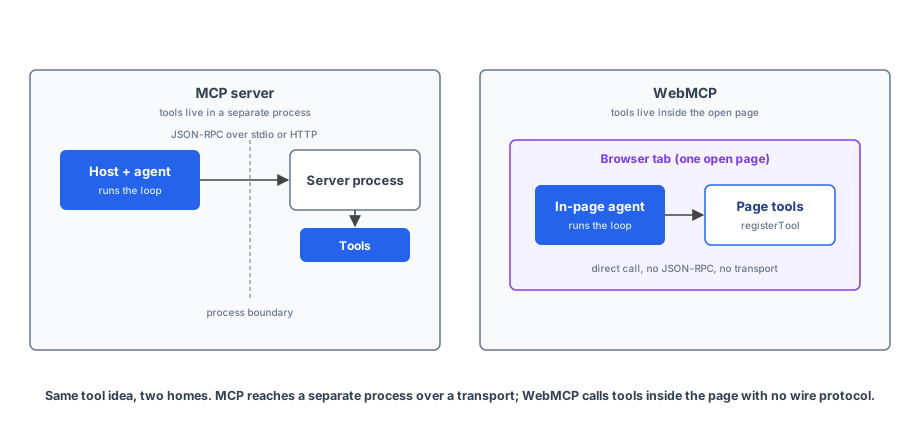
The early preview ships in Chrome 146 behind a flag; an origin trial opens from Chrome 149, and the flag stays available for local development. There are two APIs.
Imperative. A page registers tools at runtime against navigator.modelContext:
const addTodoTool = {
  name: "addTodo",
  description: "Add a new item to the todo list",
  inputSchema: {
    type: "object",
    properties: { text: { type: "string" } },
  },
  execute: ({ text }) => {
    // ...persist to whatever store the app uses...
    return `Added todo: ${text}`;
  },
  annotations: { readOnlyHint: false, untrustedContentHint: true },
};

const controller = new AbortController();
navigator.modelContext.registerTool(addTodoTool, { signal: controller.signal });

// Later: controller.abort() unregisters the tool.
The AbortSignal pattern as unregistration handle is the same shape the Chapter 6 runtime uses for tool timeouts, and the same lifecycle MCP servers signal with tools/list_changed notifications. That suits SPAs that need tools to come and go with route changes. Note untrustedContentHint: true on the annotation: the MCP chapter’s trust section flagged untrusted tool output, and this is the flag for it; it tells the host the tool’s output should not be interpreted as instructions for the model.
Declarative. Annotate an existing HTML form and the browser computes the tool’s JSON schema from the form fields:
<form toolname="search_tool"
      tooldescription="Search the catalogue"
      action="/search">
  <label for="query">Search query</label>
  <input type="text" name="query">
  <button type="submit">Search</button>
</form>
The browser turns this into a search_tool with input schema { type: "object", properties: { query: { type: "string", description: "Search query" } } }. When an agent invokes the tool, the browser fills the fields and either auto-submits (if toolautosubmit is set) or presents the populated form to the user for review. A SubmitEvent.agentInvoked flag tells your handler whether the submit came from a human or an agent.
Where WebMCP fits. It answers a different question than MCP servers do: how does an agent operate a website it didn’t ship with? If you’re building a SaaS app, WebMCP exposes your actual UI operations to agentic browsers without standing up a separate MCP server. If you’re building a research tool that runs on the user’s filesystem or an internal API, MCP servers stay the right answer.
The limits, taken straight from the early preview doc:
- A browsing context (open tab) is required. No headless agent calls.
- Tool discoverability across sites is unsolved in the preview itself: agents have to know to visit the site first. (A spec for exactly this gap is emerging; it gets its own section below.)
- Sites with complex stateful UIs need refactoring; the tool handler has to keep app state and UI state in sync, because agents may use UI state to verify execution.
WebMCP is inspired by MCP, but the wire format diverges: everything runs inside JavaScript, with no JSON-RPC and no transport layer. The protocols share a lineage, and the naming reflects that.
ARD: the registry problem gets a spec
Twice now, across the MCP chapter and this one, the same hole has shown up. An MCP server gives you a catalogue of its own tools, but you have to know the server’s URL first. WebMCP’s preview doc admits agents have to know to visit the site. Chapter 8 hit the same wall from the A2A side and solved it one domain at a time, with the Agent Card at /.well-known/agent-card.json. In June 2026, Google announced a spec that generalises that move to the whole capability zoo: Agentic Resource Discovery (ARD), built on the Linux Foundation’s AI Catalog data model and published under Apache 2.0.
ARD has two primitives. A catalog is a JSON file at /.well-known/ai-catalog.json on your domain (a robots.txt Agentmap directive and an HTML link tag exist as alternative pointers), listing the AI capabilities that domain publishes. Entries are media-typed, and this is the clever part: application/mcp-server-card+json for an MCP server, application/a2a-agent-card+json for an A2A agent, nested catalogs for bundles, and any other IANA media type the envelope needs to carry, OpenAPI included. The catalog doesn’t reinvent the Agent Card or the MCP server description; it wraps the artefacts you already have and says where they live.
A registry is the other primitive: a service that crawls and indexes published catalogs and answers POST /search requests with natural-language queries plus optional structured filters, returning ranked results. Google’s framing is “search engines for the agentic web”, and the analogy holds up mechanically too, right down to federation: registries are themselves catalog entries (application/ai-registry+json) and can merge results from peers, hand back referrals, or stay local.
Trust is anchored in domain ownership, the same root the Agent Card leans on, with optional machinery layered above it: a trustManifest carrying a cryptographic workload identity (a SPIFFE ID or DID) that must align with the publishing domain, plus attestation objects pointing at compliance documentation. Read that against the MCP chapter’s trust-and-safety section: the question “should my agent connect to this server?” currently gets answered by vibes and allow-lists, and ARD is an attempt to give it verifiable machinery instead.
It also rhymes with the MCP chapter’s progressive-disclosure section. A registry search that returns three ranked candidates, one of which you then connect to and tools/list, is progressive disclosure at web scale: the same discipline of not loading fifty schemas up front, applied to the internet instead of to one server’s catalogue.
The honesty note, same posture as WebMCP’s: the spec is v0.9, status “Proposal”, dated May 2026, and announced on June 17, 2026. Version numbers that start with 0 are an invitation to learn the shape and hold the details loosely. The shape here (capabilities published at well-known paths, indexed by registries, verified by domain-anchored identity) is the part I’d bet on outliving the draft, because it’s the same shape the web already uses for everything else.
Where it sits in the book
WebMCP sits in a different layer entirely. It’s the right tool for in-browser agents acting on web apps the user already has open. If your assistant lives in a Chrome extension or an Electron app and the user wants it to operate sites alongside them, reach for WebMCP. If your assistant is a server-side service that calls external APIs and the user never sees a browser, skip it.
What you take away
- The page-as-tool-source mental model:
navigator.modelContextas the in-browser registry, no wire protocol involved. - The two registration APIs: imperative (
registerToolwith anAbortSignallifecycle) and declarative (toolnameannotations on plain HTML forms). - Where the boundary sits: WebMCP for agents operating web apps the user has open, MCP servers for everything that runs outside a tab.
- The discovery layer forming above all of it: ARD catalogs at
/.well-known/ai-catalog.jsonand the registries that index them.
Action
- Open
chrome://flags/#enable-webmcp-testingin Chrome 146+, enable the flag, and visithttps://googlechromelabs.github.io/webmcp-tools/demos/react-flightsearch/. Install the Model Context Tool Inspector extension. Manually invoke thesearchFlightstool with a payload of your choosing and watch the page UI update from outside the page. - Take a form on a page you own and annotate it:
toolname,tooldescription, labelled inputs. Load it in flagged Chrome and inspect the schema the browser derives from your markup. Notice which of your label choices survive as parameter descriptions. - Sketch the
/.well-known/ai-catalog.jsonyour own domain would publish. If you shipped the Chapter 8 translator, its Agent Card already slots in as anapplication/a2a-agent-card+jsonentry; an MCP server you host would join it asapplication/mcp-server-card+json.
This chapter closed out the tool-source branch: MCP for processes, WebMCP for pages. Two bonus chapters remain, and they take the other branch: the Chapter 14 assistant rebuilt on Google’s ADK, then again on eve, so you can see what an off-the-shelf runtime replaces. The patterns stay the same.