Chapter 4Foundations
Tool use
24 min read · 6 of 22
What you’ll build
Open code/chapter-03/assistant.ts and ask it this:
npm run ask -- "What's the latest LTS version of Node.js?"Here’s the actual response I got from gemini-3.5-flash while writing this:
Answer:
The latest LTS version of Node.js is Node.js 22 (code-named Jod). It transitioned to Active LTS in October 2024 and is scheduled to remain supported until April 2027. Node.js 20 (Iron) and Node.js 18 (Hydrogen) also remain in maintenance LTS status.

Upgrading to Node.js 22 brings several modern features, including updates to the V8 JavaScript engine, stable WebSocket client support, an experimental TypeScript runner, and enhanced performance for common operations like fs and path.

You can download the installer or binaries for Node 22 directly from the official Node.js website, or install it via node version managers like nvm or fnm using the 'lts' or '22' aliases.

Confidence: high

Caveats:
  - Node.js patch versions change frequently; the exact latest minor/patch version (e.g., 22.13.x) should be verified on the official nodejs.org website.
  - Node.js 18 is approaching its End-of-Life (EOL) in April 2025, so migrations from 18 to 22 should be prioritized.
It’s May 2026 as I write this. v22 has been LTS since October 2024, v24 since October 2025, and v18 already hit end-of-life in April 2025. The assistant returned a plausible answer at confidence “high,” dated to its training cutoff and presented as current: it knows v22 but not the current LTS, v24, and it still describes v18’s end-of-life as something yet to come. The actual current answer never made it into the response.
This is the wall every LLM assistant hits within minutes of being deployed. The model is great at reasoning over text it has, useless for facts it doesn’t, and unable to do anything in the world. Worse, it’ll often confidently report stale facts as current. Tool use is the way out.
Tool use (also called “function calling”) is the model returning a structured “please call this function with these arguments” instead of plain text. Your code runs the function, sends the result back, and the model continues. Loop until the model is done.
This is the Schema Contract from Chapter 3 pointed at your functions instead of your data. It’s also the mechanism that turns an LLM from a question-answerer into something that can affect the world: query a database, call an API, execute code, search the web.
Two flavours of tool exist. Custom tools are functions you wrote and the model asks you to call. Built-in tools (e.g. Google Search) are functions the provider wrote and the API runs for you. (Tools exposed via MCP servers belong to the former category). We’ll cover the custom case first because it teaches the mechanism, then the built-ins because they could save you some code.
Heads-up before you start: the @google/genai JavaScript / TypeScript SDK doesn’t have automatic function calling. The Python SDK does. JS / TS devs wire the call-and-respond step manually. This chapter shows the single-round version of that; Chapter 6 builds the iterative agent loop on top.
Concept 1: Tool use as redirected structured output
Most explanations of tool use start with magic words (“the model decides”, “the agent reasons”, “the system orchestrates”). All of that is later. The mechanism is one step removed from the Schema Contract.
In Chapter 3, you constrained the model to return JSON matching a schema. The JSON described data: a name, an order ID, a confidence score. Tool use is the same primitive redirected: instead of returning data, the model returns a request to invoke a function with specific arguments. The model is the planner; your code is the runtime.
Just to clarify, the model can’t call the function directly. It emits a structured request and your code decides whether to honour it. That gap is the boundary where you put validation, rate limiting, an allow-list, an “are you sure?” confirmation. The gap between “model requested X” and “X happened” is where you enforce policy. That matters for safety and for production agents; we’ll see both in later chapters.
Google’s function calling guide spells the same shape out for the Gemini API; the mechanism is identical across providers (Anthropic, OpenAI, Vercel AI SDK), only the field names change.
How the model sees the functions
There is no special runtime channel for tools. When you pass a tools array to the API, the provider serialises each definition (name, description, parameter schema) into text and injects it into the model’s context, along with a short instruction block explaining how to request a call. From the model’s side, tools are structured text it has been trained to read and answer in kind: tokens in, tokens out, nothing more.
Two consequences follow. Tool definitions cost input tokens, a few hundred per request and more as you add tools, because they are literally part of the prompt. And the description behaves like prompt text: a sharper description produces better tool selection, for the same reason a sharper instruction produces a better answer. Writing a tool definition is a form of prompt engineering.
The injected block is provider-internal and not published verbatim, but its shape is roughly this:
You have access to the tools below. To use one, stop and emit a call:

{"name": "get_current_weather", "arguments": {"location": "Paris, France"}}

Available tools, in JSON Schema:
{"name": "get_current_weather", "description": "...", "parameters": {...}}
Treat that block as an illustration; the literal current text differs. The model emits a matching block, and the API parses it back into the clean functionCall object your code receives. The tidy JSON you get is the API un-tokenising the model’s output for you.
Where the function actually runs, and a word on “client-side.” Execution happens in your code, never on Google’s side. The Gemini API returns a functionCall and stops; your application reads response.functionCalls, runs the real function (queries your database, calls a weather API, whatever), and sends the result back as the next turn. The model then reads that result as more context and carries on (Concept 3 walks the full round trip). The word “client-side” trips people up: it means the client of the Gemini API, which is your application code, and that code usually runs on your server (a Node backend, a Lambda), not in the end user’s browser. So it is server-side from your users’ point of view, client-side from Google’s. The model can only ever request; your code decides what actually runs, which is also what makes it safe. The one exception is Gemini’s built-in tools (Google Search grounding, code execution, URL context), which Google runs on its own infrastructure inside a single call. Those are Concept 5.
One more thing that catches people out: the model is stateless across the whole exchange. Each API call is independent. You resend the full conversation every time (the original question, the model’s tool request, your tool result), and the model reconstructs where it is from that. The sense of “memory” during a tool loop comes from your code holding the message array; the provider holds nothing between calls.
Concept 2: Defining a tool
A Tool definition has three parts: a name (snake_case identifier), a description (one to two sentences in active voice describing what the tool does and when to use it), and a parameter schema (JSON Schema describing the arguments, including which are required). We author that schema in Zod, exactly as we did for structured output in Chapter 3: define it once with z.object, and z.toJSONSchema produces the JSON Schema the tool declaration carries.
A weather tool, definition only:
import { GoogleGenAI } from "@google/genai";
import { z } from "zod";

const WeatherArgs = z.object({
  location: z.string().describe("City and country, e.g., 'Paris, France'"),
  unit: z
    .enum(["celsius", "fahrenheit"])
    .optional()
    .describe("Temperature unit. Defaults to celsius."),
});

const getCurrentWeather = {
  name: "get_current_weather",
  description: "Get the current weather conditions for a given location.",
  parametersJsonSchema: z.toJSONSchema(WeatherArgs),
};
Lines 1-2. Imports: the SDK and Zod, the same schema library from Chapter 3, here describing tool parameters instead of response shapes.
Lines 4-10. The parameter schema, defined once in Zod. .describe() annotations become the per-field documentation the model reads; .optional() keeps unit out of the required set; z.enum constrains it to a fixed set of values.
Lines 12-16. The tool itself: a name (the snake_case identifier the model calls), a description (documentation written for the model), and parametersJsonSchema, where z.toJSONSchema(WeatherArgs) emits the JSON Schema the API consumes.
Note that the description matters more than the name. The model reads it to decide whether the tool is relevant to the user’s request. Vague descriptions (“does weather things”) get ignored or misused; specific, action-verb descriptions (“Get the current weather conditions for a given location”) get picked correctly. Treat tool descriptions like API documentation, because that’s exactly what they are, for the model.
The parameter schema is just Zod. z.object({...}) for the argument object, z.string() / z.number() / z.boolean() / z.array() for fields, .describe() for the per-field documentation the model reads, and .optional() for anything that isn’t required. z.enum([...]) is supported and useful: it constrains a string to a fixed set without prompt engineering. z.toJSONSchema emits standard JSON Schema, which the declaration carries in parametersJsonSchema (the field that accepts plain JSON Schema, the same dialect Zod produces). Note that providing a good per-field description also helps the model extract the right piece of information for each argument.
The required array is non-optional discipline. If you forget it, every parameter is implicitly optional and the model may skip arguments you actually need. Always declare what’s required.
Concept 3: Calling a tool
Now you have a definition. To actually use it, you make two API calls. First call: send the prompt plus the tool list. The model responds with a structured functionCall requesting the tool. Second call: run the function, send the result back. The model now has the data it needed and produces a plain-text answer.
In code/chapter-04/weather-tool.ts:
import { GoogleGenAI } from "@google/genai";
import type { Content } from "@google/genai";
import { z } from "zod";

const ai = new GoogleGenAI({});

// 1. Define the tool
const WeatherArgs = z.object({
  location: z.string().describe("City and country, e.g., 'Paris, France'"),
});

const getCurrentWeather = {
  name: "get_current_weather",
  description: "Get the current weather conditions for a given location.",
  parametersJsonSchema: z.toJSONSchema(WeatherArgs),
};

// 2. Implement the tool (stubbed; in production this hits a real API)
function callWeatherApi(args: { location: string }) {
  return {
    location: args.location,
    temperature_c: 18,
    conditions: "partly cloudy",
  };
}

const tools = [{ functionDeclarations: [getCurrentWeather] }];

// 3. First call: send the prompt + the tool list
const contents: Content[] = [
  {
    role: "user",
    parts: [{ text: "What's the weather in Budapest right now?" }],
  },
];

const first = await ai.models.generateContent({
  model: "gemini-3.5-flash",
  contents,
  config: { tools },
});

// 4. Run the function the model asked for
const call = first.functionCalls![0];
const result = callWeatherApi(call.args as { location: string });

// 5. Send the result back as a second call
contents.push(first.candidates![0].content!); // append the model's tool-call turn
contents.push({
  role: "user",
  parts: [
    {
      functionResponse: {
        name: call.name,
        id: call.id, // critical: Gemini 3 requires the id round-trip
        response: { result },
      },
    },
  ],
});

const second = await ai.models.generateContent({
  model: "gemini-3.5-flash",
  contents,
  config: { tools },
});

console.log(second.text);
Lines 1-3. Imports. GoogleGenAI and the Content type from the SDK, plus Zod for the parameter schema.
Line 5. Standard client construction.
Lines 7-16. The tool declaration. Same shape as the standalone example above.
Lines 18-25. callWeatherApi is the actual function. Stubbed for the chapter; in production this hits a real weather API.
Line 27. The shape the SDK expects: an array of “tool sets,” each containing one or more functionDeclarations. You hand this to config.tools on every call.
Lines 30-35. The conversation seed. Content[] is an array of role-tagged messages. We start with one user turn containing the question.
Lines 37-41. First call. The model sees your prompt and the tool list, and decides whether to answer directly or request a tool. With this prompt and this tool, it requests get_current_weather({ location: "Budapest, Hungary" }).
Lines 44-45. Run the requested function locally. Real callers would dispatch by call.name to a map of implementations; for one tool this is fine inline.
Line 48. Append the model’s tool-call turn to the conversation, so the next call sees what the model just asked for.
Lines 49-60. Push the result back as a functionResponse part. Three things matter: name (which tool this result is for), id (Gemini 3 requires the same id the model used in its call to round-trip back), and response: { result } (your data, wrapped under a result key).
Lines 62-66. Second call. Same conversation history plus the tool result. The model now has the data it needed and produces a plain-text answer.
Run it:
$ npm run weather

It is currently partly cloudy and 18°C in Budapest, Hungary.
The function call ID round-trip. Gemini 3 attaches a unique id to every functionCall in a response. You must include the same id in the matching functionResponse when sending the result back. Older Gemini versions tolerated missing IDs. Gemini 3 doesn’t.
Why the id matters: parallel tool calls in one turn. The model can ask for get_weather(Budapest) and convert_currency(100 USD to EUR) in the same response. Your code runs both, in any order. When you send the results back, the model needs to know which result belongs to which call. The id is the join key. Even with a single tool, always pass id: call.id. It costs nothing and prevents a category of bugs that’s hard to diagnose.
Error handling. When a tool throws, when the model calls a tool that doesn’t exist, or when an API returns an error, surface it back to the model as a structured result rather than crashing.
The model is good at reading “error: rate limit exceeded, please try again later” and adjusting (often by retrying with different args, or surrendering and reporting back to the user). Retry transient errors at the tool level (rate limit, network blip). For everything else, send the error back as { error: err.message } and let the model decide.
What if a task needs more than one round? The model searches the web, reads a URL, searches again, summarises. That’s three or four tool calls and at least four API calls. Chapter 6 builds the iterative agent loop that handles chaining, error recovery, and budget caps. For Chapter 4, single-round is enough to teach the mechanism.
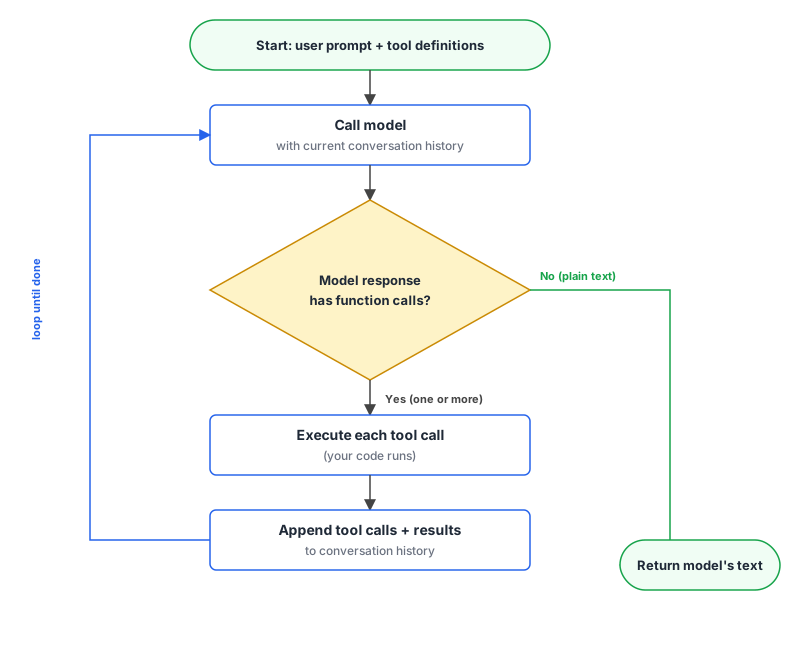
What makes this so powerful? What can you do inside a JavaScript/TypeScript function? The answer is: anything and everything.
Concept 4: Multiple tools, and steering the choice
Real agents have more than one tool. The model decides which to call based on the prompt and the descriptions. Knowing how that decision works (and how to override it when you must) means knowing how to design a tool surface that doesn’t confuse the model.
The model reads the prompt, scans the list of tool descriptions, and picks whichever one (or ones) match the request. Vague or overlapping descriptions mean the model picks the wrong one or hesitates. Sharp, non-overlapping descriptions mean the model picks correctly.
In code/chapter-04/multi-tool.ts:
const WeatherArgs = z.object({
  location: z.string(),
});

const getCurrentWeather = {
  name: "get_current_weather",
  description: "Get current weather for a location.",
  parametersJsonSchema: z.toJSONSchema(WeatherArgs),
};

const ConvertArgs = z.object({
  amount: z.number(),
  from: z.string().describe("ISO 4217 code, e.g., 'USD'"),
  to: z.string().describe("ISO 4217 code, e.g., 'EUR'"),
});

const convertCurrency = {
  name: "convert_currency",
  description:
    "Convert an amount from one currency to another at the current exchange rate.",
  parametersJsonSchema: z.toJSONSchema(ConvertArgs),
};

const tools = [
  { functionDeclarations: [getCurrentWeather, convertCurrency] },
];
Now ask the model “How much is 100 USD in EUR?” and it picks convert_currency. Ask “What’s the weather in Lisbon?” and it picks get_current_weather. Ask “I’m in Lisbon and I have 100 USD; what’s the weather and how much is that in EUR?” and a modern Gemini 3 model emits both tool calls in the same response turn.
“Parallel” here means the model batches the calls in one response. Your code decides whether to execute them serially, concurrently, or in some other order. The model hands you two slips at once instead of one; your code does the executing. response.functionCalls is the array; iterate it and run them however you like.
Common confusion: “more tools means more capability, so add lots.” Two practical limits.
Tool descriptions compete for the model’s attention. Each tool’s description is in the prompt context every call. Vague or overlapping descriptions confuse the model into picking the wrong tool, or no tool. Keep them sharp and non-overlapping.
More tools cost more tokens. Every tool definition is sent in every request. Ten well-described tools is fine. Forty starts to hurt latency and bill. If you’re approaching that, look at Chapter 8 (multi-agent: split tools across specialised agents).
Forcing or forbidding tool use. By default, the model decides whether to call a tool or answer directly. Sometimes you’ve already decided algorithmically that a tool is needed and don’t want the model to second-guess. Sometimes you want a final summarisation step where you specifically don’t want more tool calls. Gemini exposes four modes via toolConfig.functionCallingConfig.mode:
AUTO(default). Model decides whether to call a tool.ANY. Model must call at least one tool. Useful when you’ve decided algorithmically that a tool is needed and don’t want the model to second-guess. Pair withallowedFunctionNamesto restrict to a specific subset.VALIDATED. Model picks freely between a function call and a natural-language reply, but every function call is constrained to match the declared schema. The default mode when you combine built-in tools with custom function declarations; reduces malformed calls compared to plainAUTO.NONE. Model is forbidden from calling tools. Useful for a final summarisation step where you want plain text only.
import { FunctionCallingConfigMode } from "@google/genai";

const config = {
  tools,
  toolConfig: {
    functionCallingConfig: {
      mode: FunctionCallingConfigMode.ANY, // must call SOME tool
      allowedFunctionNames: ["convert_currency"], // restrict to this one
    },
  },
};
Use ANY and NONE sparingly. They’re the right tool when you need them; they also override the model’s judgment, which is sometimes a feature and sometimes a bug.
Concept 5: Built-in tools
Some tools are common enough that providers ship them. Google Search grounding turns “the model can’t fetch live information” into “the model fetches and cites.” Code execution turns “the model approximates math” into “the model runs Python and returns the actual answer.” Both are zero-implementation; you flip a config flag.
Custom tools are functions you wrote and the model calls. Built-in tools are functions Google wrote and the model calls. From your code’s perspective, the only difference is you don’t run the function; the API does, before sending the response back.
In code/chapter-04/search-grounded.ts:
const response = await ai.models.generateContent({
  model: "gemini-3.5-flash",
  contents: "What's the latest LTS version of Node.js?",
  config: {
    tools: [{ googleSearch: {} }],
  },
});

console.log(response.text);

const meta = response.candidates?.[0]?.groundingMetadata;
if (meta?.webSearchQueries?.length) {
  console.log("\nSearch queries the model issued:");
  for (const q of meta.webSearchQueries) console.log(`  - ${q}`);
}
Some highlights from the above code:
tools: [{ googleSearch: {} }] is the single config flag that turns on search grounding. Empty object; no other parameters needed.
response.candidates?.[0]?.groundingMetadata contains the search queries the model issued. Useful for debugging (“why did it answer with that source?”) and for showing the user what was searched.
You get a current answer with citations. No tool implementation on your end; Google handles the search.
When to reach for which. You’ll usually want both flavours in the same agent.
Built-in tools (Google Search, code execution, file search, URL context, Maps grounding) are zero-implementation, mature, and provider-locked. Use them when the built-in does what you need. Trade-off: the behaviour is opaque and you can’t customise. Billing also differs per tool: Search and Maps grounding cost $14 per 1,000 requests after a free 5,000 a month on Gemini 3 models, while code execution and URL context bill as ordinary tokens (file search adds $0.15 per 1M tokens for embeddings).
Custom function declarations are full-control, portable across providers, and require you to implement everything (auth, error handling, rate limiting). Use them when you need access to your own systems, when you want provider portability, or when the built-in doesn’t fit.
Concept 6: Multimodal inputs
Tools aren’t the only way the agent gets information from the world. Modern Gemini models accept images, audio, and video as input tokens directly, no separate tool needed (Claude and GPT-5 take images too, but not audio or video). This matters because a lot of real-world questions decompose into “look at this screenshot” or “transcribe this voice note” rather than “search the docs.”
The parts array on a message has held only text so far. It can hold more. Add base64-encoded images, audio bytes, or video clips alongside the text and the model reads them as additional input tokens, calculated on a fixed schedule per modality. Same call shape, same response shape. The token bill is just bigger.
Here’s an example of reading a screenshot:
import { GoogleGenAI } from "@google/genai";
import { readFileSync } from "node:fs";

const ai = new GoogleGenAI({});

const imageBytes = readFileSync("./screenshot.png");
const response = await ai.models.generateContent({
  model: "gemini-3.5-flash",
  contents: [
    {
      role: "user",
      parts: [
        { inlineData: { mimeType: "image/png", data: imageBytes.toString("base64") } },
        { text: "What's the error in this screenshot, and how do I fix it?" },
      ],
    },
  ],
});

console.log(response.text);
Lines 1-2. Imports. SDK plus readFileSync for loading the image off disk.
Line 4. Standard client construction.
Line 6. Read the screenshot bytes. Buffer in memory; we’ll base64-encode it next.
Lines 7-18. generateContent with a parts array containing two entries: an inlineData part holding the base64-encoded image with its MIME type, then a text part holding the question. The model treats both as input tokens; order matters less than presence.
Walking through it.
parts now holds two entries. First an inlineData part with the image, then a text part with the question. Order matters less than presence; the model reads both.
inlineData takes a mimeType and base64 data. PNG, JPG, WebP for images; WAV, MP3, FLAC for audio; MP4, MOV, WEBM for video. The mime type tells the model how to interpret the bytes.
The image is just another part. The model reads it alongside the text, through the same call shape and response shape as every other request; there’s no special endpoint.
Three practical points.
Inline vs Files API. Up to 100 MB total payload, inline base64 (above) is fine. Google raised the limit from 20 MB in January 2026. For larger files, upload via the Files API first and reference by URI; it supports up to 2 GB.
Cost is per-token, and non-text inputs tokenise on fixed schedules. On Gemini 3 models the schedule is set by media_resolution:
- Images cost 280, 560, or 1,120 tokens at low, medium, or high resolution. The default for images is the high figure, so budget 1,120 tokens per image unless you dial it down.
- Video costs 70 tokens per frame at low and medium resolution (the default), 280 at high.
- Audio is 32 tokens per second, per the token-counting docs.
(The per-tile numbers still on the tokens page, 258 tokens per 768×768 tile and 263 tokens per second of video, are the Gemini 2.x-era schedule.)
Multimodal mixes with tools. If a tool returns a screenshot (a browser screenshot tool, an image-rendering tool), you can pass that image back to the model as the tool result, then call again. The agent reasons over text-and-image alternations naturally.
For most TypeScript-side agents, multimodal shows up as: image attachments in chat, screenshots from browser automation, audio transcription via the same call (mimeType: "audio/wav"). Each is one extra parts entry. The call-and-respond pattern from earlier in the chapter handles them without modification.
Evolving the assistant
Time to evolve assistant.ts. The Chapter 3 version returned typed answers but couldn’t fetch live information. The Chapter 4 version uses Google Search grounding so it can answer questions about current events.
In code/chapter-04/assistant.ts:
import { GoogleGenAI } from "@google/genai";

const ai = new GoogleGenAI({});

const question = process.argv.slice(2).join(" ");

if (!question) {
  console.error(
    "Usage: node --env-file=.env --strip-types assistant.ts <your question>"
  );
  process.exit(1);
}

const response = await ai.models.generateContent({
  model: "gemini-3.5-flash",
  config: {
    systemInstruction: `<role>
You answer questions for a working developer. Use code-aware examples and assume programming familiarity. No marketing fluff.
</role>

<constraints>
1. Answer concisely (3 short paragraphs maximum).
2. Use plain prose, not markdown headings.
3. If the question requires current information, use Google Search.
4. End with a "Confidence: high/medium/low" tag.
</constraints>`,
    tools: [{ googleSearch: {} }],
    maxOutputTokens: 1000,
  },
  contents: question,
});

console.log(response.text);

const meta = response.candidates?.[0]?.groundingMetadata;
if (meta?.webSearchQueries?.length) {
  console.log("\nSources consulted:");
  for (const q of meta.webSearchQueries) console.log(`  - ${q}`);
}
Line 1. SDK import. Same as previous chapters.
Line 3. Standard client construction.
Lines 5-12. CLI argument handling, same shape as the Chapter 3 assistant.
Lines 14-31. The model call. Three things layered together: systemInstruction (the XML-tagged role and constraints from Chapter 2), tools: [{ googleSearch: {} }] (built-in search grounding from this chapter’s Concept 5), and maxOutputTokens: 1000 (a hard cap on response length). contents: question passes the user’s question as the user message.
Line 33. Print the answer text.
Lines 35-39. Inspect response.candidates?.[0]?.groundingMetadata for the actual search queries the model issued. Useful both for the user (transparency) and for you (debugging “why did it answer with that source?”).
Note the trade-off: I dropped the structured-output schema from Chapter 3 here. Gemini 3 models can combine responseJsonSchema with built-in tools (the combination is in preview), but a grounded answer reads better as prose than squeezed into a JSON wrapper, and for the assistant, current-information access is the point of this chapter. Chapter 6 brings them back together properly via the agent runtime.
Run it:
npm run ask -- "What's the latest LTS version of Node.js?"You get an answer with the search queries the model used. Whether that answer’s correct is a separate question, and here’s how that played out for me.
Running the command above on gemini-3.5-flash while writing this chapter, I got a “high confidence” three-paragraph answer that called Node v24 “Krypton” and reported a v26 release only days old. My first reaction was to flag both as hallucinations. I didn’t know any codename for v24, and a brand-new v26 landing right when I happened to run the command felt suspiciously convenient.
I was wrong on both counts. Krypton really is v24’s LTS codename, and Node 26 shipped on May 5, 2026, days before my run. The model’s live grounding was simply ahead of my stale knowledge.
That’s the honest picture, and the lesson cuts both ways. Search grounding gives the model live information; it doesn’t give you a fact-checker. The answer attributed its claims to two search queries (Node.js release schedule 2026, latest node.js lts version may 2026) without quoting either, so nothing in the output distinguished grounded fact from confabulation. I only found out which it was by opening nodejs.org. When a grounded answer surprises you, check the primary source before you overrule it; stale human knowledge fails exactly the way stale model knowledge does. We’ll come back to the citation problem in the advanced RAG bonus chapter (RAG that actually works) and make verification systematic in Chapter 10 (evals).
Next up in Chapter 5: Onboarding the agent. AGENTS.md, SKILL.md, and the small set of project-context files modern agents read on every session. The model is only as good as the context it sees, and Chapter 5 is about writing the context an agent needs the first time it walks into your repo.