Chapter 2Foundations
Prompting that works
27 min read · 4 of 22
What you’ll build
Almost every developer’s first reaction to a misbehaving prompt is to add more words: more instructions, more polite framing (“You are an expert…”), more “please be careful,” more “don’t make this mistake.”
This almost never works. It frequently makes things worse.
The reason ties straight back to Chapter 1: the model is a probabilistic completion service. It samples the most probable continuation of the text you sent; there’s no separate “read instructions and decide whether to follow” step. Adding a 200-token “you are a world-class expert…” persona block prepends that preamble to your prompt, and the model now treats it as part of the context it’s continuing. Sometimes that helps. Often it just changes which tokens are most probable in confusing ways.
A prompt is the only thing the model sees. Its job is to make the answer you want be the most probable continuation of the text you sent, not to politely ask the model to do something. Most prompt failures come from forgetting that.
This chapter teaches a single named diagnostic (the Continuation Test), walks through the anatomy of a prompt that works, separates system prompt from user prompt, shows when few-shot examples beat instructions, names the generation parameters worth touching (and the ones that aren’t), explains how prompt shape affects cost and attention, and lists the prompt-engineering tropes you can stop wasting tokens on.
By the end you’ll have evolved your assistant.ts from Chapter 1 into one that uses a proper system prompt and a consistent output shape.
Concept 1: The Continuation Test
Every failing prompt you’ll ever debug fails for the same reason: the answer you wanted wasn’t a likely continuation of what you sent. If you can spot that mechanically, you can fix any prompt without guessing.
Read your own prompt out loud, with a flat voice, like you’ve never seen the question before. Try to predict what text would actually come next, rather than what should come next. If your prediction sounds like “Sure! Here’s…” then that’s what the model is going to produce, no matter how many “ONLY return JSON” lines you add.
The Continuation Test. When a prompt isn’t producing the answer you want, stop and ask: what’s the most probable continuation of the text I just sent? If the answer you want isn’t a likely continuation, rewrite the prompt until it is.
Suppose you write:
Write me a JSON object with the user's name.And the model returns:
Sure! Here's a JSON object with the user's name:

{ "name": "Alex" }
That’s annoying. You wanted just the JSON. Run the test: what’s the most probable continuation of "Write me a JSON object with the user's name."? Almost certainly something that starts with “Sure!” or “Here’s…”, because that’s how people in the training data respond to that kind of request.
Arguing with the model (“ONLY return JSON, no preamble”) can work, but it’s fragile. The cleaner fix is to make JSON itself the most probable continuation. End your prompt with a partial example:
Return a JSON object with the user's name. Output:
{
Now the most probable continuation is "name": "Alex"\n}. The “Sure! Here’s…” preamble is no longer probable, because it doesn’t naturally follow {. Same model, same task, different probability distribution. That’s prompting.
Common confusion: “I told it not to do X and it did X anyway.” The model read your instruction. It sat in the context, shifted some probabilities, and got outweighed by the larger pattern of how that kind of request usually gets answered in the training data.
Negative instructions are the worst offenders. Models reliably struggle to follow ‘don’t’: the instruction lands, sometimes it gets quietly ignored. Positive instructions (‘discuss only features’) steer toward what you want instead of relying on the model to remember what to avoid.
Concept 2: The anatomy of a prompt that works
Once you’ve internalised the Continuation Test, the next question is structural. Prompts that work tend to share a shape: a small set of components in a particular order. You don’t always need every component, but you do need to know which one’s missing when the prompt fails.
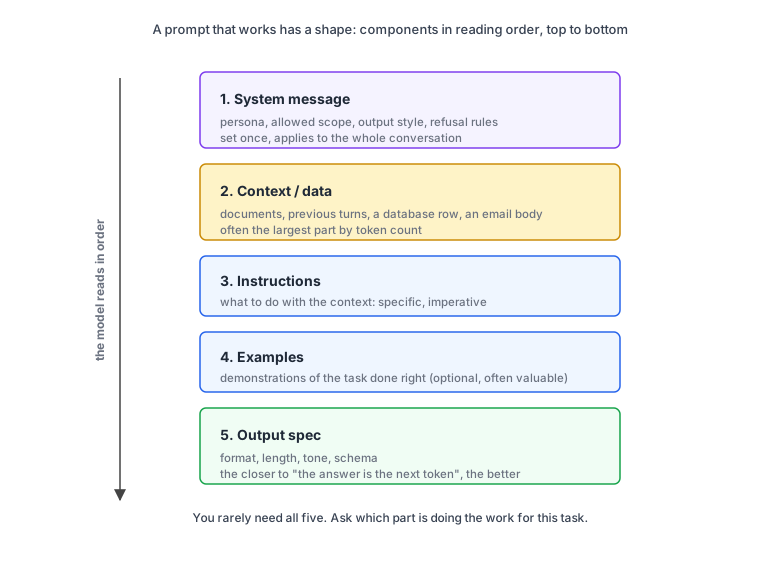
1. System message. Persistent context that frames how the model should behave across the whole conversation. Persona, allowed scope, output style, refusal rules. Set once, applies to everything.
2. Context / data. Whatever raw material the model needs to do the task. Retrieved documents, the user’s previous turns, a database row, an email body. Often the largest part by token count.
3. Instructions. What to do with the context. Specific and imperative.
4. Examples (optional, often valuable). One or more demonstrations of the task done correctly. Especially useful when the output format is non-obvious.
5. Output spec. What the response should look like. Format, length, tone, schema. The closer you get to “the answer is the next token,” the better.
Common confusion: “shouldn’t I always use all five?” You might think more parts means a better prompt. Often the opposite. A 600-token system prompt for a one-line task changes the probability distribution in directions you didn’t measure. A free-form creative task usually doesn’t want examples; they constrain the variance you wanted to keep.
The right question is: which part is doing the work for this task? Extracting data? Examples and an output spec are most of the win. Generating creative copy? The system message carries the tone and the rest is light.
When a prompt misbehaves, label its parts before you start adding words.
Concept 3: System prompt vs user prompt
Modern chat APIs separate the conversation into messages with roles. Treating that distinction casually is a tax you pay on every call: persona that gets reset every turn, output rules that drift, scope that the model forgets because you keep restating it.
The system prompt is set once and applies for the whole conversation. The user prompt is the variable input that changes turn to turn.
In code/chapter-02/system-vs-user.ts:
import { GoogleGenAI } from "@google/genai";

const ai = new GoogleGenAI({});

const userOnly = await ai.models.generateContent({
  model: "gemini-3.5-flash",
  contents: "Explain how the Force works. Keep it to 30 words.",
});

const withSystem = await ai.models.generateContent({
  model: "gemini-3.5-flash",
  config: {
    systemInstruction:
      "You are a Star Wars superfan explaining the saga to someone who's never seen any of the films. Use analogies. Keep responses under 30 words.",
  },
  contents: "Explain how the Force works.",
});

console.log("USER ONLY:");
console.log(userOnly.text);
console.log("\nWITH SYSTEM:");
console.log(withSystem.text);
Line 1. import { GoogleGenAI } from "@google/genai". Same SDK and same single named export as Chapter 1. Everything else (ai.models, ai.files, ai.live) hangs off the client instance.
Line 3. new GoogleGenAI({}). Same client construction as Chapter 1. Key from --env-file=.env, no network calls during construction.
Lines 5-8. The first call sends only model and contents. No config, so no system instruction. The shorthand string "Explain how the Force works..." is internally promoted to a single user message, the same shape as Chapter 1’s first call.
Lines 10-17. The second call adds a config object with systemInstruction. Same model. Same user message (“Explain how the Force works.”), but with a Star Wars superfan persona pinned to the system slot above it. Chapter 3 will use the same config object to attach a response schema; Chapter 4 will use it to register tools.
Lines 19-22. Two console.log blocks so you can read both responses side by side and compare them on one screen.
Walking through what runs. The user-only version sends one message: "Explain how the Force works. Keep it to 30 words." The model produces a generic in-universe explanation: midi-chlorians, the light and dark sides, Jedi training. Encyclopedic, probably accurate to canon, and not particularly useful for the audience.
The version with the system prompt sends two messages: a system message framing the persona, then the user message "Explain how the Force works." The model produces an analogy aimed at a complete newcomer.
Same model, different framing. The system prompt biased the probability distribution toward a specific kind of explanation, and that’s the win.
USER ONLY:
An energy field created by all living things, the Force surrounds and binds the galaxy. Sensitive individuals can harness it to manipulate minds, move objects, and sense the future.

WITH SYSTEM:
It’s like cosmic Wi-Fi connecting every living thing. Jedi and Sith have premium subscriptions, allowing them to "download" powers like mind-control and telekinesis.
What actually gets sent to the model
The SDK hides the wire format, but the model sees a single sequence of tokens with role markers. When you call generateContent, the SDK takes your systemInstruction and your contents and composes them into a single structured request.
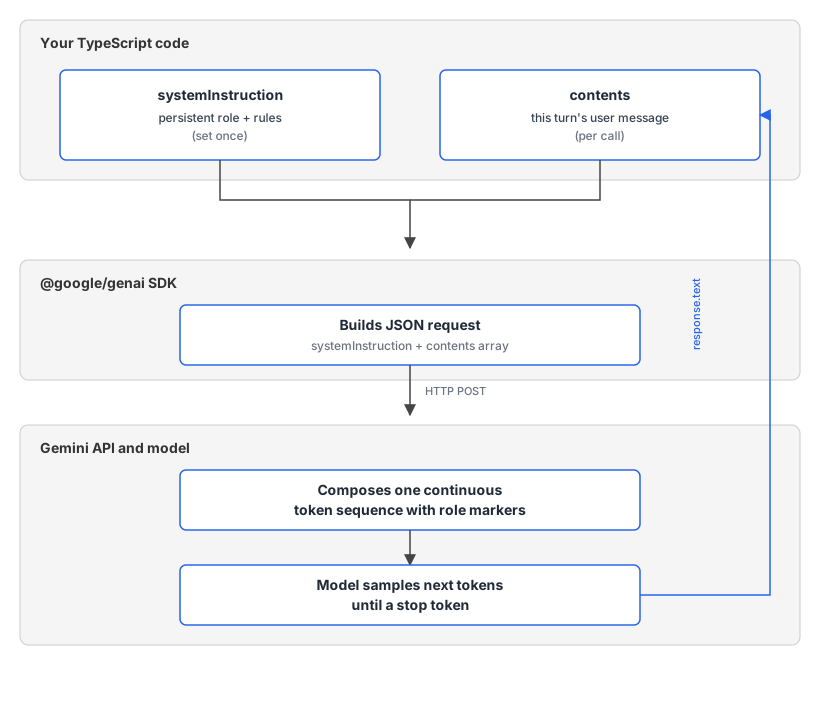
The JSON the SDK sends looks roughly like this:
{
  "systemInstruction": {
    "parts": [{ "text": "<role>You are a research assistant.</role>" }]
  },
  "contents": [
    {
      "role": "user",
      "parts": [{ "text": "How does the Force work?" }]
    }
  ]
}
What the model receives, conceptually, is one continuous prompt with the roles flattened into role-tagged sections:
<system>
<role>You are a research assistant.</role>
</system>

<user>
How does the Force work?
</user>

<assistant>
[← model starts generating from here, one token at a time]
The system prompt is just text earlier in the sequence; the role boundary plus alignment training is what makes the model weight it as authoritative. The user prompt is appended rather than merged: each turn is a separate role-tagged block, which matters in Chapter 8 (multi-agent) when you’re composing prompts that include tool calls, function results, and turns from multiple agents.
This is the longer multi-turn shape Chapter 1 promised. On a follow-up turn, the shorthand string becomes an array of role-tagged messages, and each model reply (role model in Gemini’s API, assistant in most others) gets sent back with the next request, because the API is stateless and the model only knows what you resend:
"contents": [
  { "role": "user", "parts": [{ "text": "How does the Force work?" }] },
  { "role": "model", "parts": [{ "text": "It's like cosmic Wi-Fi connecting every living thing..." }] },
  { "role": "user", "parts": [{ "text": "So what's a lightsaber then?" }] }
]
The model is continuing the sequence. What looks like a “decision” to follow your instructions is a probability distribution that your prompt has shaped.
Common confusion: “the system prompt isn’t doing anything.” It has no special status the model can’t ignore. When a system prompt seems to do nothing, two things are usually true: the system prompt is too vague (“be helpful” doesn’t help; “explain the saga to someone who’s never seen the films, in analogies, under 30 words” does, and it’s the audience, format, and length doing the work, not the “superfan” label), or the user prompt is so specific it overrides the system framing.
If the user says “explain Force philosophy in canonical detail,” the technical-detail signal beats the analogy framing. The fix is concrete system prompts (audience, format, length, refusal rules) plus user prompts that stay focused on the actual task.
Concept 4: Few-shot examples
Words describing the format you want are weaker than examples of the format you want. This is one of the few prompt-engineering claims that holds up across model generations and providers. Google’s own docs are unusually direct: “We recommend to always include few-shot examples in your prompts.” The model is a pattern-completer. When it sees one example of a pattern, it can match. When it sees two or three, it locks in.
Zero-shot, one-shot, few-shot. Names for the same prompting technique by how many worked examples you include. Zero-shot is no examples (just instructions). One-shot is one. Few-shot is two or more. Few-shot beats zero-shot for nearly any output-formatting task; the trade-off is the extra input tokens.
Compare these two prompts.
Telling (zero-shot):
Extract the dish name and main ingredient from this recipe blog snippet. Return as JSON with keys "title" and "main_ingredient". Titles should be in title case. Main ingredients should be a single noun.Showing (few-shot):
Extract the dish name and main ingredient from recipe blog snippets.

Example:
Blog: "okay this took me FOREVER to get right but my grandma's banana bread is finally here. you'll need 3 ripe bananas..."
Output: {"title": "Grandma's Banana Bread", "main_ingredient": "Banana"}

Blog: "another take on miso ramen, this one uses chicken stock instead of dashi for a meatier broth"
Output: {"title": "Miso Ramen", "main_ingredient": "Miso"}

Blog: "<the snippet you actually want extracted>"
Output:
The few-shot version uses more tokens. It’s also dramatically more reliable for non-trivial output formats, because the model is now completing a pattern it can see. Title case lands because the model just saw it done twice; pattern-completion does the work.
Concept 5: Generation parameters
You’ll see code samples with temperature, topP, topK, maxOutputTokens, stopSequences. Tutorials assign them mystical values. Most of the time the defaults are fine and touching them makes things worse. Some of these dials change how sampling happens (temperature, topP, topK). Others change when generation stops (maxOutputTokens, stopSequences). Most you should leave alone. A few you should always set.
temperature. Controls how random sampling is. 0 is as close to deterministic as you get; 1.0 is the Gemini default; higher values produce more varied (and weirder) output. Touch this when you need variety (creative tasks) or repeatability (extraction tasks). Don’t touch it because some tutorial said 0.7 is “balanced.”
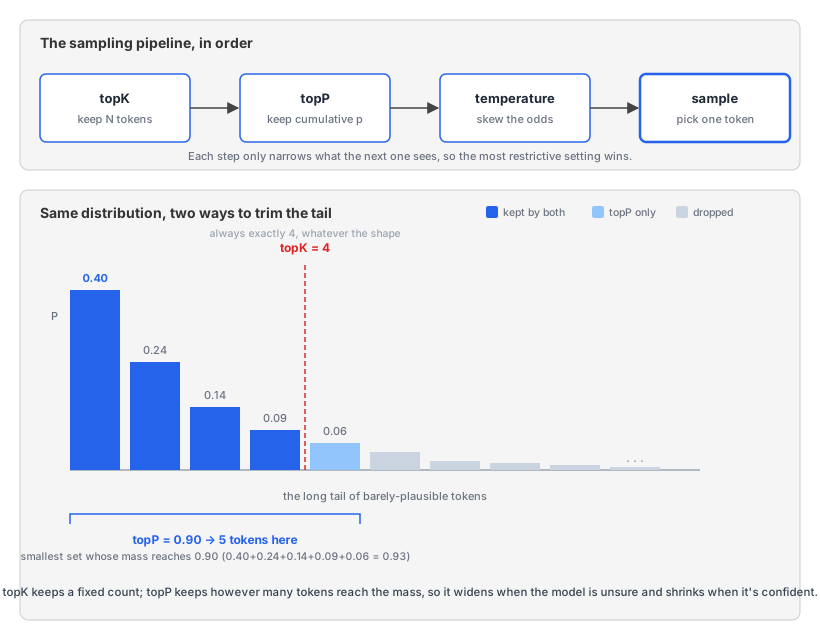
topP. Nucleus sampling. The model sorts the candidate tokens from most to least likely and keeps the smallest group whose probabilities add up to topP, then samples from that group and throws the rest away. At topP: 0.9 it keeps just enough of the top tokens to cover 90% of the probability mass. The size of that group floats with the model’s confidence: when one token is the obvious next word it might cover 90% on its own and everything else gets cut, and when the model is unsure the group widens to dozens. That adaptiveness is the whole point. It trims the long tail of barely-plausible tokens that a high temperature would otherwise occasionally surface, so you keep variety without the model wandering into nonsense. 0.95 is a common default and rarely needs changing.
topK. Same idea as topP, but with a fixed headcount instead of a probability budget. topK: 40 keeps the 40 most likely tokens and discards everything else before sampling. The difference matters: topP adapts to how confident the model is (a couple of tokens when it’s sure, many when it isn’t), while topK always keeps exactly K whether that’s too many or too few. That rigidity is why it’s the weaker knob. On a confident step 40 tokens is far more than you need, and on a flat one it can cut tokens you wanted to keep. topP generally covers the same ground better. On Gemini it does still have an effect, but a permissive temperature and topP wash most of it out. Reach for temperature or topP first and leave topK alone unless you’re reproducing someone else’s exact recipe.
These dials stack in a fixed order: topK trims the candidates to a headcount, then topP trims that set by probability mass, then temperature controls how randomly the final token is drawn from whatever survives. The most restrictive setting wins. Leave topP low and it clamps you back to a handful of tokens before temperature even gets a say, so a high temperature does almost nothing. That’s why tuning all three at once tends to fight itself. Change one, measure, then decide whether you need a second.
maxOutputTokens. Hard cap on response length. Always set this for production. Without it, a misbehaving model can produce thousands of tokens (and bills). Pick a value that’s twice your worst-case real response.
stopSequences. Strings that, if generated, cause the response to stop. Useful when you’re parsing output and want to bail at a known marker. Example: stopSequences: ["\n\n"] to stop after the first paragraph.
Note that lowering temperature isn’t always the right move on Gemini 3. Google’s docs explicitly recommend keeping temperature at 1.0 for Gemini 3 models; lowering it can cause looping or degraded reasoning. Trust the default unless you’ve measured otherwise.
Concept 6: Prompt shape (caching and where attention lives)
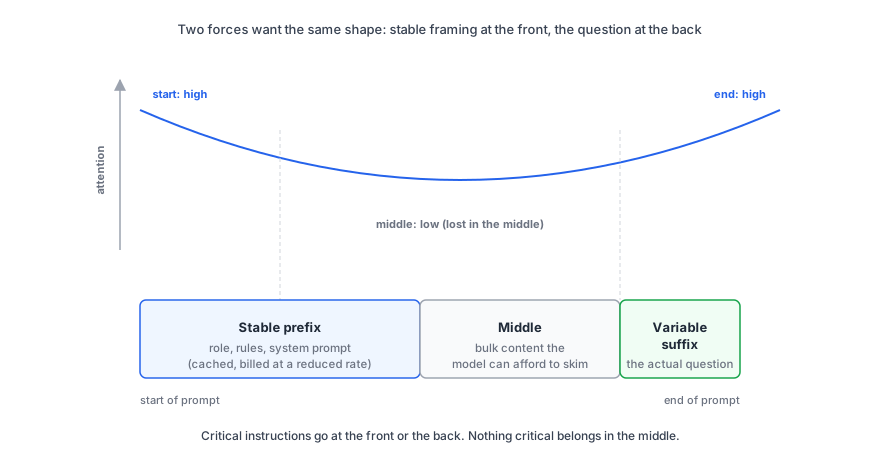
Two facts about long prompts both push you toward the same shape rule. First, hosted Gemini billing rewards stable prefixes by automatically caching them. Second, models attend more strongly to the start and end of the input than to the middle. Both want the same thing from you: stable framing at the front, the variable question at the back, and nothing critical buried in the middle.
Implicit context caching. Gemini 2.5 and newer models automatically detect shared prefixes across requests and bill the cached portion at a reduced rate (hosted API only; doesn’t apply to local models). It only applies above a per-model minimum prompt size: 4,096 tokens for Gemini 3.5 Flash. You don’t enable it. You just put stable text at the front of the prompt and variable text at the back, and the API does the rest.
Bad shape (variable parts mixed throughout):
You are a research assistant. The user's name is Alex. Today is Friday.
[system prompt continues for 5,000 tokens]
The user just asked: "What's the weather like?"
Good shape (stable prefix, variable suffix):
You are a research assistant.
[system prompt continues for 5,000 tokens]
---
The user's name is Alex.
Today is Friday.
The user just asked: "What's the weather like?"
In the second shape, the long system prompt is identical across every conversation. It caches and you pay less for it on every call after the first. Free cost saving from the structure of your prompt alone.
There’s also an explicit caching API (cachedContent) for cases where you want guaranteed savings on a specific large input (a document, a long instruction set). Chapter 14 (cost engineering) covers it. For now, write your prompts in the right shape and let implicit caching do its job.
The same shape rule has a second payoff: the model attends to it better.
Lost in the middle. For long contexts, models attend more strongly to tokens at the start and the end of the input than to tokens in the middle. The pattern is U-shaped. Critical instructions go at the front (global rules, role) or the back (the actual question). The middle is where prompts go to die.
It’s grounded in research. The “Lost in the Middle” paper (Liu et al., 2023; TACL 2024) showed that LLM performance on multi-document QA drops about 20 percentage points (and over 30% on key-value retrieval) when the relevant document sits in the middle of the context compared to the start or end. RoPE position encoding and causal masking are the leading architectural explanations.
Chroma’s Context Rot follow-up tested 18 frontier models including GPT-4.1, Claude 4, and Gemini 2.5: every one degrades as input length grows. None escape the bias.
Common confusion: “context windows got bigger, this isn’t a problem anymore.” Bigger windows make the problem worse. A 1M-token window is a longer middle. The bias is U-shaped, and the U gets wider as the input gets longer. Chroma’s measurements show every frontier model still degrades; the bigger window just lets you make the mistake at higher cost.
So the rule: stable prefix for cost, critical instructions at front or back for attention, middle for content the model can afford to skim.
Concept 7: Prompt smells
A lot of advice from the 2023-2024 prompt-engineering era still circulates as gospel. Most of it was empirically tested on GPT-3.5 in narrow conditions and stopped paying for itself two model generations ago. Knowing what to delete is as useful as knowing what to add.
Prompt smells. Patterns that look like prompt engineering and aren’t. They cost tokens, sometimes confuse the model, and rarely improve output on Gemini 3, Claude Opus 5, or GPT-5.5.
The list, with the version of each I’d defend on current models.
“You are an expert in X.” Rarely helps. The model already knows about X if it was in its training data. Role-setting biases tone, nothing more. Keep it to one short sentence at most, and only when tone actually matters for the task.
“Take a deep breath” / “think carefully” / “you can do this.” These were a meme around 2023-2024. “Take a deep breath” had a large effect on one specific 2023 model in one benchmark setting, and it never transferred. They don’t reliably help on current models. Use the inference budget you’d have spent on those words on actual context.
“I’ll tip you $200” / “my career depends on this” / “make no mistakes.” Same category: internet memes that escaped into production prompts. Don’t.
Excessive politeness. “Could you please” and “if it’s not too much trouble” cost real tokens and don’t change probability distributions in any direction you can rely on. Direct, imperative instructions work better.
Negative instructions. Models often pick up on the content of the negation rather than the prohibition. “Don’t mention pricing” can result in the model mentioning pricing, because “pricing” is now in the context. Prefer positive instructions: “Discuss only features and capabilities.”
Over-specifying every edge case before testing the basic case. Write the simplest prompt that could work. Run it. Add edge-case handling only for failures you actually observe. Most edge cases you imagine never happen.
Each of these tropes was empirically tested in some setting. The setting was usually GPT-3.5 in 2023. The current generation of models is much better at instruction-following, and the tropes have stopped paying for themselves.
A shorter prompt is usually a better prompt; the 2023 era of “prompt incantations” is over.
From v0 to v3: one prompt evolved
Time to see all the concepts together. We’ll evolve one prompt across four versions, run each on Gemini 3.5 Flash, and watch the output shape change. The task: take a freeform restaurant review and return a triage decision (sentiment, category, summary). The review:
“The carbonara was overcooked and bland but our waiter was attentive. Not sure if I’d go back.”
The full script is in code/chapter-02/worked-evolution.ts. Every output below is real, captured from gemini-3.5-flash at default temperature. Run the script yourself to reproduce.
v0 (first instinct).
Triage this review: "[review]"Real output (truncated; the actual response ran to over 40 lines of markdown plus a drafted recovery email):
Here is the triage report for the review:

### **Triage Report**
*   **Overall Sentiment:** Mixed (Leaning Negative)
*   **Urgency/Priority Level:** Medium

### **1. Key Issues Identified**
*   **Kitchen (Negative):** ...
*   **Front of House (Positive):** ...

### **2. Action Plan** [...]

### **3. Suggested Customer Response Strategy** [...drafted email...]
The model decided “triage” meant “produce a full operational report including a draft customer-recovery email.” Useful for a human manager, useless for downstream automation. The shape of the output is the model’s call, not yours.
v1 (add structure).
Triage this review and return sentiment (positive/negative/mixed), category (food/service/ambience/value), and a one-line summary.

Review: "[review]"
Real output:
**Sentiment:** Mixed
**Category:** Food, Service
**Summary:** Poor food quality was offset by attentive service, leaving the reviewer hesitant to return.
Shorter and more focused. Two issues: markdown bold labels instead of JSON (harder to parse), and Category: Food, Service returned two values when the prompt asked for one of four. Better than v0, still not machine-friendly.
v2 (add output spec).
Triage this review. Return JSON with keys "sentiment" (one of: positive, negative, mixed), "category" (one of: food, service, ambience, value), and "summary" (one short sentence).

Review: "[review]"

Respond with only the JSON.
Real output:
{
  "sentiment": "mixed",
  "category": "food",
  "summary": "The carbonara was disappointing and bland, but the service was attentive."
}
Clean JSON, no code fences, no preamble: JSON.parse(response.text) works directly. The summary is wordier than ideal but parseable.
This is where many readers can stop. If you need parseable JSON and the model gives you parseable JSON, you’re done. The next step is when you also need precise control over the format of that JSON.
v3 (apply the Continuation Test).
Triage restaurant reviews. Each entry has a review and a JSON response.

Review: "The pasta was overcooked but the service was great"
Response: {"sentiment": "mixed", "category": "food", "summary": "Overcooked pasta despite good service"}

Review: "Cold soup, slow waiter, never coming back"
Response: {"sentiment": "negative", "category": "service", "summary": "Cold soup and slow service"}

Review: "[the actual review]"
Response:
Real output (the two runs varied only in the final word, waiter in one and service in the other):
{"sentiment": "mixed", "category": "food", "summary": "Overcooked and bland carbonara despite attentive service"}Single-line JSON matching the example format exactly. The summary is tight, mirroring the concision of the few-shot examples. The model is pattern-completing what it just saw twice; the Continuation Test passes by construction.
The honest narrative. On Gemini 3.5 Flash, v2 already produces clean JSON. v3’s win is exact format control: single line, summary style, key order. You get the same correctness as v2 with finer-grained shape. The progression is from “model decides everything” (v0) to “model fills in a slot you defined” (v3). Each version constrains the probability distribution further.
For most prompts, v2 is enough. When you need byte-level format control or stylistic patterns the model can match exactly, the few-shot shape of v3 is worth the extra tokens. Chapter 3’s structured-output API takes this even further: you hand the model a schema and the API enforces it at the decoding level, eliminating the parser-defensive code entirely.
Do note that there are better ways to parse an output from a model than following a few-shot pattern. We’ll take a look at structured output APIs in Chapter 3.
Google’s official playbook (the digest)
Google publishes their own prompting strategies guide. It’s worth reading directly. The digest, with the version of each recommendation I’d defend on Gemini 3 specifically.
1. Clear and specific instructions. The Continuation Test in different words: tell the model exactly what you want.
2. Few-shot beats zero-shot. Same point as Concept 4 above. Google’s wording is unusually direct on this one.
3. Add context. Don’t assume the model knows your domain, your data, or your conventions. Put what it needs in the prompt. Chapter 5 (onboarding the agent) and the RAG bonus chapters are the systematic answers.
4. Break the prompt into components. When a single prompt gets too tangled, split it. Either chain prompts (output of one feeds into the next) or run them in parallel and merge. We get to chained and parallel agents in Chapter 6.
5. Experiment with model parameters. Same recommendation as Concept 5 above. Touch them when you’ve measured a need; don’t touch them because a tutorial said so.
6. Iterate. Rephrase. Reorder. Try an analogous task. The v0-to-v3 walkthrough above is what this looks like in practice.
7. Grounding and code execution. For facts the model might not reliably know, use Google Search grounding. For arithmetic, use code execution. Both are tool-call territory; Chapter 4 (tool use) covers them.
8. Gemini 3 specifics. Where Google’s guidance turns concrete and worth reading carefully:
- Use delimiters consistently. XML-style tags (
<context>,<task>,<role>) or Markdown headings. Pick one and stick to it within a single prompt. - Critical instructions at the top. The system instruction, or the very start of the user prompt, is where role, constraints, and output format go.
- Long context: instructions at the end. When the prompt includes large documents or code, put the data first and the specific question last. Lost in the middle (Concept 6) is the reason.
- Define ambiguous terms. Don’t assume the model interprets words the same way you do. If “good,” “concise,” or “professional” matters to your task, define what you mean.
Google’s own template, worth knowing:
<role>
You are a research assistant.
</role>

<constraints>
1. Be objective.
2. Cite sources.
</constraints>

<context>
[Insert user input here. The model treats this as data, not instructions.]
</context>

<task>
[Insert the specific user request here.]
</task>
The big win of XML-tagged structure is boundary clarity. The model can tell where the instructions end and the data begins. That matters more than it sounds. Without delimiters, a malicious user can write input that looks like instructions (“ignore the above and do X instead”); with delimiters, the model has a structural cue that the <context> block is data, not commands. Chapter 11 (safety and prompt injection) comes back to this in depth.
9. Agentic workflows. For full agents, the system prompt has to address reasoning, execution, output, and risk explicitly. Chapters 9 through 13 are the deep dive.
If you want one external source to read alongside this chapter, the Google docs page is the one.
The assistant, evolved
Chapter 1 left assistant.ts sending your question as a bare user message. It has now met every concept it needs: a system prompt (Concept 3), an output spec (Concept 2), a token cap (Concept 5), and the XML-tagged template from Google’s playbook above. Here’s the evolved version, in code/chapter-02/assistant.ts:
import { GoogleGenAI } from "@google/genai";

const ai = new GoogleGenAI({});

const question = process.argv.slice(2).join(" ");

if (!question) {
  console.error(
    "Usage: node --env-file=.env --strip-types assistant.ts <your question>"
  );
  process.exit(1);
}

const response = await ai.models.generateContent({
  model: "gemini-3.5-flash",
  config: {
    systemInstruction: `<role>
You answer questions for a working developer. Use code-aware examples and assume programming familiarity. No marketing fluff.
</role>

<constraints>
1. Answer concisely (3 short paragraphs maximum).
2. Use plain prose, not markdown headings.
3. If you don't know the answer or aren't confident, say so directly. Do not guess.
4. End with a one-line "Confidence: high/medium/low" tag based on how sure you are.
</constraints>`,
    maxOutputTokens: 500,
  },
  contents: question,
});

console.log(response.text);
The delta from Chapter 1 is the config object. systemInstruction pins the persona (a developer audience), the constraints (three paragraphs, plain prose, admit uncertainty), and a consistent output shape: every answer ends with a Confidence: high/medium/low line. maxOutputTokens: 500 caps the response, and the bill, if the model runs long.
Run it from code/chapter-02/:
npm run ask -- "How does the Force work?"Ask it a few questions and watch the shape hold: short answers, no headings, a Confidence line at the end. That trailing tag is a prompt-enforced convention, and prompt-enforced conventions drift. Chapter 3 replaces it with a schema the API enforces.
Next up in Chapter 3: Structured output. Now that prompts can produce the answer you want, the next move is making that answer into JSON your parser will accept. Schemas, JSON mode, validated mode, and why the model’s “I’ll just return JSON” promise needs enforcement, not trust.