Chapter 3Foundations
Structured output
19 min read · 5 of 22
What you’ll build
Chapter 2’s v0-to-v3 walkthrough got you clean JSON on Gemini 3.5 Flash through a careful output spec, and exact format control through few-shot examples. That works. It also leaves you trusting the model. The model is sampling, and at some point it’ll sample a stray token, an extra field, a code fence, a “Sure!” that breaks JSON.parse.
This chapter replaces trust with enforcement. Modern LLM APIs let you constrain output at the inference layer: the next token must keep the output valid against your schema, or it gets probability zero. That’s a different mechanism from asking for JSON in the prompt, and it buys you a different level of reliability.
Without structured output, the workaround is regex hacks: strip code fences, find the first {, retry on parse error. That’s debt you don’t need. The fix is to use the API’s structured output mode instead of relying on the model’s politeness.
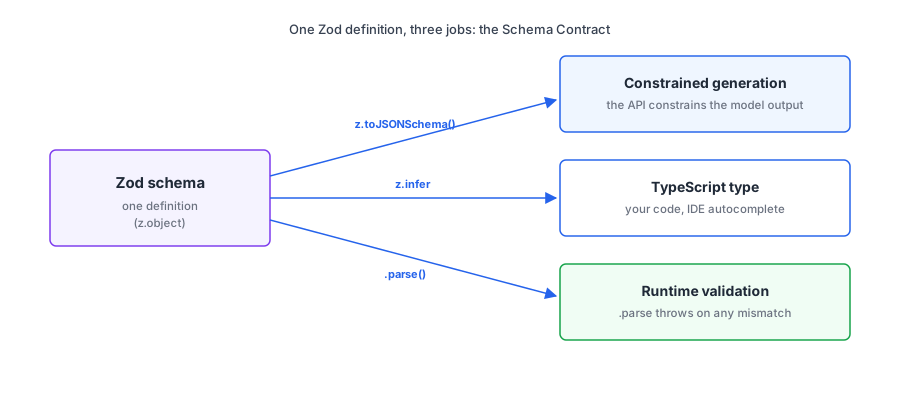
Pair Gemini’s schema enforcement with Zod on the TypeScript side and you get a single source of truth shared between your code (typed input/output), the model (constrained generation), and your validator (runtime check). I’ll call this the Schema Contract.
This chapter teaches the three layers of structured output (JSON mode, schema mode, validated mode), shows how to wire Zod schemas into Gemini calls, walks through the edge cases that bite (nullable fields, enums, refusals, depth limits), and evolves your assistant.ts to return typed JSON instead of prose.
A note on API surfaces. Google shipped the Interactions API in December 2025 and it’s now generally available; the
generateContentstructured-output docs carry a banner recommending it “for access to all the latest features and models.” This book stays ongenerateContent: it’s fully supported, and every chapter builds on the same call shape. The companion code pins@google/genaiv1 for the same reason (the SDK moved to a v2 major in May 2026). Everything you learn here about schemas transfers directly.
Concept 1: The Schema Contract
Without a contract, the boundary between the model and your code is a guess. Each call could return any string.
TypeScript’s type system makes the same trade visible. When a function returns User, your code knows the shape without checking. When it returns unknown, you have to check everything. An LLM call without a schema is unknown-shaped: a string that probably contains JSON that probably has the fields you want. The Schema Contract pulls those outputs into the typed world. One schema describes the shape; three places use it.
Three layers, each tighter than the last:
1. JSON mode. The API biases the model hard toward emitting bare JSON. In practice fences and preamble disappear, but only schema mode carries a documented validity guarantee. Shape isn’t constrained. You get back something JSON-shaped, but it might not match what you wanted.
2. Schema mode. You pass a JSON Schema with the request. The API constrains the model so its output matches the schema’s shape, types, required fields, and enums. The result is guaranteed to parse AND to match the structure you specified.
3. Validated mode. Schema mode plus a runtime validator (Zod) on your side. The model is constrained, AND your code refuses to proceed if anything’s still off.
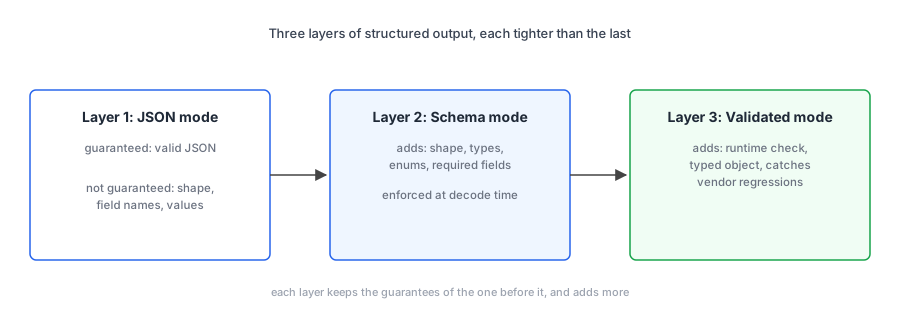
Schema mode is enforcement, not politeness. The inference server zeros out token probabilities that would lead to invalid output. Preamble can’t happen because the first token of the response is constrained to be {. That’s the difference between “usually works” and “works.”
Concept 2: Layer 1, JSON mode
The minimum viable structured-output call. One config flag. The model still chooses the shape, but the API steers it hard toward bare JSON. In practice, no more JSON.parse throwing on a stray “Sure!” preamble; on paper, Google only documents the validity guarantee when you supply a schema. You almost never want to stop here, but knowing what JSON mode does (and doesn’t do) clarifies why schema mode is the actual win. This layer and the next two are runnable from the companion code: npm run layer1, layer2, and layer3 in code/chapter-03.
import { GoogleGenAI } from "@google/genai";

const ai = new GoogleGenAI({});

const response = await ai.models.generateContent({
  model: "gemini-3.5-flash",
  contents:
    "Triage this restaurant review and return JSON with keys 'sentiment', 'category', 'summary'. Review: 'The carbonara was overcooked and bland but our waiter was attentive. Not sure if I'd go back.'",
  config: {
    responseMimeType: "application/json",
  },
});

try {
  const data = JSON.parse(response.text!);
  console.log(data);
} catch {
  console.error("Model returned invalid JSON:", response.text);
}
Line 1. import { GoogleGenAI }. Same SDK as Chapters 1 and 2.
Line 3. new GoogleGenAI({}). Same client construction; key from --env-file=.env.
Lines 5-12. ai.models.generateContent({ model, contents, config }). The new piece is config: { responseMimeType: "application/json" }. That single flag flips the API from “produce text” to “produce JSON-shaped text.” Everything else (model, contents) is the same shape as Chapter 1.
Lines 14-19. JSON.parse in a try/catch. The ! after response.text asserts non-null; the SDK’s type allows undefined. In practice the parse won’t throw; the mime type steers the model away from preamble and markdown fences. But that’s a strong bias, not a documented guarantee (Google documents one only for schema mode), so the catch stays. The shape, meanwhile, is whatever the model decided.
Walking through it. The config: { responseMimeType: "application/json" } is the only new thing. Everything else is your standard generateContent call from Chapter 1. One flag flips the API from “produce text” to “produce JSON-shaped text.”
JSON.parse(response.text!) succeeds on essentially every run; fences and preamble disappear once the mime type is set. The shape is whatever the model decided. The prompt asked for sentiment, category, summary; the model usually produces those, but sometimes you get tone instead of sentiment, or an extra recommendation field, or a nested object you didn’t ask for. JSON mode doesn’t catch shape drift.
Output, on a typical run:
{ "sentiment": "mixed", "category": "food", "summary": "Carbonara underwhelmed but service was attentive" }What changed: no preamble, no Markdown fences, no chatty wrapper. The API knows you want JSON and steers the model to produce JSON. What didn’t change: nothing stops the model from inventing extra fields, returning the wrong key names, or putting numbers where you expected strings. This layer gives us parseability in practice; correctness is the next layer’s job.
To make this concrete: I ran the same triage prompt 10 times under JSON mode (script in code/chapter-03/json-mode-test.ts). All 10 runs returned the prompt-named keys (sentiment, category, summary); field-name drift is rare when the prompt names the keys clearly. But the values drifted hard. sentiment came back as "mixed", "Mixed", and "Mixed/Negative" across runs. category came back as "food and service", "Food and Service", and once "Restaurant Review".
If your downstream code does if (sentiment === "mixed"), it fails on every other run. The values are JSON-valid strings, just not the strings your code expected. Schema mode (next concept) closes that gap by listing allowed values as enums and refusing to sample outside them.
Concept 3: Layer 2, schema mode
This is the layer to default to. It eliminates an entire class of bugs (wrong field names, wrong types, missing required fields, hallucinated extra fields) at the inference layer, not in your validator. Code that used to need defensive parsing becomes code that calls JSON.parse and proceeds.
The mechanism: the model writes its JSON one token at a time. At each step the inference server compiles your schema into a finite automaton and filters tokens against it. Tokens that would break the schema are excluded from the sampling pool. The model can only sample tokens that lead somewhere valid.
The decoder itself guarantees the result matches the schema’s shape; there’s no produce-then-validate step. The formal mechanism is described in Koo, Liu & He, “Automata-based constraints for language model decoding” (COLM 2024), the Google DeepMind paper describing the automata-based approach behind this kind of constrained decoding.
I ran the same triage prompt 10 times under schema mode (script in code/chapter-03/schema-mode-test.ts). All 10 responses passed Zod validation including the sentiment and category enums. Zero violations. Compare to the JSON-mode test in the previous concept, where the same prompt produced enum-violating values like "Mixed/Negative" and "Food and Service" across runs.
const response = await ai.models.generateContent({
  model: "gemini-3.5-flash",
  contents:
    "Triage this restaurant review: 'The carbonara was overcooked and bland but our waiter was attentive. Not sure if I'd go back.'",
  config: {
    responseMimeType: "application/json",
    responseJsonSchema: {
      type: "object",
      properties: {
        sentiment: { type: "string", enum: ["positive", "negative", "mixed"] },
        category: { type: "string", enum: ["food", "service", "ambience", "value"] },
        summary: { type: "string" },
      },
      required: ["sentiment", "category", "summary"],
    },
  },
});

const data = JSON.parse(response.text!);
Lines 1-3. Standard generateContent call shape. The model and the user prompt are unchanged from JSON mode.
Lines 5-16. The config block. responseMimeType: "application/json" is still required; it tells the API you want JSON. responseJsonSchema is the new thing: standard JSON Schema with type: "object", a properties map naming each field and its type, an enum constraining sentiment and category to specific allowed values, and a required array listing the fields that must appear in the response.
Line 19. JSON.parse(response.text!). Safe to parse, and now also safe to assume the shape, because the API constrained generation against the schema you supplied.
Walking through it. responseJsonSchema is the new thing: standard JSON Schema with type: "object", a properties map naming each field and its type, and a required array listing the fields that must appear.
required is non-optional discipline. If you don’t list a field as required, the model may skip it whenever it wants. “Forgot to mark it required” is a common bug; the symptom is fields that are sometimes missing for no obvious reason.
Notice the prompt got shorter. The contents no longer says “Return JSON with keys ‘sentiment’, ‘category’, ‘summary’.” The schema is doing that work now. The prompt is back to being about the task (triage this review) instead of the format.
Now the API enforces the shape. Wrong key names get rejected before the response leaves the server. Missing required fields don’t happen. You won’t get a string when you asked for a number, because the constrained decoder won’t sample anything that violates the schema.
Concept 4: Layer 3, validated mode (Zod)
Hand-writing JSON Schema in your TypeScript file is painful and disconnected from your types. You write the schema. You write the matching TypeScript interface. You forget to update one when the other changes. Drift sets in. The same shape exists in three places and each place thinks the others agree.
Zod fixes this. Write the schema once in TypeScript. Derive the JSON Schema (for the API) and the TypeScript type (for your code) from it. Validate the response at runtime with the same definition. One source of truth doing three jobs.
Zod is the centre of the Schema Contract. The schema you write in TypeScript becomes a JSON Schema the API enforces during generation, a TypeScript type your IDE autocompletes against, and a runtime validator that throws if the response somehow doesn’t match. One definition with three exits.
import { GoogleGenAI } from "@google/genai";
import { z } from "zod";

const Triage = z.object({
  sentiment: z.enum(["positive", "negative", "mixed"]),
  category: z.enum(["food", "service", "ambience", "value"]),
  summary: z.string(),
});

type Triage = z.infer<typeof Triage>;

const ai = new GoogleGenAI({});

const response = await ai.models.generateContent({
  model: "gemini-3.5-flash",
  contents:
    "Triage this restaurant review: 'The carbonara was overcooked and bland but our waiter was attentive. Not sure if I'd go back.'",
  config: {
    responseMimeType: "application/json",
    responseJsonSchema: z.toJSONSchema(Triage),
  },
});

const data: Triage = Triage.parse(JSON.parse(response.text!));
console.log(data); // fully typed, validated
Lines 1-2. Two imports. GoogleGenAI is the SDK. z is Zod, the TypeScript-first schema library.
Lines 4-8. const Triage = z.object({...}) defines the schema once in Zod. This is the single source of truth: field names, types, and allowed enum values all live in this one declaration.
Line 10. type Triage = z.infer<typeof Triage> derives the TypeScript type from the schema. Your IDE now knows Triage is { sentiment: "positive" | "negative" | "mixed"; category: "food" | "service" | "ambience" | "value"; summary: string }. Zero hand-written interfaces.
Line 12. new GoogleGenAI({}). Same client construction.
Lines 14-22. ai.models.generateContent with config.responseJsonSchema: z.toJSONSchema(Triage). The toJSONSchema() helper (Zod v4) emits the JSON Schema the API expects. Same source as the runtime type and the validator; different format.
Line 24. Triage.parse(JSON.parse(response.text!)) runs the Zod validator on the parsed JSON. If the API somehow returns something that doesn’t match (vendor regression, swapped model, etc.), parse throws a typed error you can catch. The data: Triage annotation pins the type.
Walking through it. const Triage = z.object({...}) defines the schema in Zod. This is the single source of truth: field names, types, allowed values all live here.
type Triage = z.infer<typeof Triage> derives the TypeScript type from the schema. Your IDE now knows Triage is { sentiment: "positive" | "negative" | "mixed"; category: "food" | "service" | "ambience" | "value"; summary: string }. Zero hand-written interfaces.
responseJsonSchema: z.toJSONSchema(Triage) converts the Zod schema to JSON Schema for the API. The toJSONSchema method is built into Zod v4. Same source, different format.
Triage.parse(JSON.parse(response.text!)) does the runtime validation. If the API somehow returns something that doesn’t match (during a brief regression, or if you swap to a model that doesn’t honour responseJsonSchema), parse throws a typed error you can catch.
Three wins from one schema: generation is constrained, code is typed, runtime is validated.
Common confusion: “constrained generation makes the validator redundant.” Don’t skip it. Three reasons.
First, the API can regress. Vendor-side bugs happen. A schema that worked yesterday might be misenforced today. The validator catches it.
Second, you might swap models. A future config change (“let’s try Claude for this call”) might land on a path that doesn’t honour the schema the same way. The validator catches it.
Third, your downstream code wants a typed object. Without the validator, JSON.parse(response.text) is typed as any. With the validator, you have Triage typed as Triage. Your IDE, your linter, and your future self will thank you. The validator costs microseconds; the bugs it prevents cost hours.
Concept 5: Schema patterns that bite
Schemas look easy until you hit a real input. The model genuinely can’t extract a value sometimes. The field has a fixed set of allowed values. The data is a list of unknown length. The structure has nested objects three levels deep. Each pattern has a clean shape and a tempting wrong shape; the wrong shapes either force the model to fabricate or get rejected by the API.
Schema patterns. A small set of recurring shapes that every production schema needs to handle correctly: nullable fields (the model legitimately can’t extract a value), enums (a fixed set of allowed values), arrays (zero or more items), nested objects (composition), and structured refusals (the model declines or doesn’t know).
Five patterns, each with the shape that works.
Nullable fields. Sometimes the model genuinely can’t extract a value. Without a nullable option, the model might hallucinate a fake one to satisfy the required field. Make the field nullable in the schema:
const ContactInfo = z.object({
  name: z.string(),
  phone: z.string().nullable(), // model may legitimately not find a phone number
});
The constrained decoder will then accept null as a valid value. The model is now allowed to say “I don’t know” instead of inventing.
Enums. When a field has a fixed set of allowed values, use an enum rather than a freeform string:
const Triage = z.object({
  severity: z.enum(["low", "medium", "high"]),
  team: z.enum(["billing", "auth", "infra"]),
});
The schema mode constrains the model to those exact strings. No “Med”, no “MEDIUM”, no “moderate.”
Arrays. Useful when the input might contain zero, one, or many items:
const Issues = z.object({
  issues: z.array(
    z.object({
      title: z.string(),
      severity: z.enum(["low", "medium", "high"]),
    })
  ),
});
The model is constrained to return an array of correctly-shaped objects. Length isn’t constrained by default; add .min(1) or .max(5) if you need bounds. (Note: not all length constraints round-trip through JSON Schema; verify the generated schema if you depend on bounds.)
Nested structures. Compose freely:
const PullRequest = z.object({
  title: z.string(),
  author: z.object({
    name: z.string(),
    email: z.string(),
  }),
  files_changed: z.array(z.string()),
});
Know the limit. Gemini’s docs note that “The API may reject very large or deeply nested schemas. If you encounter errors, try simplifying your schema by shortening property names, reducing nesting, or limiting the number of constraints.” Shallow nesting is fine; deep nesting eventually trips the API. If you need depth, flatten.
Refusals and “unknown” values. When the model legitimately can’t or shouldn’t answer (PII you’ve told it to redact, a question outside its scope), schema mode can paint you into a corner. The fix: make refusal explicit in the schema. Either nullable fields, or a top-level status enum:
const Answer = z.object({
  status: z.enum(["answered", "refused", "unknown"]),
  answer: z.string().nullable(),
  reason: z.string().nullable(),
});
This way the model has a structured path to say “I refuse” or “I don’t know,” instead of being forced to fabricate a value.
Common confusion: “schema mode prevents hallucination.” It prevents shape hallucination, not content hallucination. The schema can’t enforce that name is a real name; it can only enforce that it’s a string. If you require a phone field on an input that has no phone number, the model fills it in with something plausible-looking, because that’s what the schema demands.
Make the field nullable and the model has a path out instead of needing to fabricate, and usually takes it. The general rule: never force a required value when the input might not contain it. Either make the field nullable, or add a status discriminator so refusal is a structured option.
Evolving the running assistant
The assistant.ts from Chapter 2 returned prose with a “Confidence: high/medium/low” line at the end. Useful for humans, awkward for code. Time to make it return structured data.
In code/chapter-03/assistant.ts:
import { GoogleGenAI } from "@google/genai";
import { z } from "zod";

const ai = new GoogleGenAI({});

const Answer = z.object({
  answer: z.string(),
  confidence: z.enum(["high", "medium", "low"]),
  caveats: z.array(z.string()),
});

type Answer = z.infer<typeof Answer>;

const question = process.argv.slice(2).join(" ");

if (!question) {
  console.error(
    "Usage: node --env-file=.env --strip-types assistant.ts <your question>"
  );
  process.exit(1);
}

const response = await ai.models.generateContent({
  model: "gemini-3.5-flash",
  config: {
    systemInstruction: `<role>
You answer questions for a working developer. Use code-aware examples and assume programming familiarity. No marketing fluff.
</role>

<constraints>
1. Answer concisely (3 short paragraphs maximum).
2. Use plain prose, not markdown.
3. If you don't know the answer or aren't confident, set confidence to "low" and explain why in caveats.
4. List any important caveats, assumptions, or things you're unsure about as separate strings in the caveats array.
</constraints>`,
    responseMimeType: "application/json",
    responseJsonSchema: z.toJSONSchema(Answer),
    maxOutputTokens: 2500,
  },
  contents: question,
});

const data: Answer = Answer.parse(JSON.parse(response.text!));

console.log("Answer:");
console.log(data.answer);
console.log(`\nConfidence: ${data.confidence}`);

if (data.caveats.length > 0) {
  console.log("\nCaveats:");
  for (const caveat of data.caveats) {
    console.log(`  - ${caveat}`);
  }
}
Lines 1-2. Imports: SDK and Zod, same pair as the validated-mode example.
Line 4. new GoogleGenAI({}). Standard client construction.
Lines 6-10. Answer schema with three fields: a free-text answer, a confidence enum, and an array of caveats strings. The structured shape is what the Chapter 2 prose tag (Confidence: high) wanted to be all along.
Line 12. type Answer = z.infer<typeof Answer>. Derived TypeScript type for the same shape.
Lines 14-21. CLI argument handling. process.argv.slice(2).join(" ") joins everything after node script.ts into one question string; bail with a usage line if the user didn’t supply one.
Lines 23-41. The actual model call. systemInstruction carries the role and constraints (XML-tagged, per Chapter 2’s Concept 2). responseMimeType + responseJsonSchema constrain the output to the Answer shape. maxOutputTokens caps the response length. contents: question passes the user’s question as the user message.
One caveat on the cap: a response that hits maxOutputTokens is cut off mid-JSON, and parsing fails. Constrained decoding controls which tokens get sampled, not whether generation finishes. Size the cap generously and treat a MAX_TOKENS finish reason as an error.
Line 43. Answer.parse(JSON.parse(response.text!)) runs Zod validation on top of constrained decoding. The ! after response.text asserts non-null; the schema-mode API guarantees a valid string but the type signature still allows undefined.
Lines 45-54. Render the typed object. data.answer, data.confidence, and data.caveats are all type-safe; your IDE autocompletes them.
Three new things vs the Chapter 2 version: a Zod schema (Answer) defining the shape we want back, responseMimeType and responseJsonSchema in the config so the API constrains the output, and Answer.parse(...) for the runtime validation. The result is typed.
Run it:
npm run ask -- "How do I avoid memory leaks in long-running Node processes?"You get a clean, typed, structured response. The caveats array is genuinely useful: it gives the model a structured place to express uncertainty instead of burying it in prose. If you want, open the code for this chapter and also print the raw output from the model (response.text) to see the structure it returns.
What it can’t do yet: fetch live information, swap output shapes per task, or use tools alongside constrained decoding. Each is the topic of a later chapter. Chapter 4 plumbs in tool use; the RAG bonus chapter introduces task-typed output discrimination.
Next up in Chapter 4: Tool use. Once your model can return structured data, the next move is letting it ask your code to do things: call APIs, query databases, run searches. Tool use is the Schema Contract pointed at your functions instead of your data.