Chapter 13Production
From router to autonomous orchestrator
32 min read · 15 of 22
What you’ll build
Since Chapter 6 we’ve kept the assistant as a router with specialists. The Coordinator reads the user’s question, picks one specialist (research / memory / verify / direct-answer fallback), runs it, returns. One path per turn. That works well for “what is RRF?” or “remember I prefer concise replies.” It falls down hard on the kind of compound request a user might actually ask: “research why 0.1 + 0.2 doesn’t equal 0.3 in JavaScript, write a small snippet that demonstrates the behaviour, verify it runs, and give me the whole brief in Spanish.”
That single prompt is four jobs. A router can’t do four jobs; it picks one specialist, and the request loses three quarters of itself in the process.
By the end of this chapter the assistant decomposes intent. A Planner turns the user’s request into an ordered list of typed steps. An Executor runs them sequentially, threading each step’s output into the next. Single-step plans behave exactly like the old router (cheap, no overhead). Multi-step plans are real compound tasks the assistant finishes in one turn.
The four-job prompt above takes about 45 seconds to 2 minutes end-to-end (depending on how much the Researcher fetches) and produces a Spanish brief that explains the IEEE 754 cause, includes a working code demonstration, and quotes the sandbox’s 0.30000000000000004 result back as evidence.
Two earlier patterns come back with real jobs. A2A from Chapter 8 becomes how the Translator step actually runs (in another process, reached via Agent Card). The hand-rolled http_fetch tool (a FunctionTool since Chapter 6) is now part of the cheap-answer path the planner picks for any single-URL query.
A router is a function from intent → specialist. A planner is a function from intent → ordered list of (specialist, instruction) pairs. The same six sub-agents (research, code-author, verify, translate, memory-edit, direct-answer) compose under either, but the planner can chain them. Compound tasks become a single turn for the user instead of three or four manual hand-offs.
The framework: Plan-and-Execute. A small planner LLM emits a structured JSON plan. A typed executor loop runs each step, feeds prior outputs into the next, and returns the last step’s output as the final answer. The executor calls agent.run(input) directly on whatever the step maps to: a local Agent, a RemoteA2AAgent from Chapter 8, or a small composed function (runResearchPath) that chains two Agents. The dispatch is the same shape regardless.
By the end the running assistant ships with: a Planner that decomposes intent into 1-6 ordered steps, six sub-agents covering all the work the build can do, an A2A-served Translator (callback to Chapter 8), a two-layer log on stderr (structured JSON events for replay alongside timestamped human-readable lines with runtime tags [sandbox] / [http] / [remote A2A]), and a four-step compound demo.
What changes from Chapter 12
The Coordinator goes away. Everything else we built in Chapter 12 stays: the Docker sandbox, the audit log, the input/output filters, the per-user memory, the http_fetch tool. What replaces the Coordinator is a two-stage pipeline:
-
Planner. A single Gemini call that takes the user’s question + their memory profile and returns a structured
Plan = { steps: PlanStep[] }. Each step has anagent(one of the six sub-agent kinds) and aninput(free-text instruction for that agent). -
Executor. A TypeScript loop that calls
agent.run(input)on the specialist matching each step. Each step gets a digest of all prior step outputs concatenated into its input, so a downstream step can use upstream results without the planner having to wire references explicitly.
The Coordinator was a router (one-of-N decision). The Planner is a sequencer (1-to-N decision). When N=1, the behaviour is identical to the old router. When N>1, the executor chains the work.
Concept 1: Router vs Planner
The chapter opener showed a four-job request (research, write, run, translate). Two architectures can take a request like that, and they handle it very differently.
The router pattern. One model call reads the user’s message and picks a category (one specialist from a fixed set). The system dispatches to that specialist, the specialist runs, its output is the answer. For “what is RRF?” the router picks research, runs the researcher, returns a brief. It’s fast, predictable, and easy to debug, because every request takes exactly one path.
The router breaks on the opener’s four-job request. It has to pick one specialist. It picks research and the other three jobs (write, run, translate) get dropped. The user gets an English brief and has to do the rest by hand.
The plan-and-execute pattern. Always one model call (the planner) reads the user’s message and emits an ordered list of typed steps. The list’s length depends on what the user asked for: simple requests get short lists, compound requests get longer ones. For “what is RRF?” the planner emits a one-step list, [research]. For the opener’s four-job request it emits a four-step list, [research, code_author, verify, translate]. The planner and the call shape are identical in both cases; only the list contents change.
An executor then runs each step in turn, threading each step’s output into the next step’s prompt. The last step’s output is the answer.
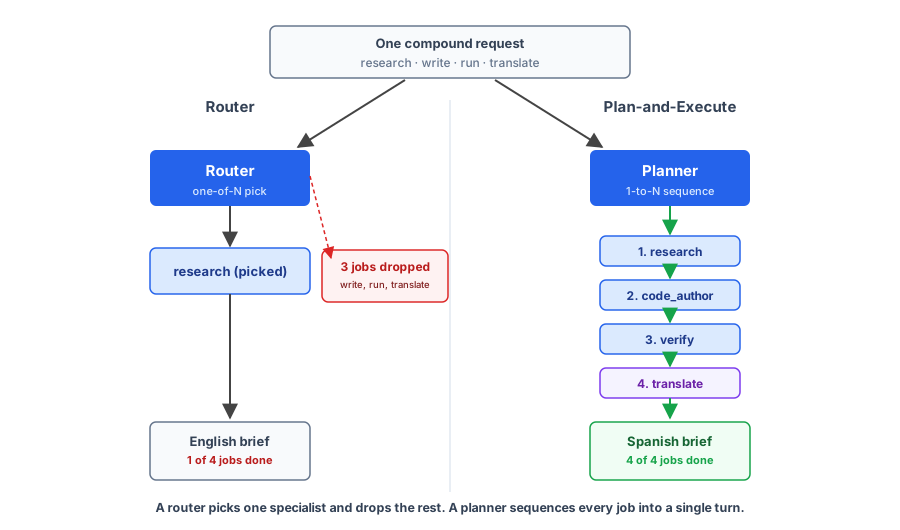
The planner adds a small fixed cost over a pure router. On every request, the planner has to write not just the specialist’s name but a rewritten instruction for that specialist (a free-text input field per step). That’s more tokens than a router classifier on every turn, even when the resulting plan is length 1. In exchange you get compound-request capability the router can’t deliver.
Why this chapter picks plan-and-execute. When the planner emits a length-1 plan, the executor dispatches to one specialist and the behaviour is identical to a router. When the user asks for compound work, the same machinery handles it. You don’t need to build both a router and a planner; the planner covers both cases. The trade-off is the small per-call overhead the planner pays on every request, even simple ones.
Workflow + agents (the Chapter 6 distinction, in operation here). The Plan-and-Execute pattern is a workflow, not an agent. The Planner is one LLM call that picks the steps, but once the plan is emitted, the Executor (plain TypeScript code) walks the steps in fixed order. The model never decides mid-execution “should I add another step?” or “should I skip the verify?” It decides once, up front, and the executor follows the plan.
Each individual step inside the executor’s loop is an agent. The Researcher’s LLM decides which tools to call and when to stop searching; the VerifyAgent’s LLM picks between
execute_codeandhttp_fetchand decides what snippet to author. So the Chapter 13 build is a workflow that composes agents: outer workflow for predictable structure, inner agents for flexible per-step behaviour.
Concept 2: Sequential pipelines and state threading
A planner that emits steps is useless without an executor that runs them and an answer to “how does step 2 see step 1’s result?” Answer it badly and each step becomes a fresh conversation that has to re-derive context the previous step already produced.
The executor’s contract: each sub-agent reads a prompt that includes a digest of all prior step outputs, produces its own output, and the executor appends that to the digest before invoking the next sub-agent. Each prior step’s output is wrapped in a labelled block (--- Output of step N (agentName) ---) so the next step can tell what came from where, and so the planner can write step inputs that reference prior outputs by ordinal (“translate the brief from step 1 and the verify report from step 3 into Spanish”).
The chapter’s executor uses a fixed format:
--- Output of step 1 (research) ---
<200-word brief on why 0.1 + 0.2 !== 0.3>

--- Output of step 2 (code_author) ---
```ts
const sum = 0.1 + 0.2;
console.log(sum.toPrecision(20));  // 0.30000000000000004441
console.log(sum === 0.3);          // false
```

--- Step 3 (verify) ---
Run the snippet authored in the previous step
The trailing --- Step 3 (verify) --- block carries the planner’s instruction for the current step. The agent reads everything above it as context, the trailing block as its task. The Translator’s system instruction explicitly notes that the digest is scaffolding (“the --- Output of step N --- headers are metadata, NOT content; do not translate, echo, or reproduce them”). Translation touches every line of the digest, so it’s the step most prone to regurgitating the structure into its own output.
Concept 3: The Planner
The planner is one Gemini call. Its only job is to turn a user message plus memory snapshot into a typed plan. Get the schema right and the rest of the system stays simple. Get it wrong and you spend the rest of the chapter writing parsers and fallbacks.
The planner translates natural language into a small typed vocabulary: six verbs (the six sub-agent kinds the executor knows about) and one operator (sequence). The output is a structured value typed by Zod, so the executor can dispatch on it without prompt-parsing.
Constraining the planner to structured output is what makes the system safe. A planner that returned prose (“first do research, then write some code, then verify it”) would force the executor to parse natural language, which is the failure mode every previous chapter taught you to avoid. JSON-schema response with a Zod validator at the parse boundary means the planner can’t emit a step the executor doesn’t know how to run.
The chapter’s StepKind enum:
const StepKind = z.enum([
  "research",       // runResearchPath (Researcher → Writer); live grounding
  "code_author",    // CodeAuthor; writes a snippet (does NOT execute)
  "verify",         // VerifyAgent; sandbox + http_fetch (the cheap-answer path)
  "translate",      // Translator; remote A2A
  "memory_edit",    // MemoryEditor; profile changes
  "direct_answer",  // DirectAnswerer; chitchat, profile lookup
]);

const Plan = z.object({
  steps: z.array(
    z.object({ agent: StepKind, input: z.string() })
  ).min(1).max(6),
});
Six step kinds is the size of the chapter’s running build. A larger assistant with twenty specialist capabilities would have twenty step kinds in the enum. The architecture doesn’t change with the number; only the planner’s system instruction grows.
The instruction itself is the prompt everything rests on. It enumerates each step kind, says when to use it, and gives explicit rules about ordering (“verify MUST come after code_author if you want the code run”; “translate is always the LAST step if present”). Without those rules the planner happily emits plans like [translate, research] that don’t make any sense.
When the planner picks a single step
In practice the planner emits single-step plans for simple questions. “What’s RRF?” yields [research]. “What’s my name?” yields [direct_answer]. “Compute factorial of 20” yields [verify]. The executor runs one step and the system behaves identically to the Chapter 12 router (the “planner subsumes router” point from Concept 1, playing out live).
Concept 4: The Executor
The executor is small but has to handle three things the planner doesn’t think about: tool denials, remote vs local sub-agents, and runtime visibility. Handle all three and the executor becomes plumbing you stop noticing.
The shape is a for loop over plan.steps. Each iteration: build the digest of prior outputs plus current instruction, dispatch to the matching specialist, capture the returned text.
The dispatch table maps each step kind to one of three shapes: a constructor that returns a fresh Agent (used for code_author, verify, memory_edit, direct_answer so the closure-bound role / userId / profile is fresh per request), the prebuilt RemoteA2AAgent instance (used for translate), or a small composed function (runResearchPath) that chains two Agents for the research step. All three expose the same .run(input) shape, so the executor calls the same await regardless.
A representative step from the executor’s loop, in shape:
async function runStep(step, prior, role, userId, memoryContext, userProfile) {
  const fullMessage = digestPriorOutputs(prior) + step.input;
  let output = "";
  let toolDenied = false;

  switch (step.agent) {
    case "research":
      output = await runResearchPath(fullMessage, memoryContext);
      break;
    case "code_author":
      output = await makeCodeAuthor().run(fullMessage);
      break;
    case "verify": {
      const verify = makeVerifyAgent(role);
      const agentReply = await verify.agent.run(fullMessage);
      const envelope = await formatVerifyOutcome({ agentReply, toolResult: verify.lastResult() });
      output = envelope.user_message;
      toolDenied = envelope.outcome === "denied";
      break;
    }
    case "translate":
      output = await translator.run(fullMessage);
      break;
    case "memory_edit":
      output = await makeMemoryEditor(userId).run(fullMessage);
      break;
    case "direct_answer":
      output = await makeDirectAnswerer(userProfile).run(fullMessage);
      break;
  }

  return { agent: step.agent, input: step.input, output, toolDenied };
}
Two patterns the verify case inherits from Chapters 11 and 12. makeVerifyAgent(role) returns {agent, lastResult} rather than just an Agent, exposing the tool’s last structured return value through a closure accessor. The structured envelope (formatVerifyOutcome) classifies the outcome into a typed enum (executed | denied | error) via a small Gemini call constrained by a Zod schema, so the executor reads envelope.outcome === "denied" instead of grepping the agent’s reply text. The other branches don’t need the envelope; they’re not gated by an authz check the executor has to react to.
The function doesn’t care whether the underlying sub-agent runs in this process or over JSON-RPC to another machine. The translator.run(fullMessage) line speaks A2A SendMessage over HTTP to the translator service; the others run model + tools in this process. It’s the same await shape either way, and that transparency is the whole reason the Chapter 8 A2A teaching pays off here.
Runtime visibility
The executor logs each step with a runtime tag so an operator can read the audit live and know where work is happening:
[21:48:05]   step 1/2 -> verify [local: VerifyAgent + sandbox/http]: Calculate the sum of the first 100 Fibonacci numbers.
[21:48:07]     [sandbox] docker run ch13-sandbox:latest (js, 153B)
[21:48:07]     [sandbox] exit=0 (156ms, stdout=22B)
[21:48:09]   step 2/2 -> translate [remote A2A: http://localhost:3001]: Spanish
Three layers visible at a glance: which sub-agent ran ([local: VerifyAgent + sandbox/http] / [remote A2A: ...]), which transport its tool calls used ([sandbox] / [http]), and the timing/byte counts on each. The structured JSON events go to stderr alongside the human-readable lines; the JSON layer is what you’d parse for replay or pipe to a log aggregator; the human-readable layer is what you watch live.
Concept 5: A2A as critical-path infrastructure
Chapter 8 introduced A2A with a single visible payoff: an agent that runs as its own service and is reached by a remote caller via an Agent Card (a small JSON document at a well-known URL that advertises the agent’s name, capabilities, and JSON-RPC endpoint). The Chapter 8 build kept everything in one process otherwise, and the protocol felt academic.
Chapter 13 puts A2A on the critical path. The Translator step in the executor’s pipeline runs in a separate Node process, reached over JSON-RPC (a lightweight RPC protocol that sends method calls as JSON objects over HTTP), discovered via the Agent Card. The compound demo doesn’t work without A2A.
A2A itself shipped four chapters ago, so the protocol is old news. The composition is the payoff: once a real multi-step orchestrator exists, A2A is how you keep services independently deployable.
The Translator owns its own model choice, scaling story, and deploy schedule. The assistant doesn’t know or care that it’s a separate process; it just calls a sub-agent.
When the Translator’s prompt needs an update, you redeploy that one service without touching the assistant. When you want to scale translation independently of research, you scale that one service. The cost is operational (one more service to run, monitor, secure); the benefit is that each capability becomes a unit you can iterate on without coordinating with the rest of the assistant.
The Chapter 13 build uses A2A for exactly one step: Translator. The other five sub-agents are local. Which sub-agents go remote is an operational decision driven by deployment shape; the orchestrator’s design doesn’t change either way. Translation is a clean candidate because it’s stateless, language-agnostic, and benefits from being independently scalable. Memory-edit would be a poor candidate because it needs access to the SQLite file the rest of the assistant owns.
A working setup
The translator-server file in code/chapter-13/ is functionally a copy of Chapter 8’s, with the instruction updated to know the Chapter 13 executor’s digest format. Two terminal processes:
# Terminal 1
npm run server          # translator-server.ts on :3001
# [a2a] Translator service listening on http://localhost:3001
# [a2a] Agent Card: http://localhost:3001/.well-known/agent-card.json
# [a2a] JSON-RPC:   http://localhost:3001/jsonrpc

# Terminal 2
npm run ask -- dev alice "compute the factorial of 20 and give me the result in Spanish"
# planner emits [verify, translate]; the translate step is a JSON-RPC call to :3001
The RemoteA2AAgent declaration in the assistant is short. This is the Chapter 8 client class; nothing new to import:
import { RemoteA2AAgent } from "./a2a-client.ts";

const translator = new RemoteA2AAgent({
  name: "Translator",
  baseUrl: process.env.TRANSLATOR_BASE_URL ?? "http://localhost:3001",
});
The executor sees this as just another .run() callable; the same runStep function dispatches it. The client fetches the Agent Card on first use, then speaks SendMessage for every call. The reply comes back as a completed Task in the JSON-RPC response; the client reads result.task.status.message.parts[].text (the same place Chapter 8 read it) and returns the joined text as the step’s output.
Sidebar: off-the-shelf alternatives. “Isn’t this what Google’s deep-research agent does?” Yes. Plan-and-Execute is well-trodden ground (LangChain’s plan-and-execute, AutoGPT’s loop-with-memory, Microsoft’s AutoGen all implement variants), and the same pattern has been packaged into managed products. Google exposes two via its Interactions API:
deep-research-preview-04-2026(speed-oriented, suited for streaming back to a UI) anddeep-research-max-preview-04-2026(max comprehensiveness, suited for automated context gathering) (Gemini Deep Research Agent docs).The call shape is
client.interactions.create({ agent: "deep-research-preview-04-2026", input, agent_config: { type: "deep-research", thinking_summaries: "auto", collaborative_planning: true }, background: true }). The agent returns a structured multi-step trace with a final brief;collaborative_planning: truemakes the agent emit a plan first and wait for confirmation in the next turn (human-in-the-loop). It’s production-ready and observable, and it scales without you operating any of it.What you give up with a managed product is control: the planner’s strategy, the sub-agent set, the trace format, the runtime each step runs in (local vs sandbox vs remote A2A), the audit-log shape, and the tool catalogue for non-research workloads (memory edits, sandboxed compute, A2A-distributed services) are all decisions the vendor has made for you. This book builds the orchestrator from scratch so every moving part is visible: the planner emits a JSON plan you can read, the executor dispatches typed steps you can debug, the runtime tags appear in the log. Whether that visibility is worth the operational cost over a managed product is a call only you can make against your own constraints.
Evolving the assistant
The Chapter 13 evolution replaces the Chapter 12 router with the Planner + Executor. Everything else stays: the Docker sandbox (Chapter 12), the audit log + filters + tool authz (Chapter 11), the per-user memory layer (Chapter 9), the hand-rolled http_fetch tool (a FunctionTool since Chapter 6), the research pair (Chapter 8). The new code is the Planner LLM call, the typed Plan schema, the Executor loop, the CodeAuthor sub-agent (new in this chapter), and the wiring of Translator over A2A (callback to Chapter 8).
The full sub-agent set after the chapter:
| Sub-agent | Where it runs | What it does |
|---|---|---|
runResearchPath | local two-await chain (Researcher → Writer Agents) | live web research with Google Search + http_fetch, writes a brief |
CodeAuthor | local Agent (new in Chapter 13) | writes a self-contained JS/TS snippet to a spec; does NOT execute |
VerifyAgent | local Agent | three modes: verify supplied snippet, compute via authored snippet, fetch URL via http_fetch |
Translator | remote A2A at :3001 | translates the digest of prior step outputs into a target language |
MemoryEditor | local Agent | edits the SQLite memory profile (forget, update_memory) |
DirectAnswerer | local Agent | one-sentence reply for chitchat or profile lookup |
The Planner picks 1-6 of these per request. Single-step plans are common (the planner correctly emits [research] for “what is RRF?”, [verify] for “compute factorial of 20”, [direct_answer] for “what’s my name?”). Multi-step plans show up for compound requests. The headline four-step demo: [research, code_author, verify, translate].
The Planner call, in code
const Plan = z.object({
  steps: z.array(z.object({
    agent: z.enum(["research", "code_author", "verify", "translate", "memory_edit", "direct_answer"]),
    input: z.string(),
  })).min(1).max(6),
});

async function plan(question: string, userProfile: string): Promise<Plan> {
  const r = await ai.models.generateContent({
    model: "gemini-3.5-flash",
    config: {
      systemInstruction: plannerInstruction(userProfile),  // step kinds + ordering rules + a <user_profile> block
      responseMimeType: "application/json",
      responseJsonSchema: z.toJSONSchema(Plan),
      temperature: 0,
    },
    contents: question,
  });
  return Plan.parse(JSON.parse(r.text ?? "{}"));
}
The planner uses a raw ai.models.generateContent call because it returns structured JSON the executor will dispatch on; the Agent loop is built around free-text reasoning + tool calls, which is the wrong shape for “emit a typed value.” Mixing styles is fine: the planner is one shape, every sub-agent is another, the executor wires them together.
The Executor loop, in code
The shape, abridged for the chapter:
async function executePlan(plan, role, userId, memoryContext, userProfile) {
  const results = [];
  for (let i = 0; i < plan.steps.length; i++) {
    const step = plan.steps[i];
    log(`  step ${i+1}/${plan.steps.length} → ${step.agent} ${RUNTIME_TAG[step.agent]}: ${step.input}`);
    const r = await runStep(step, results, role, userId, memoryContext, userProfile);
    log(`  step ${i+1}/${plan.steps.length} ← ${step.agent}: ${r.output.length} chars in ${fmtElapsed(stepMs)}`);
    results.push(r);
    if (r.toolDenied) {
      // Permission denied stops the chain. The denial message is the final answer.
      return { results, finalAnswer: r.output, toolDenied: true };
    }
  }
  return { results, finalAnswer: results.at(-1)!.output, toolDenied: false };
}
The RUNTIME_TAG lookup is the operator-friendly piece. Each step kind maps to a human-readable label that the log surfaces:
const RUNTIME_TAG: Record<StepKind, string> = {
  research:      "[local: ResearchPath]",
  code_author:   "[local: CodeAuthor]",
  verify:        "[local: VerifyAgent + sandbox/http]",
  translate:     `[remote A2A: ${TRANSLATOR_BASE_URL}]`,
  memory_edit:   "[local: MemoryEditor + sqlite]",
  direct_answer: "[local: DirectAnswerer]",
};
The four-step demo, end-to-end
Here’s the whole run in one picture, before the terminal output makes it concrete:
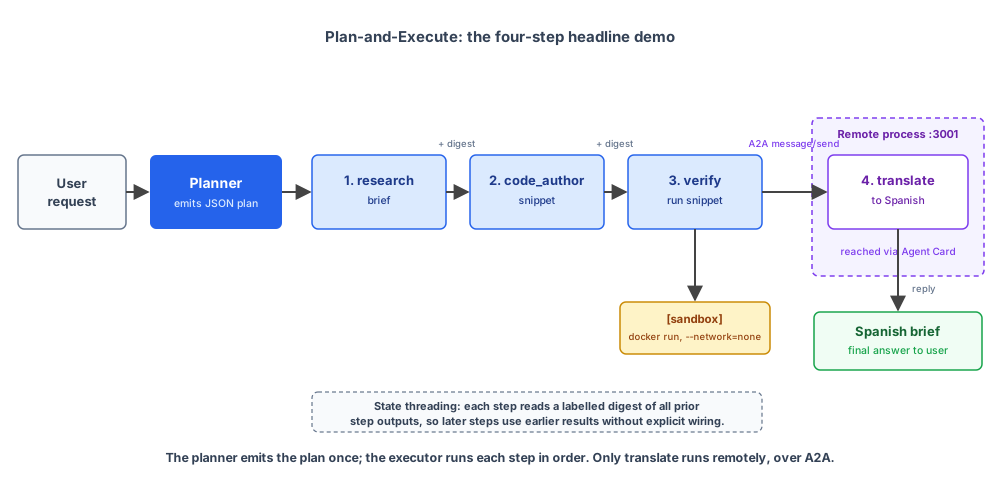
Two terminals:
# Terminal 1: A2A translator service
cd code/chapter-13
npm install
npm run build:sandbox          # builds ch13-sandbox:latest
npm run server                  # listens on :3001

# Terminal 2: the assistant
npm run ask -- dev alice "research why 0.1 + 0.2 doesn't equal 0.3 in JavaScript, write a small snippet that demonstrates the behaviour, verify it runs, and give me the whole brief in Spanish"
What the human-readable log shows (captured from a real run; the CodeAuthor picks slightly different precision-revealing prints each invocation, but it always prints the sum and the equality check):
[08:07:39] request: role=dev user=alice
[08:07:39] q: research why 0.1 + 0.2 doesn't equal 0.3 in JavaScript, write a small snippet that demonstrates t...
[08:07:40] memory: profile=(unnamed), 0 prefs, 0 focus, 0 prior recall
[08:07:43] plan: research -> code_author -> verify -> translate
[08:07:43]   step 1/4 -> research [local: ResearchPath]: Why 0.1 + 0.2 does not equal 0.3 in JavaScript IEEE 754 floating point precision
[08:07:57]   step 1/4 <- research: 1173 chars in 14.8s
[08:07:57]     --- output of step 1 (research) ---
[08:07:57]     In JavaScript, the expression `0.1 + 0.2 === 0.3` evaluates to `false` due to how computers
[08:07:57]     represent numbers under the IEEE 754 double-precision floating-point standard (64-bit).
[08:07:57]     While base-10 systems can precisely represent fractions with prime factors of 2 and 5,
[08:07:57]     binary (base-2) systems can only precisely represent fractions with denominators that are
[08:07:57]     powers of 2. Consequently, decimal numbers like 0.1 and 0.2 become infinite repeating
[08:07:57]     fractions in binary. Because the IEEE 754 standard allocates a finite 53 bits for...
[08:07:57]   step 2/4 -> code_author [local: CodeAuthor]: Write a JavaScript snippet that demonstrates 0.1 + 0.2 !== 0.3, prints the ac...
[08:08:01]   step 2/4 <- code_author: 901 chars in 4.0s
[08:08:01]     --- output of step 2 (code_author) ---
[08:08:01]     ```js
[08:08:01]     // 1. Demonstrate the floating-point precision issue
[08:08:01]     const sum = 0.1 + 0.2;
[08:08:01]     const target = 0.3;
[08:08:01]
[08:08:01]     console.log("--- Direct Comparison ---");
[08:08:01]     console.log(`0.1 + 0.2 === 0.3: ${sum === target}`); // false
[08:08:01]
[08:08:01]     console.log("\n--- Actual Representations ---");
[08:08:01]     console.log(`Sum (0.1 + 0.2)  : ${sum}`);    // 0.30000000000000004
[08:08:01]     console.log(`Target (0.3)     : ${target}`); // 0.3
[08:08:01]     // ... Number.EPSILON comparison ...
[08:08:01]     ```
[08:08:01]   step 3/4 -> verify [local: VerifyAgent + sandbox/http]: Run the snippet authored in the previous step
[08:08:03]     [sandbox] docker run ch13-sandbox:latest (js, 891B)
[08:08:03]     [sandbox] exit=0 (161ms, stdout=308B)
[08:08:09]   step 3/4 <- verify: 399 chars in 7.7s
[08:08:09]     --- output of step 3 (verify) ---
[08:08:09]     The code executed successfully (exit code: 0) in 161 ms with the following output:
[08:08:09]     0.1 + 0.2 === 0.3: false
[08:08:09]     Sum (0.1 + 0.2)  : 0.30000000000000004
[08:08:09]     Absolute difference: 5.551115123125783e-17
[08:08:09]     Number.EPSILON value: 2.220446049250313e-16
[08:08:09]     Are they approximately equal? true
[08:08:09]   step 4/4 -> translate [remote A2A: http://localhost:3001]: Spanish
[08:08:18]   step 4/4 <- translate: 2664 chars in 9.2s
[08:08:18]     --- output of step 4 (translate) ---
[08:08:18]     En JavaScript, la expresión `0.1 + 0.2 === 0.3` se evalúa como `false` debido a cómo las
[08:08:18]     computadoras representan los números bajo el estándar de punto flotante de doble precisión
[08:08:18]     IEEE 754 (de 64 bits)...
[08:08:24] done in 45.4s
And the final answer the operator sees on stdout (the full Spanish translation, with citations and code preserved, plus a Confianza: alta tag):
En JavaScript, la expresión `0.1 + 0.2 === 0.3` se evalúa como `false` debido a cómo las
computadoras representan los números bajo el estándar de punto flotante de doble precisión
IEEE 754 (de 64 bits).

Mientras que los sistemas en base 10 pueden representar con precisión fracciones con factores
primos de 2 y 5, los sistemas binarios (base 2) solo pueden representar con precisión fracciones
cuyos denominadores sean potencias de 2. En consecuencia, los números decimales como $0.1$ y
$0.2$ se convierten en fracciones periódicas infinitas en binario.

Debido a que el estándar IEEE 754 asigna una cantidad finita de 53 bits para la mantisa, estas
secuencias infinitas deben redondearse al valor binario representable más cercano. Cuando estas
dos aproximaciones redondeadas se suman, el resultado es ligeramente mayor que $0.3$,
específicamente **`0.30000000000000004`**, por lo que la comparación estricta falla.

Confianza: alta

```js
// 1. Demostrar el problema de precisión de punto flotante
const sum = 0.1 + 0.2;
const target = 0.3;

console.log("--- Comparación directa ---");
console.log(`0.1 + 0.2 === 0.3: ${sum === target}`); // false

console.log("\n--- Representaciones reales ---");
console.log(`Suma (0.1 + 0.2) : ${sum}`);    // 0.30000000000000004
console.log(`Objetivo (0.3)    : ${target}`); // 0.3

// 2. Comparación correcta utilizando Number.EPSILON
const isCloseEnough = Math.abs(sum - target) < Number.EPSILON;
console.log(`Diferencia absoluta: ${Math.abs(sum - target)}`);
console.log(`Valor de Number.EPSILON: ${Number.EPSILON}`);
console.log(`¿Son aproximadamente iguales? ${isCloseEnough}`); // true
```

El código se ejecutó correctamente (código de salida: 0) en 161 ms con la siguiente salida:
`0.1 + 0.2 === 0.3: false`, `Suma (0.1 + 0.2) : 0.30000000000000004`, y la comparación con
`Number.EPSILON` devuelve `true`.
Five details from that timeline:
- Step 3 exits with code 0. The sandbox successfully ran the snippet (161 ms, 308 bytes of stdout). The verify step’s reply summarises that stdout:
0.1 + 0.2evaluates to0.30000000000000004, the direct equality with0.3is false,Number.EPSILONgives a correct comparison. That summary becomes the evidence the brief quotes back to the user. The code result and the research findings reinforce each other in the final brief. - CodeAuthor picked plain JavaScript this run. It printed the sum and the strict equality, then added a
Number.EPSILONtolerance check. A different invocation might emit TypeScript with explicit: numberannotations (strip-types removes those at run time and the compute is unchanged) or pick different precision-revealing prints. - Step 4 runs over A2A. The
[remote A2A: http://localhost:3001]tag in the log makes that explicit. The executor dispatched to the same Translator service we shipped in Chapter 8, with a Chapter 13-aware instruction that knows the digest format. - The Spanish reply is ~2,700 characters. That’s the full brief from step 1 plus the snippet from step 2 plus the verification summary from step 3, all translated into Spanish, with
Number.EPSILON, the fenced code block, and the0.30000000000000004literal all left untranslated (correct behaviour: machine-readable identifiers and code don’t translate). - Total: ~45 s. The research step dominates at ~15 s (live Google Search plus Writer composition); the other three steps total ~21 s, and the wrapper overhead (input filter, memory load, planner, output filter, recall persistence) accounts for the rest. Latency varies per run with how much the Researcher decides to fetch (a heavier research turn can push the total past 2 minutes). The stopwatch matters less than the shape: the four jobs run as a single turn the operator can replay from the audit log, with runtime tags showing which work happened where.
Audit and durable state
Two log streams plus one database, each with a distinct purpose:
| Layer | File / surface | Format | Purpose |
|---|---|---|---|
| Human progress | stderr | timestamped lines with [sandbox] / [http] / [remote A2A] runtime tags | what the operator watches live |
| Structured audit | stderr (same stream) | one JSON event per line | replay; parseable with jq; redirect to a file or pipe to Datadog / Honeycomb / Langfuse in production |
| Per-user memory | ./memory.sqlite | SQLite tables (profiles + embedded interactions) | persists across runs; read at the start of every request to personalise |
Audit events and human-readable lines share stderr; the JSON ones start with {"ts":... and the human ones with [hh:mm:ss], so grep '^{' stderr.log > audit.ndjson separates them.
Production deployments either redirect stderr to a file or wrap the run in a process supervisor that ships stderr to the aggregator. The three layers have different lifetimes and consumers: human progress is ephemeral, the audit events are for machines and last as long as you keep the captured stderr, and the memory database is the persistent state of who the user is.
When the planner picks wrong
Worth being honest about failure modes. The planner is one model call; sometimes it gets the plan wrong.
Wrong shape, undercount. The planner emits [research] for a request that should have been [research, translate]. The user gets an English brief when they asked for Spanish. The fix: make the system instruction more explicit about when to chain. (“If the user names a target language in the current request, the LAST step is always translate with that language as the input.”)
Wrong shape, overcount. The planner emits [research, code_author, verify, translate] for “what is RRF?” when [research] would have done. Cost is 4x what it should be. The fix: explicit guidance in the system instruction (“Most user requests are a SINGLE step. Only chain when the user genuinely asks for multiple actions.”).
Wrong agent. The planner picks research for a question that should have been verify (single value, fetchable). The system runs the heavy pipeline for what should have been a 12-second answer. The fix in this chapter: the VerifyAgent’s description and the planner’s instruction both push hard toward “anything whose answer is a single value goes to verify.” If the planner still picks wrong on a class of questions, add a few-shot example.
Bad input to a step. The planner picks the right agents but writes a confusing instruction for one of them (“translate” with input “the brief from step 1 and also the source URL list” when the Translator only knows how to translate the digest). The fix: tighten the planner’s instruction with explicit per-agent guidance about what the input field should look like.
Phantom step from stored preference. The planner emits [verify, code_author, translate] for a request that only asked for a value and a code script. The translate step is there because the user’s stored profile says preferences: ["wants briefs in Spanish"] from an earlier run, and the planner over-applies it. Stored preferences should never trigger steps the user didn’t ask for in the current turn.
This one needs two fixes. Chapter 9’s extractor has to stop capturing per-request output shapes (“this one in Spanish”, “in bullets this time”) as preferences. Only enduring traits (“I prefer terse answers”) belong in the profile. The planner’s translate rule has to require an explicit ask in the current request, regardless of what the profile says. Both edits are in this chapter’s running build; the extractor change is the canonical fix and the planner change is defence in depth.
In all five cases the audit log is the source of truth. The plan event tells you what the planner emitted; the step_start events record the planner’s instruction for each step (truncated to 120 characters); the step_end events tell you what came back (output length, duration, whether a tool was denied). The message a sub-agent actually received is that instruction plus the digest of all prior step outputs, which the human-readable log prints under each step. When the system answers something wrong, you read those events and you know what to fix.
What we shipped in Chapter 13
This is the second-to-last chapter. The orchestrator we just shipped is functionally complete: it researches, codes, verifies, translates, remembers users, defends against prompt injection, isolates code execution. What it lacks is the production wrapper (HTTP server, traces, cost caps, deploy target). Chapter 14 closes those out.
The assistant becomes a real autonomous orchestrator. The Coordinator (Chapter 12’s router) is replaced by a Planner that decomposes intent into 1-6 typed steps and an Executor that runs them sequentially, threading prior outputs into each step’s prompt. Multi-step plans handle compound tasks the previous build couldn’t touch.
What you have in the running build:
- A Planner LLM call that emits structured JSON plans with six step kinds (research, code_author, verify, translate, memory_edit, direct_answer).
- A typed Executor that dispatches each step against the matching specialist via plain
await agent.run(input), transparently handling localAgents, the Chapter 8RemoteA2AAgent, and the small composedrunResearchPathchain alike. - A new CodeAuthor sub-agent that writes self-contained JS/TS snippets to a spec (does NOT execute).
- The Translator step running as a separate Node process over A2A (callback to Chapter 8), reached via Agent Card.
- A two-layer log on stderr: structured JSON events for replay alongside timestamped human-readable lines with runtime tags (
[sandbox],[http],[remote A2A]). - A four-step compound demo: research a topic, author code, run it in the sandbox, translate the result. About 45 seconds to 2 minutes end-to-end.
What this chapter doesn’t do (and Chapter 14 picks up):
- Production observability beyond local stderr (captured JSON events shipped to Datadog / Honeycomb / Langfuse).
- Per-user cost budgets and unit economics.
- A Hono server + SSE streaming + a deploy story.
Add the next chapter’s production observability, cost engineering, and deploy patterns to this chapter’s planner-driven orchestrator, and the assistant ships.
Where does ADK sit in this? Its workflow agents (SequentialAgent, ParallelAgent, LoopAgent) cover the fixed-shape case where the steps are known at write-time. Plan-and-Execute exists for the other case: when the plan itself has to be generated per request, no fixed agent class lines up. A2A is a first-class protocol in ADK as well, with the same Agent Card discovery shape Chapter 8 used.
Action
Before Chapter 14:
- Set up
code/chapter-13/. Install deps. Runnpm run build:sandboxto buildch13-sandbox:latest(one-time). - In one terminal, start the A2A translator:
npm run server. Verify the Agent Card resolves:curl http://localhost:3001/.well-known/agent-card.json | jq .name. - In a second terminal, run a single-step request:
npm run ask -- dev alice "what is RRF?". Watch the human log; note theplan: researchline, the runtime tags, the timing. - Run a 2-step request:
npm run ask -- dev alice "compute the factorial of 20 and give me the result in Spanish". Note theplan: verify → translate, the[sandbox]line on step 1, the[remote A2A: ...]line on step 2. - Run the headline 4-step demo:
npm run ask -- dev alice "research why 0.1 + 0.2 doesn't equal 0.3 in JavaScript, write a small snippet that demonstrates the behaviour, verify it runs, and give me the whole brief in Spanish". Read the timeline; note the sandbox runs cleanly (exit code 0) and prints a precision-revealing result such as0.30000000000000004to stdout, which the verify step quotes back as the evidence the final brief carries. - Capture stderr to a file (
npm run ask -- ... 2> run.log), filter the JSON events withgrep '^{' run.log | jq, and find theplanandsandbox_exitevents for the run you just made. - Pick one of the provokable planner failure modes from earlier in the chapter (under-count, over-count, wrong agent, bad step input; the phantom-step mode is already patched in the running build). Try to provoke it. Adjust the planner’s system instruction to handle it. Re-test.
Next up in Chapter 14: Observability, cost, and deploy. Chapter 14 wraps the build in a Hono server with per-event audit logging, per-user budgets, and SSE streaming, then deploys it. It also swaps the planner-driven workflow for the agent-as-tool pattern from Chapter 6: the deployable shape is a real ReAct-style autonomous agent that decides per turn what to do next. Both shapes (Chapter 13’s workflow and Chapter 14’s agent) are production-grade end-states the book offers.