Chapter 12Production
Sandboxing
25 min read · 14 of 22
What you’ll build
Chapter 11 added input filters, output filters, tool authz, and an audit log. Those layers handle the threats where the action is the problem: the model says something off-policy, calls a tool that shouldn’t be called, leaks PII into a response.
This chapter handles the threat where the code itself is the problem. The model writes Python and runs it; same story for a bash one-liner, or a SQL query against an untrusted dataset. Once the agent generates code that executes, every defence from Chapter 11 is downstream of an attacker who’s already inside the runtime.
By the end of this chapter the running assistant has a code-execution tool backed by a real container sandbox. Concretely, the running build wraps Docker (tier 1 in the Isolation Tiers below) for the Chapter 11 execute_code capability, since Docker is the most portable answer for a reader to set up locally. The chapter still walks all five tiers and recommends moving to tier 4 (microVM, via a managed service like E2B) when production stakes warrant.
The pipeline now does what it claimed in Chapter 11: when a brief contains a code example, the verify path can actually run it. The worst the executed code can do is kill the container; your real environment never sees it.
This chapter also flags one architectural option a real sandbox opens up: the bash-is-all-you-need pattern (Chapter 6, Concept 10), where the agent gets a shell and a filesystem instead of bespoke JSON-schema-wrapped tools for every operation. The pattern is only safe with tier-4 isolation; that’s why it surfaces here as a downstream consequence of the sandbox.
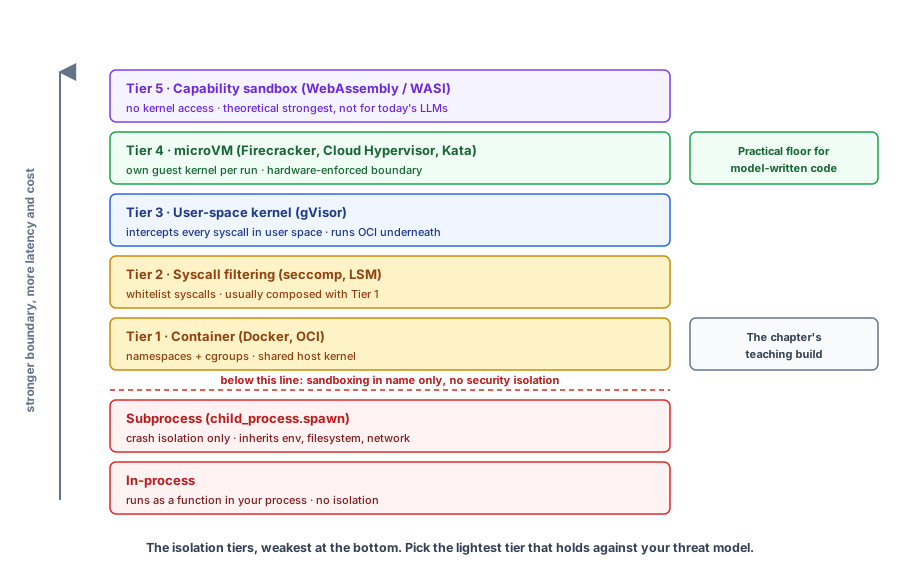
The framework: the Isolation Tiers. Five tiers ranked by the mechanism that enforces the boundary, each stronger than the previous and costing more in latency and complexity. Pick the lightest tier that holds against your threat model.
- Container (Docker, OCI). Namespace + cgroup isolation. Shared host kernel. The first real isolation tier.
- Syscall filtering (seccomp, LSM). bubblewrap, Seatbelt, Landlock. Often composed with tier 1.
- User-space kernel (gVisor). Intercepts syscalls in user space; runs OCI containers underneath.
- microVM (Firecracker, Cloud Hypervisor, Kata). Hardware virtualisation. Each invocation gets its own guest kernel.
- Capability sandbox (WebAssembly / WASI). No kernel access at all; theoretically the strongest. Runs plugin platforms in production today, but not yet a fit for model-written code (Concept 1 explains why).
A quick gloss on the acronyms: OCI is the Open Container Initiative, the standard image format Docker and other container runtimes share. cgroups are control groups, the Linux kernel feature that caps how much CPU, memory, and I/O a process tree can use. LSM is Linux Security Modules (AppArmor, SELinux), policy frameworks that restrict what processes can do beyond standard Unix permissions.
The practical floor for code an LLM writes is tier 4 (microVM). The easy path is a managed service, and the market is crowded: Vercel Sandbox, Cloudflare, fly.io, and a dozen smaller players all run isolation infrastructure for you. This chapter uses three representative vendors, each at a different tier.
E2B runs your code in Firecracker microVMs (tier 4). Daytona runs it in containers by default (tier 1), or microVMs if you opt in. Modal Sandboxes runs it in gVisor (tier 3) and is the one with GPU support built in.
Concept 2 covers what each vendor is and when to pick which. Self-hosting Firecracker is possible but usually not worth the operational cost.
Concept 1: The Isolation Tiers
The opener listed the five tiers in one line each. This section is the long form: what each tier actually does, what it’s acceptable for, what it isn’t, and what it costs. Two baselines sit below the tiers and still get called “sandboxing”:
- In-process. The tool runs as a function in your Node process. No isolation. Acceptable only for tools you wrote that read trusted inputs.
- Subprocess. The tool runs as a child process spawned with
child_process.spawn. Crash isolation only (a tool segfault doesn’t kill the agent); no security isolation. The subprocess inherits your env, filesystem, and network.
Neither protects you from untrusted code. The five real isolation tiers start here, ordered by the mechanism that enforces the boundary. This ordering follows the published taxonomies (fly.io’s MicroVM vs Container, shayon.dev’s isolation overview, Northflank’s AI-agent sandbox guide).
Here’s the whole ladder at a glance, the two baselines included.
Tier 1: container (namespaces + cgroups)
The tool runs in a Docker (or other OCI) container. Linux namespaces give the container its own view of processes, the filesystem, and the network, so it can’t see or touch the host’s; cgroups cap how much CPU and memory it can use.
- Acceptable for: tools where you trust the container image. Running your own tests, building artefacts, isolating tools whose blast radius you want bounded.
- Wrong for: code the model wrote, with network access, against the open internet. Container escapes are a steady stream of CVEs (entries in the Common Vulnerabilities and Exposures database, the public catalogue of disclosed security flaws); the shared host kernel is the hole.
- Cost: cold start typically in the hundreds-of-milliseconds-to-low-seconds range (varies widely by image size and host caching); warm start drops by an order of magnitude with image layers cached. Memory floor is substantial per container (the full image plus the Node runtime in our case).
Tier 2: syscall filtering (seccomp, LSM)
Filter the syscalls a process is allowed to make. Linux’s seccomp lets a process restrict itself to a whitelist of syscalls; LSMs (AppArmor, SELinux) impose policy from outside. bubblewrap on Linux and Seatbelt on macOS apply this pattern as user-friendly wrappers; Anthropic’s Claude Code sandboxing confirms Claude Code uses bubblewrap + Seatbelt rather than containers. Linux Landlock is the same idea, written for self-restricting processes.
- Acceptable for: hardening a tier-1 container, or isolating a process you control on a host where running a container is overkill (CLI tools, dev environments).
- Wrong for: standalone defence against untrusted code. The filtering catches the obvious calls; what you missed is what the attacker uses.
- Cost: negligible per syscall (kernel-level filtering via BPF, the Berkeley Packet Filter: a tiny in-kernel virtual machine that runs the seccomp rules without a syscall round-trip). Profile authoring is the real cost.
- Almost always composed with tier 1 (Docker + seccomp profile is the standard production pattern).
Tier 3: user-space kernel (gVisor)
gVisor intercepts every syscall in user space and decides what to allow. The application thinks it’s running on Linux; gVisor implements its own minimal kernel between the application and the host. Stronger than tier 2 (it controls the kernel-side, not just filters), weaker than tier 4 (no hardware boundary).
- Acceptable for: running mostly-trusted code that still might do something dangerous. Modal’s sandboxes use gVisor.
- Wrong for: tools that use syscalls gVisor doesn’t implement, or extremely syscall-heavy workloads where the per-syscall overhead compounds. Per gVisor’s published Ant Group production report (December 2021), most application workloads see negligible overhead: 70% of apps under 1%, another 25% under 3%. Syscall-bound workloads fare substantially worse; gVisor’s own performance guide covers where the cost lands.
- Cost: similar to a container plus a syscall overhead.
Tier 4: microVM (Firecracker, Cloud Hypervisor, Kata)
A hardware-virtualised VM. Each tool invocation gets its own guest kernel inside a lightweight virtual machine; the hypervisor enforces the boundary in hardware. AWS Lambda and fly.io run on Firecracker (AWS’s open-source microVM monitor, originally built for Lambda) for exactly this reason. Kata Containers packages a microVM with an OCI runtime so it drops in where you used to run Docker.
- Acceptable for: any untrusted code execution at any scale. The practical floor for code an agent writes.
- Cost: Firecracker boots in roughly 125ms per AWS’s own spec; real-world cold starts after the wrapping platform’s overhead are typically 150-200ms; single-digit-to-tens-of-milliseconds warm start with snapshot restore; memory floor under 5 MiB per VM. Firecracker is self-hostable but complex to operate; E2B is the easiest way to consume it as a managed service.
Everything weaker has known escape paths under sufficiently adversarial code.
Tier 5: capability sandbox (WebAssembly / WASI)
Theoretically the strongest tier. WebAssembly with the WASI capability system has no kernel access at all; the module can only call capabilities the host explicitly grants.
This tier runs in production today, just not for agents: plugin platforms like Shopify Functions and Fastly’s edge compute execute untrusted third-party code this way, by compiling a JavaScript engine to WebAssembly and running the submitted code inside it. That engine-in-WASM path handles small pure functions well, and that’s the catch for agent workloads: the moment a model-written snippet needs Node APIs, npm packages, or a filesystem, you’re back to needing a real kernel, which is exactly what tiers 1 to 4 isolate.
Microsoft is already working this tier from a different angle, though: sandboxing the agent’s tools rather than its arbitrary code. Their Wassette (open-sourced in August 2025) runs MCP tools as WebAssembly components under a capability model, so each tool can only touch what the host explicitly grants. The standard underneath is maturing too: WASI 0.3 arrived in early 2026, with 1.0 on the horizon.
Tier 5 is on the ladder because it defines the ceiling. The practical floor for arbitrary agent code execution stays tier 4, for now.
Concept 2: The Managed Sandbox Vendors
You could roll your own Firecracker setup. AWS publishes the binaries; the open-source community has wrappers. Self-hosting microVMs is its own engineering effort, though: image building, snapshot management, network policy, GPU passthrough if you need it, security updates.
Plenty of vendors operate this for you. This section covers three representative ones, each at a different point in the isolation/speed/cost triangle; pricing is usage-based on all three, and each has a free tier.
E2B. AI-infrastructure company whose product is “Firecracker microVMs as a service.” Each “sandbox” is its own microVM, persistent across the conversation but isolated from others. SDKs for TypeScript and Python. Generous free tier; paid tier is reasonable. The default I’d recommend for a TypeScript agent that needs sandboxed code execution.
Daytona. Originally a cloud-development-environments platform (think hosted dev containers); their Sandbox API exposes the same infrastructure for ad-hoc code execution. Docker containers by default, with optional Kata Containers (microVM-level isolation) on request. Faster cold start than E2B in the default mode, lower per-invocation cost, weaker isolation unless you opt into Kata. Good when you trust the code more than you trust the inputs and want low latency.
Modal Sandboxes. Modal is a serverless cloud platform for Python AI/ML workloads (think AWS Lambda but built around GPU-bound inference). Sandboxes is their feature for spinning up isolated execution environments on demand: built on gVisor (user-space kernel, tier 3 in the isolation framework). Higher latency than E2B/Daytona; offers GPU access without the ops overhead of standing up Firecracker-with-GPU yourself, which is the differentiator for ML and inference workloads.
Those three aren’t the whole market. Vercel Sandbox went GA in January 2026 and runs Firecracker microVMs (tier 4), the obvious pick if you already deploy on Vercel. Cloudflare and fly.io sell sandboxed compute too, and the 2026 roundups add a shelf of smaller players (Northflank, Blaxel, Runloop).
The differentiators above are what each vendor pitches, not a benchmark. No public head-to-head ranks the three on a shared workload, and they aim at different ones anyway. Run a small adversarial workload through each before you commit.
For the running assistant in this chapter, we’ll go three tiers down to Docker (tier 1) and keep everything local. The interface is the same shape; if you outgrow Docker’s isolation, swap runInDocker for an E2B / Daytona / Modal call without changing anything above the tool boundary.
Concept 3: What to Sandbox
Sandboxing every tool call is wasteful and slow. Sandboxing nothing is dangerous. Misplacing the line costs in two ways: sandbox too much and you pay cold-start latency and per-invocation cost on operations that never needed isolation; sandbox too little and one careless tool design becomes a production incident.
List your tools in two columns. The left column is “tools I wrote that read trusted inputs”; the right is “tools that run code derived from the model’s output, or that interact with external state with real consequences.” The left column runs in-process; the right runs in a sandbox.
The split has standards behind it. OWASP’s Top 10 for Agentic Applications names the code-execution half directly as ASI05 (Unexpected Code Execution): “Never execute agent-generated code without strict sandboxing, input validation, and allowlisting” (OWASP Top 10 for Agentic Applications (ASI05)).
Tools that touch external state (production DB writes, sending email) need authz and rate limits rather than a sandbox. That maps to OWASP LLM06:2025 Excessive Agency (cited in Chapter 11) and to familiar runtime-authorisation principles: least privilege, just-in-time access, action-level approvals for high-impact decisions. NIST’s AI risk-management work pushes in the same direction.
Concretely, sandbox:
- Code interpreter tools. Model writes Python; sandbox runs it. Always.
- Shell tools. Model writes a bash one-liner; sandbox runs it. Always.
- Code modification tools that then run tests. Sandbox the test execution.
- Browsing tools that execute JavaScript on fetched pages. The page can be malicious.
- PDF/Office parsers that handle untrusted documents. Some formats execute code.
Don’t bother sandboxing (engineering pragma rather than a standards-backed rule):
- Read-only API calls to your own services where the tool is tightly scoped: fixed endpoint, parameters validated, agent can’t choose the URL. A generic
http_fetchwith a model-chosen URL is the opposite and does need treating as a possible SSRF surface against your own network, even though the destination is “internal.” - Vector retrieval against your own corpus. No code execution path, no SSRF surface. (Retrieved text can still carry indirect prompt injection, but that’s a job for Chapter 11’s input/output filters.)
- Read-only calls to data-only third-party APIs (OpenWeather, public reference APIs, the read methods of services you’ve authenticated to). State-mutating third-party calls (Stripe charges, sending email, anything that does something irreversible) are not on this list. Those need authz and rate limits per the rule above, regardless of whether the data going in is trusted.
The cost of sandboxing every tool call is real (cold-start latency in the ~125ms range for microVM-based services per Firecracker’s own spec, plus real money per invocation at scale). Apply it where the threat exists.
If the right column is empty (no code interpreter, no shell tool, no untrusted-document parser), you don’t need this chapter shipped today. The Chapter 11 layers are your full safety story.
What a real sandbox unlocks
Once you have tier-4 isolation, an architectural option opens up that wasn’t safe before: hand the agent bash and a filesystem instead of building a custom JSON-schema tool for every operation. Chapter 6’s Concept 10 covers the bash-is-all-you-need pattern in detail (including the Braintrust/Vercel empirical results that show pure bash actually loses to specialised tools on structured data, and where the pattern does and doesn’t fit).
The pattern is only safe inside a sandbox: without isolation, handing the model bash hands it your machine. Sandbox first, then choose the tool surface.
What sandboxing doesn’t solve
Sandboxing solves one problem: untrusted code execution. Other production threats need other layers.
- Data exfiltration via tool outputs. The model can run a sandboxed query, get the result, and include it in its reply. Output filtering (Chapter 11) catches this; the sandbox doesn’t.
- Prompt injection. Lives in text input rather than executed code. Input filtering (Chapter 11).
- Cost runaway. Sandbox caps CPU per invocation; doesn’t cap how many invocations the agent makes. Per-user budget (Chapter 14).
- Bad business logic. “Send a $10,000 wire transfer to attacker@example.com” is a structured tool call that uses the legitimate API; the sandbox can’t tell the call from any other. Authz (Chapter 11) is the layer.
Cost back-of-the-envelope
E2B’s pricing is usage-based: per-second charges for the vCPU and RAM a sandbox holds while it runs, on top of the plan fee. Plug in your own numbers and the sandbox bill is usually a small fraction of the agent’s main model-call bill (model tokens dominate). Two habits keep sandbox spend bounded: reuse a sandbox within a user session (amortise cold start), and cap maximum lifetime (a few minutes idle, then die) so a forgotten kill() doesn’t run up the bill.
Self-hosted Firecracker becomes the right call at high sustained volumes (the math depends on your hourly invocation rate and what a managed vendor charges per sandbox-second; do the comparison once your traffic stabilises), or when regulatory / air-gap requirements (defence, healthcare) rule out a third-party data path. Production-grade self-hosting (snapshot caching, network policy, security updates, image building) is weeks of engineering. AWS publishes Firecracker and the firecracker-containerd integration; Kata Containers wraps it with an OCI runtime.
Evolving the assistant
The Chapter 12 evolution wires real isolation behind Chapter 11’s execute_code tool. Chapter 11 introduced the dev-only Verify path with execute_code as a stub (the tool returned a placeholder); Chapter 12 swaps the stub for a Docker-backed runner. When the writer drafts a brief that includes a JavaScript or TypeScript code example, the verify path can run it for real and confirm it executes without errors.
The container shape is minimal. The chapter ships its own image rather than running snippets directly inside the public node:24-alpine, for two reasons: pinning exactly what’s in the runtime, and adding a non-root user the snippet runs as. The Dockerfile lives in code/chapter-12/Dockerfile:
FROM node:24-alpine

# Non-root user with no shell and a fixed UID. The container will run as this
# user; even if the snippet escalates within Node, there is no setuid path to
# root inside the image.
RUN adduser -D -H -s /sbin/nologin -u 10001 sandbox \
    && mkdir -p /sandbox \
    && chown sandbox:sandbox /sandbox

USER sandbox
WORKDIR /sandbox
# No ENTRYPOINT or CMD; the runtime invocation supplies node + flags + filename.
Build it once: npm run build:sandbox (which runs docker build -t ch12-sandbox:latest .).
The runner in code/chapter-12/sandbox.ts invokes the image with run-time flags that lock it down further:
import { spawn } from "node:child_process";
import { randomUUID } from "node:crypto";
import { mkdtempSync, rmSync, writeFileSync } from "node:fs";
import { tmpdir } from "node:os";
import { join } from "node:path";

export async function runInDocker(
  snippet: string,
  language: "js" | "ts",
  options: { timeoutMs?: number; onSpawn?: () => void } = {},
): Promise<SandboxResult> {
  const timeoutMs = options.timeoutMs ?? 30_000;
  const containerName = `ch12-sandbox-${randomUUID()}`;
  const tmp = mkdtempSync(join(tmpdir(), "ch12-sandbox-"));
  const filename = language === "js" ? "snippet.mjs" : "snippet.ts";
  const filePath = join(tmp, filename);
  writeFileSync(filePath, snippet);

  const dockerArgs = [
    "run", "--rm",
    "--name", containerName,                        // known name so we can kill it
    "--network=none",                               // no outbound traffic
    "--memory=512m", "--cpus=0.5",                  // resource caps
    "--read-only",                                  // immutable container fs
    "--tmpfs", "/tmp:rw,size=64m",                  // small scratch for Node
    "--cap-drop", "ALL",                            // drop every Linux capability
    "--security-opt", "no-new-privileges",          // block setuid escalation
    "-v", `${filePath}:/sandbox/${filename}:ro`,
    "-w", "/sandbox",
    "ch12-sandbox:latest",
    "node",
    // Old flag spelling on purpose: valid on every Node 24.x container image,
    // including ones pulled before the 24.12 rename to --strip-types.
    ...(language === "ts" ? ["--experimental-strip-types"] : []),
    filename,
  ];
  // Spawn docker, fire options.onSpawn on the child's "spawn" event, and
  // capture stdout/stderr. A setTimeout runs `docker kill ${containerName}`
  // at the timeoutMs deadline: that stops the container itself (killing the
  // docker CLI client wouldn't; the snippet would keep running under
  // containerd). Then resolve { ok, stdout, stderr, exitCode, durationMs }.
}
Three dimensions matter: isolation (--network=none cuts outbound traffic, --read-only plus --tmpfs /tmp keeps the container filesystem immutable except for a small writable tmpfs, --cap-drop ALL removes every Linux capability, --security-opt no-new-privileges blocks setuid escalation, --memory=512m and --cpus=0.5 cap resources, and the image runs as a non-root user with no shell), timeout (wall-clock cap: a setTimeout runs docker kill on the named container after 30 seconds; killing only the docker CLI client would leave the snippet running), and observability (structured { ok, stdout, stderr, exitCode, durationMs } returned to the calling agent and emitted to the audit log).
The verify path’s audit gains two new events. sandbox_spawn fires the moment Docker’s child process is up ({event, image, language}), so the trace shows when the container was invoked. sandbox_exit fires when the container completes ({event, ok, exitCode, durationMs, stdoutLen, stderrLen, timedOut}).
Chapter 11’s existing tool_call_executed still fires the moment the tool dispatches. The sequence reads tool_call_executed → sandbox_spawn → sandbox_exit for a successful sandbox run; the gap between sandbox_spawn and sandbox_exit is what the snippet actually consumed inside the container.
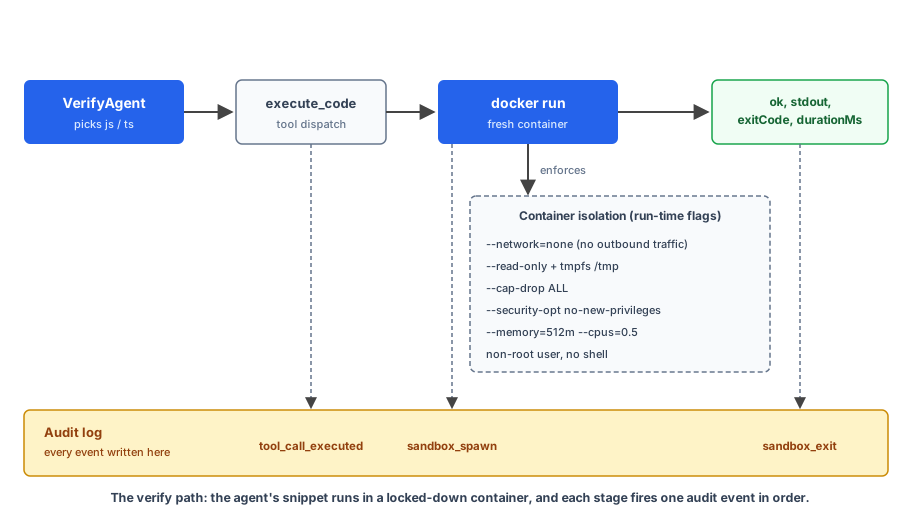
The chapter ships three adversarial tests against the verify path with the dev role, plus a happy-path sanity check and one user-role command to confirm the deny path. The CLI is the same shape as Chapter 11: npm run ask -- <dev|user> <user_id> "<prompt>".
cd code/chapter-12
npm install
npm run build:sandbox          # builds ch12-sandbox:latest from the Dockerfile

# Happy path
npm run ask -- dev alice 'Verify this snippet runs: console.log([1,2,3].reduce((a,b)=>a+b))'

# Adversarial: read host file
npm run ask -- dev alice "Verify: import fs from 'node:fs'; console.log(fs.readFileSync('/etc/passwd','utf8'))"

# Adversarial: write to read-only fs
npm run ask -- dev alice "Verify: import fs from 'node:fs'; fs.writeFileSync('/etc/x','y')"

# Adversarial: outbound network
npm run ask -- dev alice "Verify: const r = await fetch('https://example.com'); console.log(r.status)"

# User role: verify is denied entirely
npm run ask -- user alice 'Verify: console.log("hi")'
Observed results from the actual runs. Every sandboxed case fires the same three-event sequence: tool_call_executed → sandbox_spawn → sandbox_exit. The numbers below come from a fresh execution of each command.
- Happy path.
sandbox_spawnfires withimage=ch12-sandbox:latest, language=js, thensandbox_exitreportsok=true, exitCode=0, durationMs=158, stdoutLen=2. Container stdout is6. The VerifyAgent’s reply quotes the exit code, the duration, and the stdout. - Read
/etc/passwd.sandbox_spawn(the agent pickslanguageper snippet;json this run), thensandbox_exit(ok=true, exitCode=0, durationMs=165, stdoutLen=791). The stdout contains the container’s/etc/passwd, not the host’s: Alpine’s stripped user list plus thenodeandsandboxusers added by the Dockerfile (root,bin,daemon,lp,sync,shutdown,halt,mail, …,nobody,node,sandbox). Any file the snippet touches comes from the image’s filesystem, contained inside the sandbox. - Write to
/etc.sandbox_spawnthensandbox_exit(ok=false, exitCode=1, durationMs=166, stderrLen=498) with stderr containingError: EROFS: read-only file system, open '/etc/x'.--read-onlydoing its job. fetch('https://example.com').sandbox_spawnthensandbox_exit(ok=false, exitCode=1, durationMs=5231, stderrLen=349) with stderr containingError: getaddrinfo EAI_AGAIN example.com.--network=nonedoing its job; the multi-second duration is Node’s own DNS retry inside the container before giving up. The request never leaves the container’s empty network namespace.- User role.
tool_call_deniedfires; nosandbox_spawn, nosandbox_exitbecause the sandbox never ran. Chapter 11’s role gate refused at the tool boundary before any Docker invocation. The agent’s user-facing reply is “I’m sorry, you don’t have permission for that.”
Each sandboxed failure surfaces cleanly through the audit log (sandbox_exit with ok=false, exit code, duration, stderr length) and through the agent’s user-facing reply.
Two execution modes for VerifyAgent
Once execute_code is real, the VerifyAgent that owns it outgrows the one-trick “verify a user-supplied snippet” role and becomes the cheap-answer specialist for any question whose answer is a single deterministic value computable by running a short snippet in the Docker sandbox. Two modes, one agent; the agent picks the mode itself based on what the user said. The execution path is the same in both: execute_code inside the sandbox, with --network=none and the other run-time restrictions enforced.
- Verify a snippet the user supplied. The original mode. Extract the fenced code from the user’s message, call
execute_code, report exit code + duration + stdout. The path the chapter has been building toward. - Compute a deterministic value. The user asks “factorial of 20”, “sum of the first 100 fibonacci numbers”, “sort these numbers”. VerifyAgent authors a tiny self-contained JavaScript snippet (a single
console.log(...)), callsexecute_code, and reports the answer. A real run for “factorial of 20” producessandbox_exit ok=true exitCode=0 durationMs=154 stdoutLen=20and the stdout2432902008176640000; the agent’s reply quotes that value back. The alternative (routing to the research pipeline so the model can quote math sites) is both slower and unverifiable.
Live external data (a value from a URL or named API) is not in VerifyAgent’s scope in this chapter, because the sandbox is --network=none by design. Questions like “what’s Luke Skywalker’s height per SWAPI?” route to the Researcher specialist, which has its own host-side http_fetch tool (Chapter 8’s research pipeline, unchanged). VerifyAgent must not fabricate a value from training knowledge: the system instruction explicitly forbids that and tells the agent to suggest a research-routed phrasing when the user asks for live data.
The router’s classification rule is the change everything else rests on. A user-supplied snippet to verify or a deterministic compute goes to VerifyAgent. A live-data lookup or multi-source synthesis goes to the Researcher. The router’s instruction encodes that split; misclassification is a router-quality problem, not a sandbox problem.
Where the workflow-vs-agent distinction shows up: VerifyAgent is an agent (its LLM picks how to use execute_code and decides what snippet to author for a compute request). The Researcher and the Writer are also agents at the leaves. The router itself and the two-await research path that wraps them are workflows (the dispatch and the sequence are TypeScript code; the model never decides “should we skip the researcher?”).
Same composition pattern as Chapters 6 and 8, with VerifyAgent’s snippet-authoring making the agent-ness more visible per turn.
Chapter 13 takes this further by replacing the single-path router with a Planner that can chain steps for compound tasks. The same VerifyAgent shows up there, dispatched as one step in a larger plan.
What we shipped in Chapter 12
The assistant’s verify path now has real isolation: the Chapter 11 execute_code stub is replaced with a Docker-backed runner. When a brief contains a JS/TS code example and the dev role explicitly asks for verification, the snippet runs in a fresh container with no network, capped memory and CPU, a read-only filesystem, and a wall-clock timeout. The worst a malicious snippet can do is consume the budget and exit.
What you have in the running build:
- Code execution as a first-class tool, backed by Docker (tier 1) and ready to swap up to tier 4 (E2B / Daytona / Modal) when stakes warrant.
- A clear rule for which tools need a sandbox (anything running model-generated code) and which don’t.
- The bash-is-all-you-need pattern as an option once the sandbox is in place.
What you don’t have yet:
- Production observability for the runs (Chapter 14).
- Cost caps that include sandbox-second usage (Chapter 14).
- A deploy pattern that handles the sandbox lifecycle correctly (Chapter 14).
Chapter 13 (Plan-and-Execute) is next; Chapter 14 closes those production gaps. With observability, cost engineering, and deploy patterns in place, the assistant ships.
If you’re building on ADK: it provides GkeCodeExecutor (gVisor-isolated pods on GKE) and VertexAiCodeExecutor (server-side sandboxed); both require GCP infrastructure. The raw Docker invocation from this chapter is the portable option and works the same whether ADK wraps it or not. The Isolation Tiers framework applies either way: the question is which tier the executor lands on.
Action
Before Chapter 13:
- Set up
code/chapter-12/. Have Docker installed locally (docker --versionshould print a version). No external API key required for the running build’s tier-1 setup. - Ask the dev-role assistant to verify a small JS snippet (e.g.,
Verify: console.log([1,2,3].reduce((a,b)=>a+b))). Watch the audit log:tool_call_executed, thensandbox_spawnandsandbox_exitwith the exit code and duration. - Write a snippet that would be malicious if not sandboxed (
fs.readFileSync('/etc/passwd', 'utf-8')). Verify the container blocks the read or returns an empty result. (No-network plus read-only filesystem plus minimal image makes most paths unreachable; check what does and doesn’t slip through on your stack.) - For one tool you have in production that runs code or shell commands, wrap it in the same Docker pattern. Compare latency to the in-process version.
- If your stakes warrant tier 4, swap the Docker wrapper for an E2B / Daytona / Modal client. The agent code above the wrapper doesn’t change.
Next up in Chapter 13: From router to autonomous orchestrator. The Coordinator we’ve been building since Chapter 6 routes one specialist per turn; Chapter 13 replaces it with a Planner that decomposes intent into ordered steps, threading prior outputs into each next step. The same sub-agents you’ve been building with (research, memory, verify) compose into compound tasks the Coordinator couldn’t touch. A2A from Chapter 8 returns as the transport for the Translator step. Chapter 14 is the closer: observability, cost, deploy.